logotype
  • Home
  • News
  • Product dan Services
    • Zimbra Mail Server
      • Excellent Managed Services Email
      • Lisensi Zimbra NE
      • Support dan Maintenance
      • MX Backup & ASAV
      • SMTP Relay
    • Proxmox
      • Proxmox Virtual Environment
      • Proxmox Mail Gateway
      • Proxmox Backup Server
    • XCP-ng
    • Red Hat Enterprise Linux
    • Ubuntu Pro
    • Nakivo Backup & Recovery
    • Vinchin Backup & Recovery
    • Lisensi
      • Proxmox Mail Gateway
      • Lisensi Zimbra Network Edition
      • Lisensi Nakivo Backup & Recovery
      • Subscription Zoom
    • Buku Training Mandiri
      • Buku Training Mandiri
      • Ebook Training Mandiri
    • Cloud & Hosting
      • Excellent Managed Services Email Server
      • MX Backup/Anti Spam & Anti Virus
      • SMTP Relay & Mail Gateway
      • Excellent Mail Hosing
    • SSL Sertifikat
  • Training
  • Insight
  • About Us
  • Contacts
logotype
logotype
  • Home
  • News
  • Product dan Services
    • Zimbra Mail Server
      • Excellent Managed Services Email
      • Lisensi Zimbra NE
      • Support dan Maintenance
      • MX Backup & ASAV
      • SMTP Relay
    • Proxmox
      • Proxmox Virtual Environment
      • Proxmox Mail Gateway
      • Proxmox Backup Server
    • XCP-ng
    • Red Hat Enterprise Linux
    • Ubuntu Pro
    • Nakivo Backup & Recovery
    • Vinchin Backup & Recovery
    • Lisensi
      • Proxmox Mail Gateway
      • Lisensi Zimbra Network Edition
      • Lisensi Nakivo Backup & Recovery
      • Subscription Zoom
    • Buku Training Mandiri
      • Buku Training Mandiri
      • Ebook Training Mandiri
    • Cloud & Hosting
      • Excellent Managed Services Email Server
      • MX Backup/Anti Spam & Anti Virus
      • SMTP Relay & Mail Gateway
      • Excellent Mail Hosing
    • SSL Sertifikat
  • Training
  • Insight
  • About Us
  • Contacts
logotype
  • Home
  • News
  • Product dan Services
    • Zimbra Mail Server
      • Excellent Managed Services Email
      • Lisensi Zimbra NE
      • Support dan Maintenance
      • MX Backup & ASAV
      • SMTP Relay
    • Proxmox
      • Proxmox Virtual Environment
      • Proxmox Mail Gateway
      • Proxmox Backup Server
    • XCP-ng
    • Red Hat Enterprise Linux
    • Ubuntu Pro
    • Nakivo Backup & Recovery
    • Vinchin Backup & Recovery
    • Lisensi
      • Proxmox Mail Gateway
      • Lisensi Zimbra Network Edition
      • Lisensi Nakivo Backup & Recovery
      • Subscription Zoom
    • Buku Training Mandiri
      • Buku Training Mandiri
      • Ebook Training Mandiri
    • Cloud & Hosting
      • Excellent Managed Services Email Server
      • MX Backup/Anti Spam & Anti Virus
      • SMTP Relay & Mail Gateway
      • Excellent Mail Hosing
    • SSL Sertifikat
  • Training
  • Insight
  • About Us
  • Contacts
Blog Post
BlogResourceUbuntu Variant

Mudahnya Membuat LDAP Server dengan Turnkey Linux OpenLDAP

November 24, 2012by Ahmad Imanudin

Untuk membuat sebuah LDAP Server atau lebih, biasanya saya menggunakan distro Linux SLES/Opensuse karena proses instalasi dan konfigurasi nya yang mudah dan menggunakan wizard andalan YAST. Bagi pengguna Debian dan turunannya, untuk membuat sebuah LDAP server,  sekarang sangat mudah dengan sebuah Appliance Turnkey Linux OpenLDAP. Appliance ini tersedia dalam beberapa format yang langsung dapat digunakan seperti : OVF Template, VMDK Image, ISO, Xen Image dll. Untuk mendapatkan Appliance ini, kita bisa langsung download di website resmi Turnkey Linux http://www.turnkeylinux.org/openldap. Berikut proses instalasi Appliance Turnkey Linux menggunakan format ISO.

  1. Burning hasil download Appliance Turnkey Linux ISO kedalam sebuah CD/USB
  2. Pastikan posisi booting pertama melalui CD/DVD ROM
  3. Pada saat masuk menu instalasi Turnkey linux OpenLDAP pilih install to hard disk
  4. Pada pilihan partisi, kita bisa memilih dari ketiga opsi partisi yang diberikan
  5. Kemudian pilih Yes untuk melakukan format terhadap hard disk
  6. Tunggu proses instalasi Turnkey Linux OpenLDAP sampai dengan muncul pilihan install Grub pilih Yes
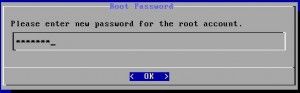
  7.  Masukkan password untuk root

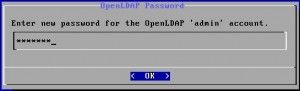
8.  Masukkan password untuk LDAP Admin
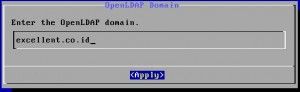
9.  Isi nama domain OpenLDAP yang dikehendaki
10. Pilih skip pada pilihan Initialize hub service

11. Turnkey Linux OpenLDAP siap digunakan
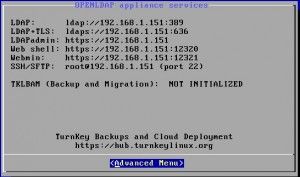
 

PENGGUNAAN TURNKEY LINUX OPENLDAP

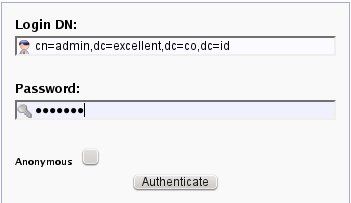
Untuk menambahkan OU, Group maupun User pada OpenLDAP Appliance, akses ip address OpenLDAP Appliance, maka kita akan dihadapkan pada form login phpLDAPadmin dan masukkan password yang diisi pada saat instalasi
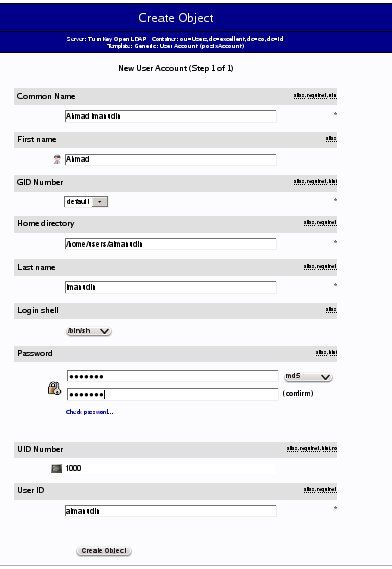
Untuk membuat user, pilih ou=Users kemudian pilih Create a child entry dan pilih Generic : User Account. Isi sesuai dengan isian yang tersedia, create object lalu commit
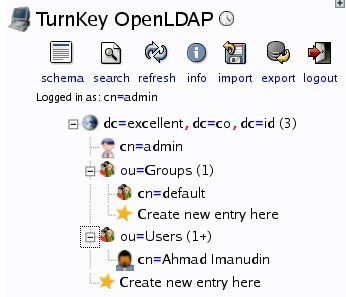
Untuk pembuatan group dan yang lainnya, step by stepnya sama dengan pembuatan account

Silakan dicoba dan semoga bermanfaat 😀

Active Directory LDAP Turnkey Tutorial
AboutAhmad Imanudin
Ahmad Imanudin, Guest Blogger di <a href="http://www.vavai.com"> http://www.vavai.com </a>.Tinggal di Bekasi. Bekerja sebagai salah satu senior staff pada <a href="http://www.excellent.co.id">PT. Excellent Infotama Kreasindo</a>. Blog pribadi saya dapat diakses pada alamat <a href="http://http://www.imanudin.com">http://www.imanudin.com</a> dan <a href="http://www.imanudin.net">http://www.imanudin.net</a>
Prev

Training Zimbra Mail Server Komplit 5 Hari (Fundamental, Medium & Advanced), 17-21 Desember 2012

Next

Paket VMware vSphere Essentials Kit untuk Small Business

Related Posts

jalan-1024×682.jpg
Blog
February 21, 2019

Tanggung Jawab pada Kehidupan Pribadi dan Keluarga

Read more
landscape-1024×576.jpg
Blog
February 26, 2019

Hidup Sulit Masih Sempat Facebookan?

Read more
ilc-2007-1.jpg
Blog
October 5, 2018

Kenangan ILC 2007 dan Fondasi Masa Depan

Read more

Comments(02)

  1. By aris
    November 29, 2012

    Pernah pakai zimbra turnkey,ternyata zimbranya versi 5 dan nggak ada updatenya lagi.untungnya bisa di.migrasi ke versi 7. Makanya msh trauma pk produk turnkey pak 🙂

  2. By pryo
    December 5, 2013

    Om ini gimana dengan Backup database Ldap nya apa kah lebih mudah ??

Leave a Reply

Your email address will not be published. Required fields are marked *

Search
Recent Post
  • Zimbra Daffodil 10.1.16 Rilis: Modern Web App Makin Cerdas, Backup Lebih Hemat Storage, dan Peningkatan Keamanan
  • Live Migration vs High Availability di XCP-ng: Perbedaan dan Skenario Penggunaan
  • Informasi untuk Pelanggan PT. Excellent Infotama Kreasindo : Penyesuaian Kebijakan Masa Berlaku Sertifikat SSL/TLS Menuju Standar Keamanan Global
  • Excellent Infotama Kreasindo: Lingkungan Kerja yang Memberi Ruang untuk Bertumbuh
  • Segudang Benefit dari Dana Buffer: Ketika Kebijakan Berangkat dari Pengalaman
Categories
Archives
Featured image: Mudahnya Membuat LDAP Server dengan Turnkey Linux OpenLDAP
Get in Touch

KATEGORI

  • Home
  • Artikel
  • Jadwal
  • Event
  • Berita

LAYANAN

  • Zimbra Mail Server
  • Ubuntu
  • XCP-ng
  • Vinchin
  • ASAV
  • Proxmox
  • RHEL
  • Nakivo
  • SMTP Relay
  • SSL Certificate

KONTAK KAMI

PT. Excellent Infotama Kreasindo, Premier Serenity Blok J12, Jl. KH. Agus Salim No. 40E, Bekasi Jaya, Bekasi Timur, Bekasi 17112, Jawa Barat, Indonesia

TENTANG KAMI

PT. Excellent Infotama Kreasindo merupakan entitas bisnis yang fokus pada layanan komputerisasi seperti implementasi sistem, konsultasi, training/workshop, dan maintenance sistem, terutama migrasi dari sistem Windows ke Linux. more…