logotype
  • Home
  • News
  • Product dan Services
    • Zimbra Mail Server
      • Excellent Managed Services Email
      • Lisensi Zimbra NE
      • Support dan Maintenance
      • MX Backup & ASAV
      • SMTP Relay
    • Proxmox
      • Proxmox Virtual Environment
      • Proxmox Mail Gateway
      • Proxmox Backup Server
    • XCP-ng
    • Red Hat Enterprise Linux
    • Ubuntu Pro
    • Nakivo Backup & Recovery
    • Vinchin Backup & Recovery
    • Lisensi
      • Proxmox Mail Gateway
      • Lisensi Zimbra Network Edition
      • Lisensi Nakivo Backup & Recovery
      • Subscription Zoom
    • Buku Training Mandiri
      • Buku Training Mandiri
      • Ebook Training Mandiri
    • Cloud & Hosting
      • Excellent Managed Services Email Server
      • MX Backup/Anti Spam & Anti Virus
      • SMTP Relay & Mail Gateway
      • Excellent Mail Hosing
    • SSL Sertifikat
  • Training
  • Insight
  • About Us
  • Contacts
logotype
logotype
  • Home
  • News
  • Product dan Services
    • Zimbra Mail Server
      • Excellent Managed Services Email
      • Lisensi Zimbra NE
      • Support dan Maintenance
      • MX Backup & ASAV
      • SMTP Relay
    • Proxmox
      • Proxmox Virtual Environment
      • Proxmox Mail Gateway
      • Proxmox Backup Server
    • XCP-ng
    • Red Hat Enterprise Linux
    • Ubuntu Pro
    • Nakivo Backup & Recovery
    • Vinchin Backup & Recovery
    • Lisensi
      • Proxmox Mail Gateway
      • Lisensi Zimbra Network Edition
      • Lisensi Nakivo Backup & Recovery
      • Subscription Zoom
    • Buku Training Mandiri
      • Buku Training Mandiri
      • Ebook Training Mandiri
    • Cloud & Hosting
      • Excellent Managed Services Email Server
      • MX Backup/Anti Spam & Anti Virus
      • SMTP Relay & Mail Gateway
      • Excellent Mail Hosing
    • SSL Sertifikat
  • Training
  • Insight
  • About Us
  • Contacts
logotype
  • Home
  • News
  • Product dan Services
    • Zimbra Mail Server
      • Excellent Managed Services Email
      • Lisensi Zimbra NE
      • Support dan Maintenance
      • MX Backup & ASAV
      • SMTP Relay
    • Proxmox
      • Proxmox Virtual Environment
      • Proxmox Mail Gateway
      • Proxmox Backup Server
    • XCP-ng
    • Red Hat Enterprise Linux
    • Ubuntu Pro
    • Nakivo Backup & Recovery
    • Vinchin Backup & Recovery
    • Lisensi
      • Proxmox Mail Gateway
      • Lisensi Zimbra Network Edition
      • Lisensi Nakivo Backup & Recovery
      • Subscription Zoom
    • Buku Training Mandiri
      • Buku Training Mandiri
      • Ebook Training Mandiri
    • Cloud & Hosting
      • Excellent Managed Services Email Server
      • MX Backup/Anti Spam & Anti Virus
      • SMTP Relay & Mail Gateway
      • Excellent Mail Hosing
    • SSL Sertifikat
  • Training
  • Insight
  • About Us
  • Contacts
Blog Post
vsphere-update-manager-pada-mode-html5.png
BlogBlog & ResourcesVMWare

vSphere Update Manager 6.7

January 14, 2019by Masim Vavai Sugianto

VMware vSphere Update Manager adalah tools yang memudahkan pengelolaan otomatisasi patch, update dan manajemen versi sistem secara terpusat, baik untuk vSphere Host, VM maupun Appliance.

Dengan menggunakan Update Manager, kita dapat dengan mudah melakukan berbagai hal secara terintegrasi, antara lain :

  • Melakukan proses upgrade dan implementasi patch terhadap vSphere host
  • Melakukan instalasi dan update aplikasi pihak ketiga (third-party software) pada vSphere host
  • Melakukan proses upgrade VMware Tools dan virtual machine hardware

Proses update dan patch yang dilakukan bisa dijalankan secara massal, misalnya melakukan update versi vSphere seluruh host yang ada pada suatu cluster atau melakukan update VMware Tools seluruh VM yang ada pada suatu host.

Kita bisa menggunakan vSphere Update Manager baik melalui vCenter berbasis Windows maupun menggunakan vCenter Server Appliance (VCSA).

Pada vCenter Server Appliance (VCSA), vSphere Update Manager otomatis tersedia sebagai salah satu menu, tanpa harus menggunakan atau melakukan instalasi addon secara terpisah. Menu ini tersedia baik pada akses menggunakan mode HTML5 maupun menggunakan mode Flex. Buku ini menggunakan mode HTML5 atas pertimbangan kecepatan dan kestabilan akses menu dan feature vCenter.
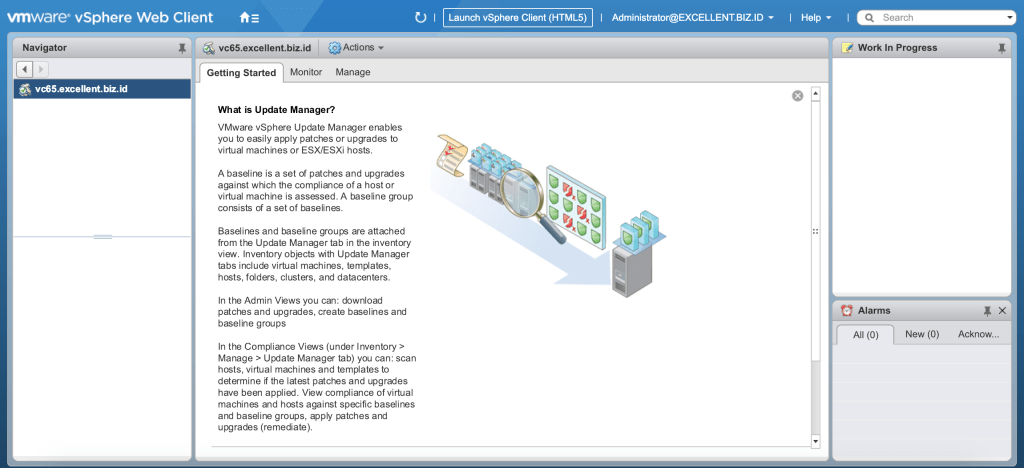
vSphere Update Manager pada Mode HTML5
vSphere Update Manager 6.7
vSphere Update Manager pada Mode Flex

Tampilan Update Manager

vSphere Update Manager bisa diakses melalui menu Home | Update Manager atau bisa juga melalui Menu | Update Manager. 

Pada tampilan administrasi vSphere Update Manager, kita bisa melakukan beberapa proses, antara lain :

  • Melakukan konfigurasi setting vSphere Update Manager
  • Membuat Baseline dan Baseline Groups yang akan digunakan sebagai basis update bagi vSphere host
  • Melakukan upload file ISO ESXi maupun Patch untuk digunakan sebagai media import yang nantinya digunakan sebagai baseline update vSphere host
  • Mengecek dan melakukan monitoring proses update yang dilakukan, termasuk notifikasi dari hasil proses update
  • Melakukan review terhadap repository patch vSphere sekaligus mengecek apakah ada pilihan upgrade yang tersedia untuk host, VM atau appliance tertentu
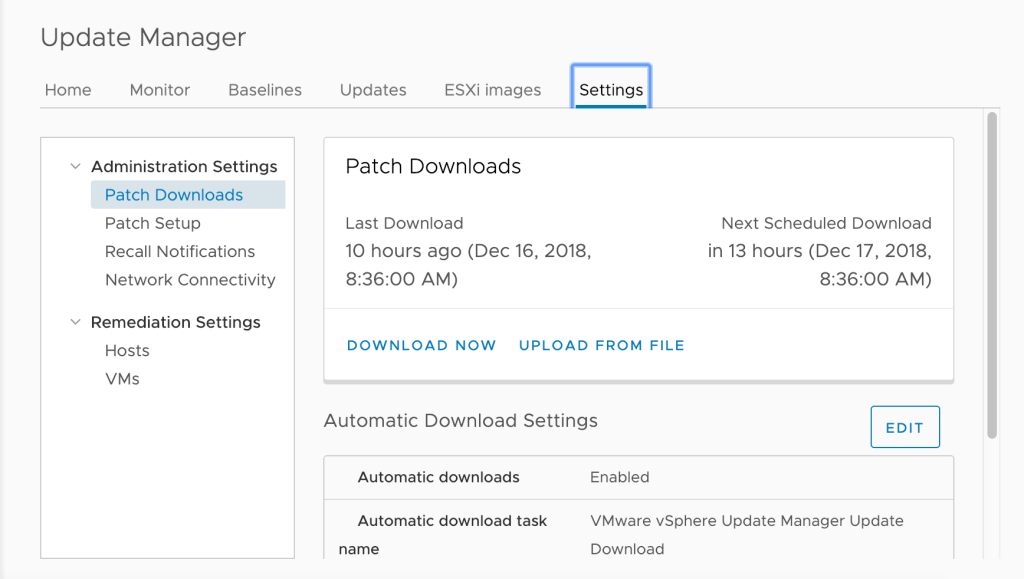
vSphere Update Manager 6.7

Selain menu pada bagian administrasi vSphere Update Manager, tersedia juga menu Update Manager pada masing-masing object terkait, misalnya di sisi data center, cluster maupun VM. Dari menu Update di masing-masing object, kita bisa melakukan proses scanning terkait compliance status masing-masing host, VM maupun appliance. 

Sebagai contoh, kita bisa melakukan proses scanning apakah semua host dalam data center maupun cluster sudah comply dengan standar yang ada. Apakah ada yang bisa diupdate ke versi yang sesuai baseline yang ditentukan atau tidak. 
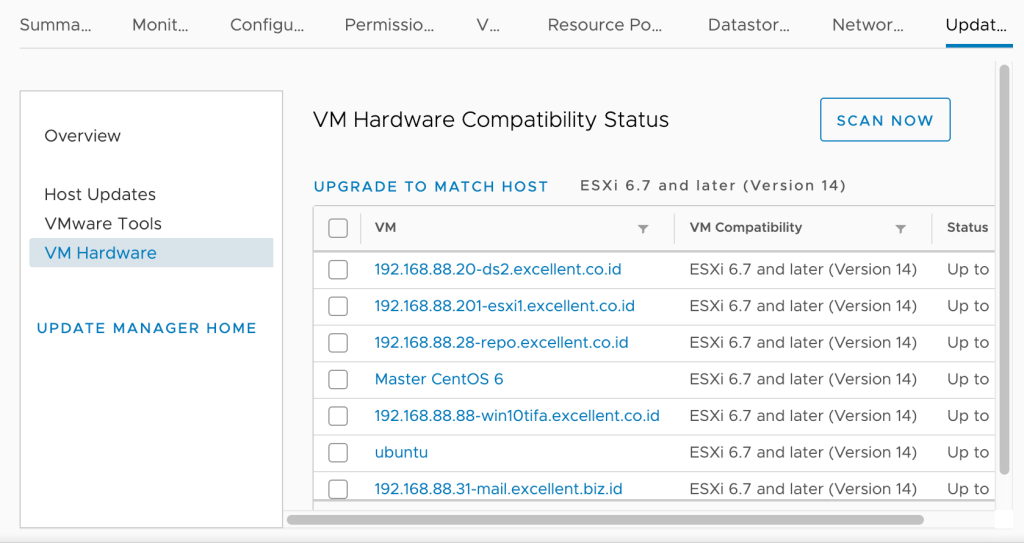
vSphere Update Manager 6.7

Disisi VM, kita bisa mengecek apakah semua VM memiliki versi VMware Tools yang sama dan sesuai dengan versi host atau tidak. Apakah semua memiliki VM Hardware atau VM version yang sesuai dengan host atau tidak. Jika pertama kali instalasi sistem menggunakan vSphere 6.5 kemudian diupgrade ke vSphere 6.7, ada kemungkinan VMware Tools maupun VM hardware masih merujuk ke versi 6.5. Kita bisa menggunakan vSphere Update Manager untuk melakukan upgrade VMware Tools dan VM Hardware secara massal untuk setiap VM yang ada.

Catatan :

  1. Materi diatas merupakan bagian dari materi training virtualisasi server di Excellent. Rencananya, training pertama virtualisasi server dengan konsep dan spesifikasi baru di tahun 2019 akan dilaksanakan pada 16-19 Februari 2019.
  2. Ebook VMware vSphere 6.7 tersedia pada Google Play. Saat ada rilis baru, otomatis akan terupdate dengan materi baru
  3. Jika lebih menyukai format buku cetak, buku VMware vSphere 6.7 tersedia juga di Tokopedia dan Bukalapak, hanya saja versi cetak tidak otomatis terupdate (ya iyalah 😛) dan harus membeli edisi baru jika sudah rilis versi terbarunya

Virtualization VSphere
Prev

Free Ebook Tentang VMware (English)

Next

Excellent Insight Day #18 : Memberikan yang Terbaik

Related Posts

How-the-Internet-Happened-From-Netscape-to-the-iPhone.png
Blog
January 24, 2019

Rekomendasi Ebook : “How the Internet Happened: From Netscape to the iPhone”

Read more
insight-1024×679.jpg
BlogBlog & Resources
January 28, 2019

Usia 40

Read more
malu-300×300.jpg
BlogBlog & Resources
May 4, 2018

Keputusan Sulit

Read more
Search
Recent Post
  • Zimbra Daffodil 10.1.16 Rilis: Modern Web App Makin Cerdas, Backup Lebih Hemat Storage, dan Peningkatan Keamanan
  • Live Migration vs High Availability di XCP-ng: Perbedaan dan Skenario Penggunaan
  • Informasi untuk Pelanggan PT. Excellent Infotama Kreasindo : Penyesuaian Kebijakan Masa Berlaku Sertifikat SSL/TLS Menuju Standar Keamanan Global
  • Excellent Infotama Kreasindo: Lingkungan Kerja yang Memberi Ruang untuk Bertumbuh
  • Segudang Benefit dari Dana Buffer: Ketika Kebijakan Berangkat dari Pengalaman
Categories
Archives
Featured image: vSphere Update Manager 6.7
Get in Touch

KATEGORI

  • Home
  • Artikel
  • Jadwal
  • Event
  • Berita

LAYANAN

  • Zimbra Mail Server
  • Ubuntu
  • XCP-ng
  • Vinchin
  • ASAV
  • Proxmox
  • RHEL
  • Nakivo
  • SMTP Relay
  • SSL Certificate

KONTAK KAMI

PT. Excellent Infotama Kreasindo, Premier Serenity Blok J12, Jl. KH. Agus Salim No. 40E, Bekasi Jaya, Bekasi Timur, Bekasi 17112, Jawa Barat, Indonesia

TENTANG KAMI

PT. Excellent Infotama Kreasindo merupakan entitas bisnis yang fokus pada layanan komputerisasi seperti implementasi sistem, konsultasi, training/workshop, dan maintenance sistem, terutama migrasi dari sistem Windows ke Linux. more…