logotype
  • Home
  • News
  • Product dan Services
    • Zimbra Mail Server
      • Excellent Managed Services Email
      • Lisensi Zimbra NE
      • Support dan Maintenance
      • MX Backup & ASAV
      • SMTP Relay
    • Proxmox
      • Proxmox Virtual Environment
      • Proxmox Mail Gateway
      • Proxmox Backup Server
    • XCP-ng
    • Red Hat Enterprise Linux
    • Ubuntu Pro
    • Nakivo Backup & Recovery
    • Vinchin Backup & Recovery
    • Lisensi
      • Proxmox Mail Gateway
      • Lisensi Zimbra Network Edition
      • Lisensi Nakivo Backup & Recovery
      • Subscription Zoom
    • Buku Training Mandiri
      • Buku Training Mandiri
      • Ebook Training Mandiri
    • Cloud & Hosting
      • Excellent Managed Services Email Server
      • MX Backup/Anti Spam & Anti Virus
      • SMTP Relay & Mail Gateway
      • Excellent Mail Hosing
    • SSL Sertifikat
  • Training
  • Insight
  • About Us
  • Contacts
logotype
logotype
  • Home
  • News
  • Product dan Services
    • Zimbra Mail Server
      • Excellent Managed Services Email
      • Lisensi Zimbra NE
      • Support dan Maintenance
      • MX Backup & ASAV
      • SMTP Relay
    • Proxmox
      • Proxmox Virtual Environment
      • Proxmox Mail Gateway
      • Proxmox Backup Server
    • XCP-ng
    • Red Hat Enterprise Linux
    • Ubuntu Pro
    • Nakivo Backup & Recovery
    • Vinchin Backup & Recovery
    • Lisensi
      • Proxmox Mail Gateway
      • Lisensi Zimbra Network Edition
      • Lisensi Nakivo Backup & Recovery
      • Subscription Zoom
    • Buku Training Mandiri
      • Buku Training Mandiri
      • Ebook Training Mandiri
    • Cloud & Hosting
      • Excellent Managed Services Email Server
      • MX Backup/Anti Spam & Anti Virus
      • SMTP Relay & Mail Gateway
      • Excellent Mail Hosing
    • SSL Sertifikat
  • Training
  • Insight
  • About Us
  • Contacts
logotype
  • Home
  • News
  • Product dan Services
    • Zimbra Mail Server
      • Excellent Managed Services Email
      • Lisensi Zimbra NE
      • Support dan Maintenance
      • MX Backup & ASAV
      • SMTP Relay
    • Proxmox
      • Proxmox Virtual Environment
      • Proxmox Mail Gateway
      • Proxmox Backup Server
    • XCP-ng
    • Red Hat Enterprise Linux
    • Ubuntu Pro
    • Nakivo Backup & Recovery
    • Vinchin Backup & Recovery
    • Lisensi
      • Proxmox Mail Gateway
      • Lisensi Zimbra Network Edition
      • Lisensi Nakivo Backup & Recovery
      • Subscription Zoom
    • Buku Training Mandiri
      • Buku Training Mandiri
      • Ebook Training Mandiri
    • Cloud & Hosting
      • Excellent Managed Services Email Server
      • MX Backup/Anti Spam & Anti Virus
      • SMTP Relay & Mail Gateway
      • Excellent Mail Hosing
    • SSL Sertifikat
  • Training
  • Insight
  • About Us
  • Contacts
Blog Post
ResourceSUSE Linux Enterprise

Membangun Active Directory Server, Domain Controller & File Server Menggunakan Excellent Samba 4 Appliance

September 23, 2012by Masim Vavai Sugianto

Salah satu project yang menarik untuk diimplementasikan, terutama untuk para System Administrator yang masih menangani Windows Server dan Client adalah Samba 4. Apa itu Samba 4?

Samba4 is a massive reworking of the Samba 3 implementation, with a goal of providing full Active Directory, domain controller and file server support for all current Windows clients.

Proses deployment Samba 4 biasanya membutuhkan dependency file yang diperlukan untuk proses kompilasi package. Untuk memudahkan dan memastikan tidak ada kesulitan dalam kompilasi, team Excellent membuat sebuah Appliance berbasis SUSE Linux Enterprise Server (SLES) 11 SP2 yang diberi nama : Excellent Samba 4 Appliance

Excellent Samba 4 Appliance adalah hasil remastering dari SLES 11 SP2 dalam formasi minimal dan sudah memuat seluruh kebutuhan library untuk Samba 4. Excellent Samba 4 Appliance tersedia dalam format LiveCD (ISO), ISO Installer (Preload ISO) dan Virtual Image (VMDK, VHD dan OVF).

Berikut adalah  cara deploy Excellent Samba 4 Appliance dengan mengambil sampel menggunakan VirtualBox :

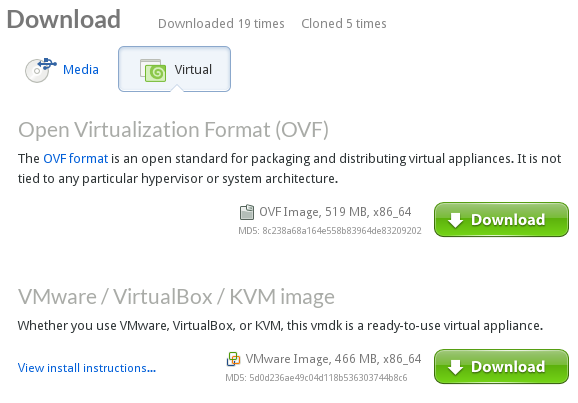
  1. Download Samba 4 Appliance dari link berikut : http://susestudio.com/a/veav1Y/excellent-samba4-appliance
  2. Pilih tipe download : Virtual Image-OVF
    `
  3. Jalankan VirtualBox
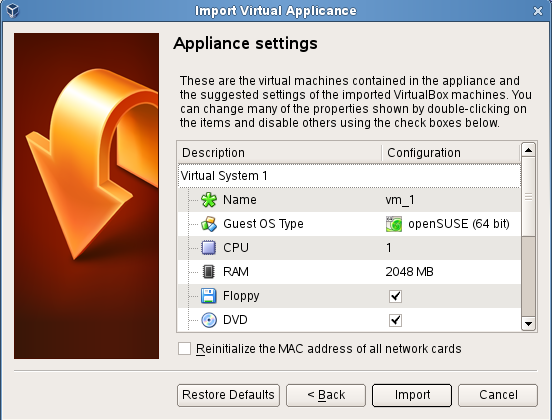
  4. Pilih menu File | Import Appliance
    `
  5. Klik Import
  6. Setelah selesai, jalankan Appliance dengan user name : root dan password : opensuse
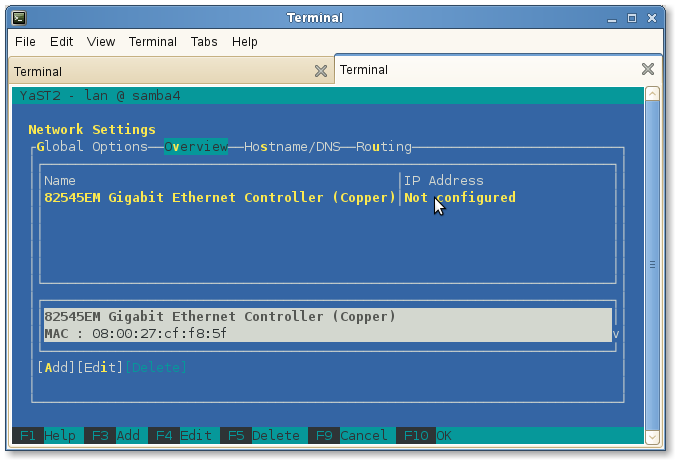
  7. Langkah pertama sebelum melakukan proses kompilasi adalah melakukan setup network dengan menjalankan perintah di konsole : yast lan
  8. Lakukan setting network dengan merujuk pada contoh gambar dibawah ini :
    `
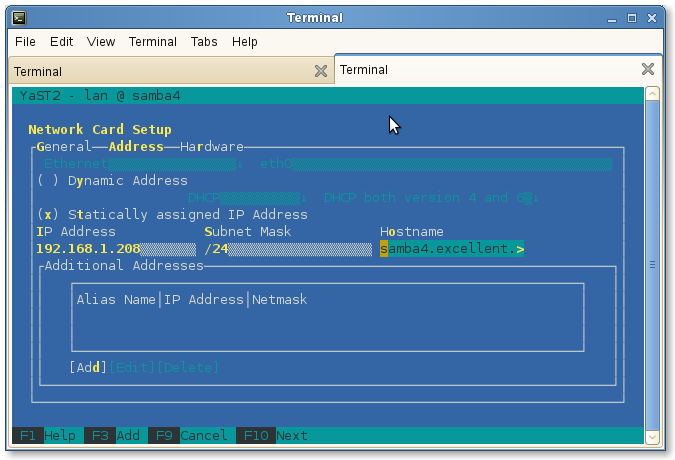
  9. Tekan tombol ALT+I (Edit) untuk melakukan konfigurasi network dan set networknya seperti berikut ini, jangan lupa sesuaikan konfigurasi IP Address dengan IP Address yang diinginkan. Jika sudah selesai, tekan tombol ALT+N untuk menutup tampilan konfigurasi IP dan kembali ke tampilan konfigurasi utama.
    `
  10. Tekan tombol ALT+S untuk berpindah ke tab DNS Server dan lakukan setting seperti contoh pada gambar dibawah ini. Ingat, saya menggunakan IP server sebagai DNS pertama karena akan melakukan setting DNS Server di server Samba 4.
    `
  11. Setelah selesai, tekan tombol ALT+U untuk melakukan setting Routing/Gateway. Isikan IP gateway yang dipergunakan oleh server untuk bisa terhubung ke internet, dalam contoh ini saya menggunakan IP modem ADSL : 192.168.1.1
    `
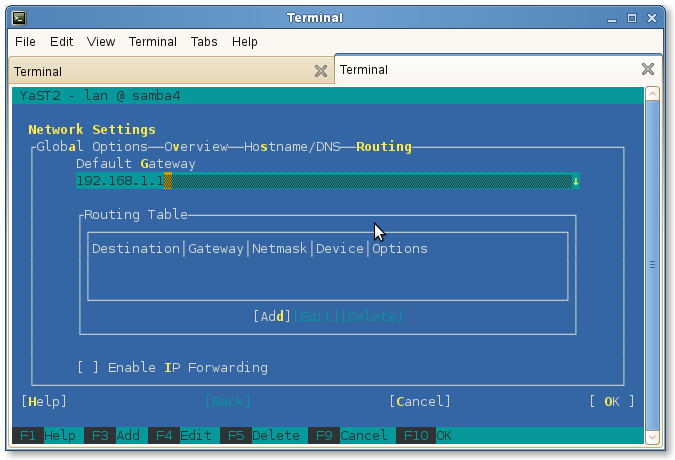
  12. Klik ALT+O untuk menekan tombol OK dan kembali ke konsole. Test koneksi server dengan melakukan perintah ping ke sesama network maupun ke internet.

Setelah selesai melakukan konfigurasi network, Excellent Samba4 Appliance sudah bisa dipergunakan secara remote. Kita bisa menggunakan Putty atau SSH untuk mengakses dan melakukan konfigurasi secara remote. Untuk kompilasi Samba4, silakan download file binary install Samba4 dari website Samba4. Proses ini akan saya jelaskan secara lebih detail pada artikel berikutnya : Instalasi & Konfigurasi Samba 4 Sebagai Active Directory Server-Bagian 1-Instalasi & Kompilasi
Active Directory AD Samba4 Window Server
Prev

Training Linux Fundamental & Advanced Server (Migrasi Windows Linux) 29-30 September 2012

Next

Instalasi & Konfigurasi Samba 4 Sebagai Active Directory Server-Bagian 1-Instalasi & Kompilasi

Related Posts

ResourceZimbra
April 18, 2012

Summary Proses Instalasi & Konfigurasi Mail Server untuk Production Server (Live)-Bagian 3

Read more
ResourceSLES, RHEL & Zextras
September 30, 2012

Instalasi & Konfigurasi Samba 4 Sebagai Active Directory Server Bagian 5-NTP Server & Join Domain

Read more
ResourceZimbra
September 8, 2012

Tips Mail Server : Zimbra & Mailman Mailing List Multi Domain

Read more

Comments(02)

  1. By arsigo
    October 5, 2012

    Pak Vavai..
    Gimana kalo saya ga mau pake Appliance, tapi saya maunya pake OpenSuse.
    Pertanyaannya:
    1. OpenSuse brapa yg harus saya pakai
    2. Paket apa aja yg harus saya install
    Terimakasih sebelumnya.

  2. By naedi
    October 21, 2016

    mas vavai/….link susestudionya sdah tak bsa d akses yaa????altenatif link ada kah???

Leave a Reply

Your email address will not be published. Required fields are marked *

Search
Recent Post
  • Segudang Benefit dari Dana Buffer: Ketika Kebijakan Berangkat dari Pengalaman
  • Konsep Backup Storage di OpenNebula
  • Ritual Mingguan Kami di Excellent
  • Menguji Fitur Live Migration di XCP-ng Menggunakan Xen Orchestra
  • Keistimewaan Bekerja di Excellent : Upaya Menjaga Ritme Kerja Karyawan
Categories
Archives
Featured image: Membangun Active Directory Server, Domain Controller & File Server Menggunakan Excellent Samba 4 Appliance
Get in Touch

KATEGORI

  • Home
  • Artikel
  • Jadwal
  • Event
  • Berita

LAYANAN

  • Zimbra Mail Server
  • Ubuntu
  • XCP-ng
  • Vinchin
  • ASAV
  • Proxmox
  • RHEL
  • Nakivo
  • SMTP Relay
  • SSL Certificate

KONTAK KAMI

PT. Excellent Infotama Kreasindo, Premier Serenity Blok J12, Jl. KH. Agus Salim No. 40E, Bekasi Jaya, Bekasi Timur, Bekasi 17112, Jawa Barat, Indonesia

TENTANG KAMI

PT. Excellent Infotama Kreasindo merupakan entitas bisnis yang fokus pada layanan komputerisasi seperti implementasi sistem, konsultasi, training/workshop, dan maintenance sistem, terutama migrasi dari sistem Windows ke Linux. more…