logotype
  • Home
  • News
  • Product dan Services
    • Zimbra Mail Server
      • Excellent Managed Services Email
      • Lisensi Zimbra NE
      • Support dan Maintenance
      • MX Backup & ASAV
      • SMTP Relay
    • Proxmox
      • Proxmox Virtual Environment
      • Proxmox Mail Gateway
      • Proxmox Backup Server
    • XCP-ng
    • Red Hat Enterprise Linux
    • Ubuntu Pro
    • Nakivo Backup & Recovery
    • Vinchin Backup & Recovery
    • Lisensi
      • Proxmox Mail Gateway
      • Lisensi Zimbra Network Edition
      • Lisensi Nakivo Backup & Recovery
      • Subscription Zoom
    • Buku Training Mandiri
      • Buku Training Mandiri
      • Ebook Training Mandiri
    • Cloud & Hosting
      • Excellent Managed Services Email Server
      • MX Backup/Anti Spam & Anti Virus
      • SMTP Relay & Mail Gateway
      • Excellent Mail Hosing
    • SSL Sertifikat
  • Training
  • Insight
  • About Us
  • Contacts
logotype
logotype
  • Home
  • News
  • Product dan Services
    • Zimbra Mail Server
      • Excellent Managed Services Email
      • Lisensi Zimbra NE
      • Support dan Maintenance
      • MX Backup & ASAV
      • SMTP Relay
    • Proxmox
      • Proxmox Virtual Environment
      • Proxmox Mail Gateway
      • Proxmox Backup Server
    • XCP-ng
    • Red Hat Enterprise Linux
    • Ubuntu Pro
    • Nakivo Backup & Recovery
    • Vinchin Backup & Recovery
    • Lisensi
      • Proxmox Mail Gateway
      • Lisensi Zimbra Network Edition
      • Lisensi Nakivo Backup & Recovery
      • Subscription Zoom
    • Buku Training Mandiri
      • Buku Training Mandiri
      • Ebook Training Mandiri
    • Cloud & Hosting
      • Excellent Managed Services Email Server
      • MX Backup/Anti Spam & Anti Virus
      • SMTP Relay & Mail Gateway
      • Excellent Mail Hosing
    • SSL Sertifikat
  • Training
  • Insight
  • About Us
  • Contacts
logotype
  • Home
  • News
  • Product dan Services
    • Zimbra Mail Server
      • Excellent Managed Services Email
      • Lisensi Zimbra NE
      • Support dan Maintenance
      • MX Backup & ASAV
      • SMTP Relay
    • Proxmox
      • Proxmox Virtual Environment
      • Proxmox Mail Gateway
      • Proxmox Backup Server
    • XCP-ng
    • Red Hat Enterprise Linux
    • Ubuntu Pro
    • Nakivo Backup & Recovery
    • Vinchin Backup & Recovery
    • Lisensi
      • Proxmox Mail Gateway
      • Lisensi Zimbra Network Edition
      • Lisensi Nakivo Backup & Recovery
      • Subscription Zoom
    • Buku Training Mandiri
      • Buku Training Mandiri
      • Ebook Training Mandiri
    • Cloud & Hosting
      • Excellent Managed Services Email Server
      • MX Backup/Anti Spam & Anti Virus
      • SMTP Relay & Mail Gateway
      • Excellent Mail Hosing
    • SSL Sertifikat
  • Training
  • Insight
  • About Us
  • Contacts
Blog Post
virtualization
HeadlineTraining

Jadwal Training Virtualisasi, Clustering & Linux High Availability Server Januari 2011
December 28, 2010by Masim Vavai Sugianto

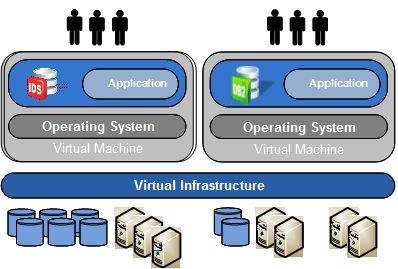
Training Virtualisasi & Linux HA ini akan diadakan dalam 2 hari. Hari pertama membahas mengenai implementasi teknologi virtualisasi sedangkan hari kedua membahas mengenai implementasi Linux HA & fail over. Training ini cocok bagi ISP/perusahaan /lembaga/instansi yang ingin menerapkan teknologi virtualisasi, clustering & high availability server dilingkungannya.

MATERI TRAINING VIRTUALISASI, CLUSTERING & LINUX HA

Hari Pertama

  • Penjelasan mengenai virtualisasi & cloud computing
  • Penjelasan mengenai keuntungan & kerugian penggunaan
    virtualisasi & cloud computing
  • Penjelasan mengenai karakteristik teknologi virtualisasi dan perbedaan masing-masing teknologi
  • Penjelasan mengenai contoh-contoh virtualisasi
  • Kebutuhan sistem & persiapan untuk implementasi virtualisasi
  • Implementasi virtualisasi menggunakan VirtualBox
  • Implementasi virtualisasi menggunakan Xen Hypervisor
  • Implementasi virtualisasi menggunakan Proxmox Virtual Appliance
  • Implementasi virtualisasi menggunakan KVM
  • Implementasi virtualisasi menggunakan OpenVZ

Hari Kedua

  • Tips menentukan skema virtualisasi yang paling tepat
  • Tips melakukan backup & restore virtualisasi
  • Penjelasan mengenai mekanisme backup & restore
  • Penjelasan mengenai contoh-contoh backup menggunakan
    rsync dan fsdump
  • Penjelasan & Implementasi DRBD
  • Penjelasan & implementasi HeartBeat
  • Konfigurasi DRBD+HeartBeat untuk online failover & Linux HA

DETAIL REGISTRASI

Bagaimana cara melakukan pendaftaran ?
Silakan mengirimkan email pendaftaran ke alamat email training@vavai.com dan di cc ke vavai@vavai.com berisi Nama, alamat, no telp yang bisa dihubungi dan jumlah peserta yang akan mengikuti training.

Kami juga menyediakan formulir pendaftaran training, khususnya bagi peserta yang dikirimkan oleh perusahaan/instansi :

  • Formulir pendaftaran dalam format Open Document Format OpenOffice (ODF/ODT)
  • Formulir pendaftaran dalam format Microsoft Word (DOC)
  • Formulir pendaftaran dalam format PDF

Kontak telepon : 0818 489 629 atau 0838 9247 8780 atau 021-881 6671.

Bagaimana Mekanisme Pembayaran Training

Biaya training sebesar Rp. 500.000,- per hari atau Rp. 1.000.000,- untuk 2 hari full day training. Biaya training sudah termasuk : Sertifikat, Buku modul panduan, DVD openSUSE 11.3/DVD SUSE Linux Enterprise Server dan CD aplikasi sesuai materi dan makan siang+snack selama training.

Biaya ditransfer ke salah satu rekening sebagai berikut :

  1. BCA KCP Jababeka Cikarang – Bekasi Ac No : 876 019 6755 atas nama Masim Sugianto

  2. Jika anda Pengguna Group Bank ATM Bersama (Mandiri, BNI, Bukopin, BII dll) Silakan menggunakan Rekening Bank Muamalat, A/C No : 305 218 2022 atas nama Masim Sugianto.

  3. Jika anda pengguna Bank Niaga atau Bank Lippo, silakan menggunakan nomor rekening Bank Niaga : 9080103275145 kantor cabang Kelapa Gading atas nama Masim Sugianto.

Fasilitas Training :

  1. Fasilitas komputer training, 1 peserta 1 komputer (boleh membawa laptop/server sendiri jika dibutuhkan untuk simulasi real)
  2. Full akses internet up to 2 Mbps
  3. Modul training
  4. Sertifikat training
  5. DVD Linux + CD modul paket sesuai training
  6. Snack & Makan Siang
  7. Garansi & support pasca training selama 6 bulan. Setelah masa garansi, support tetap diberikan melalui forum/mailing resmi Excellent

Konfirmasi transfer bisa dikirimkan melalui email ke alamat email training@vavai.com di cc ke vavai@vavai.com atau SMS atau telepon ke 0818 489 629/0838 9247 8780.

Form Kontak

Silakan gunakan halaman kontak jika anda memerlukan informasi lebih detail mengenai training
OpenVZ Proxmox & Untangle Training VirtualBox Virtualisasi VMWare Xen
Prev

Training Zimbra Mail Server pada 3 Sistem Operasi : SUSE, Ubuntu LTS & CentOS, 18-19 Desember 2010

Next

Keuntungan Teknologi Virtualisasi & Cloud Computing

Related Posts

proxy-1
ScheduleTraining
October 1, 2014

Training All About Proxy Server & Bandwidth Management, 29 Oktober 2014

Read more
Cover_Mastering_Zimbra_H2
ScheduleTraining
January 27, 2017

Training Mastering Zimbra (Advanced Configuration & Multi Server), 13-15 Maret 2017

Read more
allabout-pdc
ScheduleTraining
February 10, 2014

Training All About Active Directory, Domain Controller & File Server Samba 4, 22-23 Maret 2014

Read more

Leave a Reply

Your email address will not be published. Required fields are marked *

Search
Recent Post
  • Infrastruktur Virtualisasi Sudah Berjalan, Tapi Kenapa Server Masih Sering Lambat dan Sulit Dikembangkan?
  • Training Proxmox: High Availability & Efficient Infrastructure Solution
  • Implementasi High Availability Storage: Instalasi Ceph di Proxmox VE
  • Website Error “Not Secure” dan Email Gagal Login? Bisa Jadi SSL Perusahaan Anda Expired
  • PegaProx: Solusi Manajemen Proxmox VE Multi-Cluster yang Komprehensif
Categories
Archives
Featured image: Jadwal Training Virtualisasi, Clustering & Linux High Availability Server Januari 2011
Get in Touch

KATEGORI

  • Home
  • Artikel
  • Training
  • Event
  • Berita

LAYANAN

  • Zimbra Mail Server
  • Ubuntu
  • XCP-ng
  • Vinchin
  • ASAV
  • Proxmox
  • RHEL
  • Nakivo
  • SMTP Relay
  • SSL Certificate

KONTAK KAMI

PT. Excellent Infotama Kreasindo, Premier Serenity Blok J12, Jl. KH. Agus Salim No. 40E, Bekasi Jaya, Bekasi Timur, Bekasi 17112, Jawa Barat, Indonesia

TENTANG KAMI

PT. Excellent Infotama Kreasindo merupakan entitas bisnis yang fokus pada layanan komputerisasi seperti implementasi sistem, konsultasi, training/workshop, dan maintenance sistem, terutama migrasi dari sistem Windows ke Linux. more…