
logotype
  • Home
  • News
  • Product dan Services
    • Zimbra Mail Server
      • Excellent Managed Services Email
      • Lisensi Zimbra NE
      • Support dan Maintenance
      • MX Backup & ASAV
      • SMTP Relay
    • Proxmox
      • Proxmox Virtual Environment
      • Proxmox Mail Gateway
      • Proxmox Backup Server
    • XCP-ng
    • Red Hat Enterprise Linux
    • Ubuntu Pro
    • Nakivo Backup & Recovery
    • Vinchin Backup & Recovery
    • Lisensi
      • Proxmox Mail Gateway
      • Lisensi Zimbra Network Edition
      • Lisensi Nakivo Backup & Recovery
      • Subscription Zoom
    • Buku Training Mandiri
      • Buku Training Mandiri
      • Ebook Training Mandiri
    • Cloud & Hosting
      • Excellent Managed Services Email Server
      • MX Backup/Anti Spam & Anti Virus
      • SMTP Relay & Mail Gateway
      • Excellent Mail Hosing
    • SSL Sertifikat
  • Training
  • Insight
  • About Us
  • Contacts
logotype
logotype
  • Home
  • News
  • Product dan Services
    • Zimbra Mail Server
      • Excellent Managed Services Email
      • Lisensi Zimbra NE
      • Support dan Maintenance
      • MX Backup & ASAV
      • SMTP Relay
    • Proxmox
      • Proxmox Virtual Environment
      • Proxmox Mail Gateway
      • Proxmox Backup Server
    • XCP-ng
    • Red Hat Enterprise Linux
    • Ubuntu Pro
    • Nakivo Backup & Recovery
    • Vinchin Backup & Recovery
    • Lisensi
      • Proxmox Mail Gateway
      • Lisensi Zimbra Network Edition
      • Lisensi Nakivo Backup & Recovery
      • Subscription Zoom
    • Buku Training Mandiri
      • Buku Training Mandiri
      • Ebook Training Mandiri
    • Cloud & Hosting
      • Excellent Managed Services Email Server
      • MX Backup/Anti Spam & Anti Virus
      • SMTP Relay & Mail Gateway
      • Excellent Mail Hosing
    • SSL Sertifikat
  • Training
  • Insight
  • About Us
  • Contacts
logotype
  • Home
  • News
  • Product dan Services
    • Zimbra Mail Server
      • Excellent Managed Services Email
      • Lisensi Zimbra NE
      • Support dan Maintenance
      • MX Backup & ASAV
      • SMTP Relay
    • Proxmox
      • Proxmox Virtual Environment
      • Proxmox Mail Gateway
      • Proxmox Backup Server
    • XCP-ng
    • Red Hat Enterprise Linux
    • Ubuntu Pro
    • Nakivo Backup & Recovery
    • Vinchin Backup & Recovery
    • Lisensi
      • Proxmox Mail Gateway
      • Lisensi Zimbra Network Edition
      • Lisensi Nakivo Backup & Recovery
      • Subscription Zoom
    • Buku Training Mandiri
      • Buku Training Mandiri
      • Ebook Training Mandiri
    • Cloud & Hosting
      • Excellent Managed Services Email Server
      • MX Backup/Anti Spam & Anti Virus
      • SMTP Relay & Mail Gateway
      • Excellent Mail Hosing
    • SSL Sertifikat
  • Training
  • Insight
  • About Us
  • Contacts
Blog Post
ResourceZimbra

Konfigurasi DKIM/DomainKeys Multi Domain pada Zimbra Mail Server
May 26, 2012by Masim Vavai Sugianto

Salah seorang alumni training Excellent mengirimkan pertanyaan melalui milis alumni mengenai bagaimana caranya melakukan setting DKIM/DomainKeys untuk multi domain. Pada artikel “Tips Mail Server : 10 Ciri-Ciri Mail Server yang Dikonfigurasi dengan Baik”, salah satu tips yang saya sarankan adalah implementasi DKIM/DomainKeys.

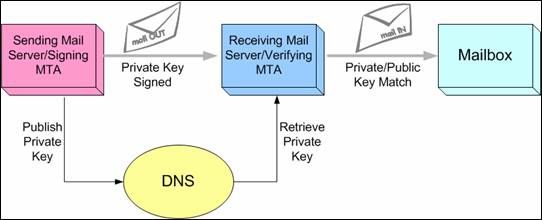
DomainKeys atau DKIM pada dasarnya merupakan signature yang menjadi pertanda bahwa email yang keluar dari suatu mail server sudah di sign dengan kode tertentu sesuai nama domain dan identitas mail server sehingga dianggap syah dan meyakinkan sebagai pengirim resmi.

Domain Keys Identified Mail (DKIM) is a technology designed to make it difficult or impossible for criminals to steal the identities of legitimate organizations. This authentication technology allows good senders to “sign” a message to prove that it really did come from them..

DKIM originally written as sender authentication protocol developed in order to address the problem of forged email messages. Yahoo! released the DomainKeys specification and Cisco released the Internet Identified Mail specification. Both methods are based on cryptographic message signing. The two efforts have been merged, and the combined specification is known as DomainKeys Identified Mail (DKIM).

Pada tulisan sebelumnya, “Implementasi DomainKeys pada Zimbra & SLES 11 SP1 Menggunakan OpenDKIM”, saya menguraikan tata cara pembuatan DKIM/DomainKeys untuk 1 domain. Bagaimana jika ingin menerapkannya pada multi domain, misalnya untuk Zimbra yang melayani 3 buah domain : excellent.co.id, vavai.net dan vavai.com?

Caranya mudah, lakukan modifikasi untuk 3 hal berikut ini :

  1. Pada file /etc/opendkim.conf, tuliskan seluruh domain pada paramater domain seperti berikut ini :
    [code lang=”bash”] Domain excellent.co.id,vavai.net,vavai.com
    InternalHosts 192.168.10.0/24, 127.0.0.1
    KeyFile /etc/mail/dkim/selector.private
    Mode sv
    Selector selector
    Socket inet:8891@localhost
    Syslog Yes
    SyslogFacility mail
    X-Header Yes
    [/code]
  2. Pada saat generate file selector jangan lupa mencantumkan nama domain yang diinginkan seperti contoh perintah berikut ini :
    [code lang=”bash”] opendkim-genkey -d excellent.co.id,vavai.net,vavai.com -D /etc/mail/dkim -s selector
    [/code]
  3. Masukkan isi file selector.txt  sebagai salah satu TXT records di DNS public untuk ketiga domain tersebut. Jadi nantinya ketiga domain memiliki TXT records untuk DKIM atau DomainKeys yang sama

Untuk panduan selengkapnya bisa mengikuti “Implementasi DomainKeys pada Zimbra & SLES 11 SP1 Menggunakan OpenDKIM” dengan mengacu pada beberapa perubahan diatas.

Prev

Kurikulum dan Skema Training di Excellent

Next

Training VMWare vSphere Fundamental & Medium (High Availability), 09-10 Juni 2012

Related Posts

EventHeadlineTrainingZimbra
February 27, 2012

Training Zimbra Mail Server, 17-18 Maret 2012

Read more
ResourceUbuntu Variant
October 17, 2012

Solved : LinuxMint 13 Intel HD Graphics Blank Screen (Tanpa GUI Display)

Read more
ResourceZimbra
November 6, 2012

Implementasi Zimbra Multi Server untuk Zimbra Large Deployment-Bagian 3

Read more

Comment(01)

  1. By fajar
    March 11, 2013

    Untuk multi server DKIM ini di install diserver yg mana Mas,
    LDAP, Mailbox, MTA ?
    terima kasih

Leave a Reply

Your email address will not be published. Required fields are marked *

Search
Recent Post
  • Zimbra Daffodil 10.1.16 Rilis: Modern Web App Makin Cerdas, Backup Lebih Hemat Storage, dan Peningkatan Keamanan
  • Live Migration vs High Availability di XCP-ng: Perbedaan dan Skenario Penggunaan
  • Informasi untuk Pelanggan PT. Excellent Infotama Kreasindo : Penyesuaian Kebijakan Masa Berlaku Sertifikat SSL/TLS Menuju Standar Keamanan Global
  • Excellent Infotama Kreasindo: Lingkungan Kerja yang Memberi Ruang untuk Bertumbuh
  • Segudang Benefit dari Dana Buffer: Ketika Kebijakan Berangkat dari Pengalaman
Categories
Archives
Featured image: Konfigurasi DKIM/DomainKeys Multi Domain pada Zimbra Mail Server
Get in Touch

KATEGORI

  • Home
  • Artikel
  • Jadwal
  • Event
  • Berita

LAYANAN

  • Zimbra Mail Server
  • Ubuntu
  • XCP-ng
  • Vinchin
  • ASAV
  • Proxmox
  • RHEL
  • Nakivo
  • SMTP Relay
  • SSL Certificate

KONTAK KAMI

PT. Excellent Infotama Kreasindo, Premier Serenity Blok J12, Jl. KH. Agus Salim No. 40E, Bekasi Jaya, Bekasi Timur, Bekasi 17112, Jawa Barat, Indonesia

TENTANG KAMI

PT. Excellent Infotama Kreasindo merupakan entitas bisnis yang fokus pada layanan komputerisasi seperti implementasi sistem, konsultasi, training/workshop, dan maintenance sistem, terutama migrasi dari sistem Windows ke Linux. more…