logotype
  • Home
  • News
  • Product dan Services
    • Zimbra Mail Server
      • Excellent Managed Services Email
      • Lisensi Zimbra NE
      • Support dan Maintenance
      • MX Backup & ASAV
      • SMTP Relay
    • Proxmox
      • Proxmox Virtual Environment
      • Proxmox Mail Gateway
      • Proxmox Backup Server
    • XCP-ng
    • Red Hat Enterprise Linux
    • Ubuntu Pro
    • Nakivo Backup & Recovery
    • Vinchin Backup & Recovery
    • Lisensi
      • Proxmox Mail Gateway
      • Lisensi Zimbra Network Edition
      • Lisensi Nakivo Backup & Recovery
      • Subscription Zoom
    • Buku Training Mandiri
      • Buku Training Mandiri
      • Ebook Training Mandiri
    • Cloud & Hosting
      • Excellent Managed Services Email Server
      • MX Backup/Anti Spam & Anti Virus
      • SMTP Relay & Mail Gateway
      • Excellent Mail Hosing
    • SSL Sertifikat
  • Training
  • Insight
  • About Us
  • Contacts
logotype
logotype
  • Home
  • News
  • Product dan Services
    • Zimbra Mail Server
      • Excellent Managed Services Email
      • Lisensi Zimbra NE
      • Support dan Maintenance
      • MX Backup & ASAV
      • SMTP Relay
    • Proxmox
      • Proxmox Virtual Environment
      • Proxmox Mail Gateway
      • Proxmox Backup Server
    • XCP-ng
    • Red Hat Enterprise Linux
    • Ubuntu Pro
    • Nakivo Backup & Recovery
    • Vinchin Backup & Recovery
    • Lisensi
      • Proxmox Mail Gateway
      • Lisensi Zimbra Network Edition
      • Lisensi Nakivo Backup & Recovery
      • Subscription Zoom
    • Buku Training Mandiri
      • Buku Training Mandiri
      • Ebook Training Mandiri
    • Cloud & Hosting
      • Excellent Managed Services Email Server
      • MX Backup/Anti Spam & Anti Virus
      • SMTP Relay & Mail Gateway
      • Excellent Mail Hosing
    • SSL Sertifikat
  • Training
  • Insight
  • About Us
  • Contacts
logotype
  • Home
  • News
  • Product dan Services
    • Zimbra Mail Server
      • Excellent Managed Services Email
      • Lisensi Zimbra NE
      • Support dan Maintenance
      • MX Backup & ASAV
      • SMTP Relay
    • Proxmox
      • Proxmox Virtual Environment
      • Proxmox Mail Gateway
      • Proxmox Backup Server
    • XCP-ng
    • Red Hat Enterprise Linux
    • Ubuntu Pro
    • Nakivo Backup & Recovery
    • Vinchin Backup & Recovery
    • Lisensi
      • Proxmox Mail Gateway
      • Lisensi Zimbra Network Edition
      • Lisensi Nakivo Backup & Recovery
      • Subscription Zoom
    • Buku Training Mandiri
      • Buku Training Mandiri
      • Ebook Training Mandiri
    • Cloud & Hosting
      • Excellent Managed Services Email Server
      • MX Backup/Anti Spam & Anti Virus
      • SMTP Relay & Mail Gateway
      • Excellent Mail Hosing
    • SSL Sertifikat
  • Training
  • Insight
  • About Us
  • Contacts
Blog Post
Proxmox & Untangle

Menambahkan Channel Turnkey di Proxmox

June 29, 2012by Mochamad Welly R.

Sudah kenal dengan Proxmox? Ya, Proxmox VE (virtual environment) adalah distro Linux berbasis Debian (x86_64) yang dikhususkan sebagai distro virtualisasi. Proxmox secara default menyertakan OpenVZ dan KVM dan disediakan dalam modus teks (console mode). Proses administrasinya dilakukan menggunakan akses web.

Lalu, sudah kenal dengan TurnkeyLinux? Belum? Silakan baca disini: http://vavai.com/2011/08/05/turnkey-linux-aplikasi-virtual-gratis-berbasis-ubuntu/

Untuk yang sudah bermain menggunakan Proxmox tentunya tahu kalau template openvz yang disediakan oleh proxmox sangat terbatas. Nah, Turnkey linux, dengan library yang dimilikinya dapat menjadi  satu channel tambahan untuk proxmox pve. Sebagai gambaran, sebelum ditambah channel turnkey, template yang disediakan oleh proxmox akan terlihat seperti berikut:
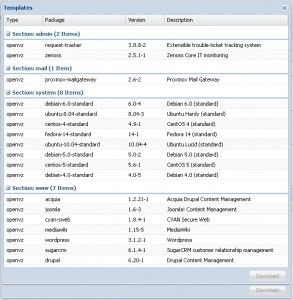
Proxmox Template

Setelah ditambah Turnkey Channel akan ada tambahan seperti berikut:
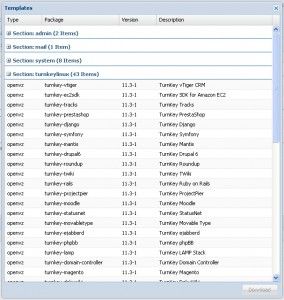
TurnKey Channel di Proxmox

Template yang disediakan oleh proxmox memang terbatas. Jika ingin memperkaya template, bisa menambahkan channel template yang disediakan oleh Turnkey.  Inti dari yang akan kita lakukan adalah kita dapat mendownload dan deploy appliance yang terdapat di Turnkey pada server proxmox kita dengan beberapa kllik saja tana harus menutup browser.

Untuk menambah channel, kita perlu memodifikasi file APLInfo.pm yang terdapat di server proxmox. Langkah yang harus kita lakukan adalah sebagai berikut:

  1. Masuk ke direktori /usr/share/perl5/PVE :
    cd  /usr/share/perl5/PVE
  2. backup file APLInfo.pm yang asli:
    mv APLInfo.pm APLInfo.pm.bak
  3. Ambil file APLInfo.pm yang disediakan oleh Turnkey:
    wget https://raw.github.com/turnkeylinux/pve-patches/master/PVE/APLInfo.pm
  4. Lalu update daftar appliance:
    pveam update

Modifikasi selesai. Silakan lihat di daftar appliance proxmox server kita. Kalau sudah ada channel dari Turnkey (seperti gambar diatas), artinya modifikasi sudah berhasil.

Selamat Mencoba.

Administrator Proxmox & Untangle Ubuntu Virtualisasi Virtualization
AboutMochamad Welly R.
Mochamad Welly Rosadi. Penganjur penggunaan sistem Linux dan aplikasi Open Source. Kontak: moch.welly [at] gmail.com
Prev

Recovery Data & Mengembalikan Partisi yang Hilang dengan Aplikasi TestDisk-PartedMagic

Next

Tips Virtualization : Membuat Cluster Server pada Proxmox 2.1

Related Posts

RilisProxmoxDataCenter
NewsProduct & ServicesProxmox & Untangle
December 5, 2025

Rilis Proxmox Datacenter Manager 1.0: Solusi Sentralisasi Multi-Cluster untuk Proxmox Virtual Environment dan Proxmox Backup Server

Read more
virtualization
EventHeadlineProxmox & Untangle
February 27, 2012

Special Class Training : Mastering Proxmox Virtualization Environment, 10 Maret 2012

Read more
Poster Nakivo(3)
BlogBlog & ResourcesLinuxProduct & ServicesProxmox & Untangle
April 24, 2025

Import VM ke Proxmox VE Menggunakan File .vmdk

Read more

Leave a Reply

Your email address will not be published. Required fields are marked *

Search
Recent Post
  • Zimbra Daffodil 10.1.16 Rilis: Modern Web App Makin Cerdas, Backup Lebih Hemat Storage, dan Peningkatan Keamanan
  • Live Migration vs High Availability di XCP-ng: Perbedaan dan Skenario Penggunaan
  • Informasi untuk Pelanggan PT. Excellent Infotama Kreasindo : Penyesuaian Kebijakan Masa Berlaku Sertifikat SSL/TLS Menuju Standar Keamanan Global
  • Excellent Infotama Kreasindo: Lingkungan Kerja yang Memberi Ruang untuk Bertumbuh
  • Segudang Benefit dari Dana Buffer: Ketika Kebijakan Berangkat dari Pengalaman
Categories
Archives
Featured image: Menambahkan Channel Turnkey di Proxmox
Get in Touch

KATEGORI

  • Home
  • Artikel
  • Jadwal
  • Event
  • Berita

LAYANAN

  • Zimbra Mail Server
  • Ubuntu
  • XCP-ng
  • Vinchin
  • ASAV
  • Proxmox
  • RHEL
  • Nakivo
  • SMTP Relay
  • SSL Certificate

KONTAK KAMI

PT. Excellent Infotama Kreasindo, Premier Serenity Blok J12, Jl. KH. Agus Salim No. 40E, Bekasi Jaya, Bekasi Timur, Bekasi 17112, Jawa Barat, Indonesia

TENTANG KAMI

PT. Excellent Infotama Kreasindo merupakan entitas bisnis yang fokus pada layanan komputerisasi seperti implementasi sistem, konsultasi, training/workshop, dan maintenance sistem, terutama migrasi dari sistem Windows ke Linux. more…