
Instalasi & Konfigurasi Samba 4 Sebagai Active Directory Server-Bagian 3-Provisioning Samba4
Artikel sebelumnya :
- Membangun Active Directory Server, Domain Controller & File Server Menggunakan Excellent Samba 4 Appliance
- Instalasi & Konfigurasi Samba 4 Sebagai Active Directory Server-Bagian 1-Instalasi & Kompilasi
- Instalasi & Konfigurasi Samba 4 Sebagai Active Directory Server-Bagian 2-Konfigurasi DNS Server
REMOUNT ROOT FOLDER DENGAN ACL & USER_XATTR
- Agar akses pada fileserver berjalan dengan lancar, edit file fstab dan tambahkan acl beserta user_xattr
[code lang=”bash”] vi /etc/fstab
[/code] - Tambahkan acl dan user_xattr didepan defaults pada partisi root atau pada partisi yang dijadikan data untuk fileserver. Pada contoh dibawah, partisi root saya berada pada disk /dev/sda1
[code lang=”bash”] /dev/sda1 / ext3 defaults,acl,user_xattr 1 1
[/code] - Mounting ulang sistem partisi root
[code lang=”bash”] mount -o remount /
[/code]

PROVISIONING SAMBA 4
Setelah proses konfigurasi DNS Server selesai dijalankan pada artikel sebelumnya, tahap selanjutnya adalah provisioning Samba 4. Provisioning ini adalah proses menjadikan Samba 4 sebagai Active Directory atau Domain Controller) (tergantung parameter yang diset saat melakukan provisioning)
Pada artikel ini, nama domain yang digunakan adalah excellent.co.id dan nama hostname samba4. Provisioning dapat dilakukan dengan perintah melalui konsole/terminal :
[code lang=”bash”] /usr/local/samba/bin/samba-tool domain provision[/code]
Untuk –realm diisi dengan nama domain (huruf kecil, komplit), misalnya –realm=excellent.co.id, untuk –domain diisi dengan nama domain (tanpa TLD, tanpa .co.id dalam huruf besar), misalnya –domain=EXCELLENT, untuk –adminpass diisi dengan password Administrator dalam formasi Strong password, misalnya –adminpass=Rahasia123 sedangkan untuk DNS back end diisi dengan: BIND9_DLZ
Jangan lupa sesuaikan nama domainnya. Untuk parameter –realm diisi dengan FQDN (Fully Qualified Domain Name, misalnya excellent.co.id) sedangkan untuk parameter domain diisi dengan nama domain dalam huruf besar (cukup nama domain tanpa TLD, misalnya kalau –realm = excellent.co.id maka –domain=EXCELLENT. Jika –realm=vavai.com maka –domain=VAVAI). Untuk password harus memenuhi kaidah strong password, dalam contoh saya menggunakan password Rahasia123 (mengandung UPPERCASE, minimal 8 karakter dan ada angka)
Tunggu hingga proses provisioning selesai, jika tidak ada masalah seharusnya hasil provisioning seperti berikut :
# /usr/local/samba/bin/samba-tool domain provision
Realm [EXCELLENT.CO.ID]: EXCELLENT.CO.ID
Domain [EXCELLENT]: EXCELLENT
Server Role (dc, member, standalone) [dc]: dc
DNS backend (SAMBA_INTERNAL, BIND9_FLATFILE, BIND9_DLZ, NONE) [SAMBA_INTERNAL]: BIND9_DLZ
Administrator password:
Retype password:
Looking up IPv4 addresses
Looking up IPv6 addresses
No IPv6 address will be assigned
Setting up secrets.ldb
Setting up the registry
Setting up the privileges database
Setting up idmap db
Setting up SAM db
Setting up sam.ldb partitions and settings
Setting up sam.ldb rootDSE
Pre-loading the Samba 4 and AD schema
Adding DomainDN: DC=excellent,DC=co,DC=id
Adding configuration container
Setting up sam.ldb schema
Setting up sam.ldb configuration data
Setting up display specifiers
Adding users container
Modifying users container
Adding computers container
Modifying computers container
Setting up sam.ldb data
Setting up well known security principals
Setting up sam.ldb users and groups
Setting up self join
Adding DNS accounts
Creating CN=MicrosoftDNS,CN=System,DC=excellent,DC=co,DC=id
Creating DomainDnsZones and ForestDnsZones partitions
Populating DomainDnsZones and ForestDnsZones partitions
See /usr/local/samba/private/named.conf for an example configuration include file for BIND
and /usr/local/samba/private/named.txt for further documentation required for secure DNS updates
Setting up sam.ldb rootDSE marking as synchronized
Fixing provision GUIDs
A Kerberos configuration suitable for Samba 4 has been generated at /usr/local/samba/private/krb5.conf
Once the above files are installed, your Samba4 server will be ready to use
Server Role: active directory domain controller
Hostname: samba4
NetBIOS Domain: EXCELLENT
DNS Domain: excellent.co.id
DOMAIN SID: S-1-5-21-1910059976-2566974092-2077678061
A phpLDAPadmin configuration file suitable for administering the Samba 4 LDAP server has been created in /usr/local/samba/private/phpldapadmin-config.php.
SCRIPT SAMBA 4
Untuk melakukan start, stop samba4 kita dapat menggunakan perintah berikut :
[code lang=”bash”]
/usr/local/samba/sbin/samba
[/code]
Check apakah samba sudah berjalan dengan perintah ps
[code lang=”bash”]
ps aux | grep samba
[/code]
Untuk melakukan stop, kita dapat menggunakan perintah pkill
[code lang=”bash”]
pkill samba
[/code]
Agar otomatis jalan pada saat booting, kita dapat membuat satu script untuk menjalankannya. Buat script dengan nama samba4 kemudian simpan di folder /etc/init.d dengan isi sebagai berikut :
[code lang=”bash”]
#! /bin/sh
# Copyright (c) 1999-2004 SuSE Linux AG, Nuernberg, Germany.
# All rights reserved.
#
# Author: Lars Mueller
#
# /etc/init.d/smb
# and its symbolic link
# /usr/sbin/rcsmb
#
# This program is free software: you can redistribute it and/or modify
# it under the terms of the GNU General Public License as published by
# the Free Software Foundation, either version 3 of the License, or
# (at your option) any later version.
#
# This program is distributed in the hope that it will be useful,
# but WITHOUT ANY WARRANTY; without even the implied warranty of
# MERCHANTABILITY or FITNESS FOR A PARTICULAR PURPOSE. See the
# GNU General Public License for more details.
#
# You should have received a copy of the GNU General Public License
# along with this program. If not, see
#
### BEGIN INIT INFO
# Provides: samba4
# Required-Start: $network $remote_fs $syslog
# Should-Start:
# Required-Stop: $network $remote_fs $syslog
# Should-Stop:
# Default-Start: 3 5
# Default-Stop: 0 1 2 6
# Short-Description: Samba 4 SMB/CIFS file and print server
# Description: Samba 4 SMB/CIFS file and print server
### END INIT INFO
SMBD_BIN=”/usr/local/samba/sbin/samba”
SMB_CONF=”/usr/local/samba/etc/smb.conf”
PID_FILE=”/usr/local/samba/var/run/samba.pid”
. /etc/rc.status
rc_reset
# Check for missing binary
if [ ! -x ${SMBD_BIN} ]; then
echo -n >&2 “Samba SMB daemon, ${SMBD_BIN} is not installed. ”
rc_status -s
exit 5
fi
# be extra carefull cause connection fail if TMPDIR is not writeable
export TMPDIR=”/var/tmp”
test -f /etc/sysconfig/samba && \
. /etc/sysconfig/samba
for setting in $SAMBA_SMBD_ENV; do
pathcheck=”${setting%%:*}”
variable=”${setting##*:}”
test “${pathcheck}” != “${variable}” -a ! -e “${pathcheck}” && \
continue
export eval ${variable}
done
case “$1” in
start)
echo -n “Starting Samba SMB daemon ”
if [ ! -f ${SMB_CONF} ]; then
echo -n >&2 “Samba configuration file, ${SMB_CONF} does not exist. ”
rc_status -s
exit 6
fi
checkproc -p ${PID_FILE} ${SMBD_BIN}
case $? in
0) echo -n “- Warning: daemon already running. ” ;;
1) echo -n “- Warning: ${PID_FILE} exists. ” ;;
esac
test -f /etc/sysconfig/language && \
. /etc/sysconfig/language
export LC_ALL=”$RC_LC_ALL”
export LC_CTYPE=”$RC_LC_CTYPE”
export LANG=”$RC_LANG”
startproc -p ${PID_FILE} ${SMBD_BIN} -D -s ${SMB_CONF}
unset LC_ALL LC_CTYPE LANG
rc_status -v
;;
stop)
echo -n “Shutting down Samba SMB daemon ”
checkproc -p ${PID_FILE} ${SMBD_BIN} || \
echo -n ” Warning: daemon not running. ”
killproc -p ${PID_FILE} -t 10 ${SMBD_BIN}
rc_status -v
;;
try-restart|condrestart)
if test “$1” = “condrestart”; then
echo “${attn} Use try-restart ${done}(LSB)${attn} rather than condrestart ${warn}(RH)${norm}”
fi
$0 status
if test $? = 0; then
$0 restart
else
rc_reset
fi
rc_status
;;
restart)
$0 stop
$0 start
rc_status
;;
force-reload|reload)
echo -n “Reloading Samba SMB daemon ”
checkproc -p ${PID_FILE} ${SMBD_BIN} && \
touch ${PID_FILE} || \
echo -n >&2 ” Warning: daemon not running. ”
killproc -p ${PID_FILE} -HUP ${SMBD_BIN}
rc_status -v
;;
status)
echo -n “Checking for Samba SMB daemon ”
checkproc -p ${PID_FILE} ${SMBD_BIN}
rc_status -v
;;
probe)
test ${SMB_CONF} -nt ${PID_FILE} && echo reload
;;
*)
echo “Usage: $0 {start|stop|status|try-restart|restart|force-reload|reload|probe}”
exit 1
;;
esac
rc_exit[/code]
Setelah selesai membuat script, jalankan perintah berikut ini untuk mengaktifkannya :
[code lang=”bash”]
chmod 755 /etc/init.d/samba4
chmod +x /etc/init.d/samba4
chkconfig samba4 on
service samba4 restart
[/code]
Setelah selesai, jalankan perintah berikut untuk melakukan pengecekan status service Samba 4 :
/usr/local/samba/sbin/samba –version
/usr/local/samba/bin/smbclient -L localhost -U%
[/code]
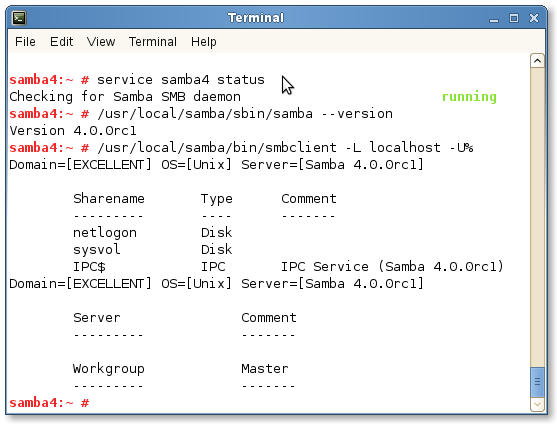
Test masuk ke folder share dengan menjalankan perintah berikut :
[code lang=”bash”] /usr/local/samba/bin/smbclient //localhost/netlogon -Uadministrator%Rahasia123[/code]
Jika berhasil, prompt konsole akan berubah menjadi : smb: \> :
/usr/local/samba/bin/smbclient //localhost/netlogon -Uadministrator%Rahasia123
Domain=[EXCELLENT] OS=[Unix] Server=[Samba 4.0.0rc1] smb: \>
Setelah selesai proses setup diatas, kita sudah berhasil melakukan konfigurasi Samba 4 sebagai Active Directory. Kita bisa keluar dari prompt Samba 4 dengan mengetikkan perintah : exit.
Proses selanjutnya adalah setup Dynamic DNS & Kerberos untuk keperluan komunikasi dengan sistem klien.
Mas,
kenapa kalo saya gunakan domain TLD , tidak mau waktu join domain windows ?
tetapi kalo saya gunakan domain Non-TLD (misal : domain.local) , berhasil join domain window.
@Fahry :
Apakah ada pesan error saat gagal join domain windowsnya ?
Di file servernya kenapa tidak ada fitur shadow copy untuk previous version seperti di windows file server..?
misi mas vavai saya mau tanya untuk samba4 kan saya install yg versi terbaru 4.12.6 dan bind9nya yang vesi 9.16.x apakah bisa?
soalnya di buku di beritaunya harus yang di support oleh samba4 , kalau misalnya harus install bind9 versi 9.12x atau versi yang disupport seperti yg di katakan dibuku , ada tidak perintah yang langsung install versi bind9 tertentu contoh 9.11.x /9.12.x tanpa harus manual download satu2x ?
terimakaish