logotype
  • Home
  • News
  • Product dan Services
    • Zimbra Mail Server
      • Excellent Managed Services Email
      • Lisensi Zimbra NE
      • Support dan Maintenance
      • MX Backup & ASAV
      • SMTP Relay
    • Proxmox
      • Proxmox Virtual Environment
      • Proxmox Mail Gateway
      • Proxmox Backup Server
    • XCP-ng
    • Red Hat Enterprise Linux
    • Ubuntu Pro
    • Nakivo Backup & Recovery
    • Vinchin Backup & Recovery
    • Lisensi
      • Proxmox Mail Gateway
      • Lisensi Zimbra Network Edition
      • Lisensi Nakivo Backup & Recovery
      • Subscription Zoom
    • Buku Training Mandiri
      • Buku Training Mandiri
      • Ebook Training Mandiri
    • Cloud & Hosting
      • Excellent Managed Services Email Server
      • MX Backup/Anti Spam & Anti Virus
      • SMTP Relay & Mail Gateway
      • Excellent Mail Hosing
    • SSL Sertifikat
  • Training
  • Insight
  • About Us
  • Contacts
logotype
logotype
  • Home
  • News
  • Product dan Services
    • Zimbra Mail Server
      • Excellent Managed Services Email
      • Lisensi Zimbra NE
      • Support dan Maintenance
      • MX Backup & ASAV
      • SMTP Relay
    • Proxmox
      • Proxmox Virtual Environment
      • Proxmox Mail Gateway
      • Proxmox Backup Server
    • XCP-ng
    • Red Hat Enterprise Linux
    • Ubuntu Pro
    • Nakivo Backup & Recovery
    • Vinchin Backup & Recovery
    • Lisensi
      • Proxmox Mail Gateway
      • Lisensi Zimbra Network Edition
      • Lisensi Nakivo Backup & Recovery
      • Subscription Zoom
    • Buku Training Mandiri
      • Buku Training Mandiri
      • Ebook Training Mandiri
    • Cloud & Hosting
      • Excellent Managed Services Email Server
      • MX Backup/Anti Spam & Anti Virus
      • SMTP Relay & Mail Gateway
      • Excellent Mail Hosing
    • SSL Sertifikat
  • Training
  • Insight
  • About Us
  • Contacts
logotype
  • Home
  • News
  • Product dan Services
    • Zimbra Mail Server
      • Excellent Managed Services Email
      • Lisensi Zimbra NE
      • Support dan Maintenance
      • MX Backup & ASAV
      • SMTP Relay
    • Proxmox
      • Proxmox Virtual Environment
      • Proxmox Mail Gateway
      • Proxmox Backup Server
    • XCP-ng
    • Red Hat Enterprise Linux
    • Ubuntu Pro
    • Nakivo Backup & Recovery
    • Vinchin Backup & Recovery
    • Lisensi
      • Proxmox Mail Gateway
      • Lisensi Zimbra Network Edition
      • Lisensi Nakivo Backup & Recovery
      • Subscription Zoom
    • Buku Training Mandiri
      • Buku Training Mandiri
      • Ebook Training Mandiri
    • Cloud & Hosting
      • Excellent Managed Services Email Server
      • MX Backup/Anti Spam & Anti Virus
      • SMTP Relay & Mail Gateway
      • Excellent Mail Hosing
    • SSL Sertifikat
  • Training
  • Insight
  • About Us
  • Contacts
Blog Post
Case StudiesResource

High Availability Linux LAMP (Ubuntu Server 12.04)-Bagian 3
October 9, 2012by Mochamad Welly R.
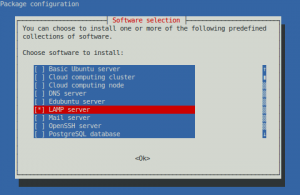
Ubuntu Tasksel
Instal Paket dengan Tasksel

Langkah selanjutnya kita akan install paket yang mendukung rangkaian LAMP. Tujuan akhir kita adalah memiliki service heartbeat yang mengatur service dari paket rangkaian LAMP dan mencegah rangkaian LAMP ini dari aturan normal yang diatur dalam init.

Kita kemudian akan menempatkan konfigurasi LAMP dan file data pada perangkat DRBD sehingga kedua server akan memiliki informasi yang sama saat salah satu dari server yang kita miliki menjadi primer dari perangkat DRBD.

Install paket LAMP pada node1 dan node2.

[node1]tasksel install lamp-server
[node2]tasksel install lamp-server

Catatan:
Selama proses instalasi kita akan mendapatkan notifikasi untuk membuat password root MySQL.
Tes apakah instalasi berhasil dengan membuka jendela browser ( Firefox / Chrome / IE ) dan arahkan ke alamat IP salah satu server.

Stop Sementara semua service LAMP.

[node1]/etc/init.d/apache2 stop
[node1]/etc/init.d/mysql stop
[node2]/etc/init.d/apache2 stop
[node2]/etc/init.d/mysql stop

Pastikan semua service LAMP sudah berhenti dengan melihat proses yang sedang berjalan dan koneksi jaringan yang sedang terhubung.

[node1]ps aux | grep mysql
[node1]ps aux | grep apache
[node1]ss -at

Hapus LAMP dari skrip init.

[node1]update-rc.d -f apache2 remove
[node1]update-rc.d -f mysql remove
[node2]update-rc.d -f apache2 remove
[node2]update-rc.d -f mysql remove

Pindahkan konfigurasi LAMP ke /srv.

[node1]mv /etc/apache2 /srv/etc
[node1]mv /etc/php5 /srv/etc
[node1]mv /etc/mysql /srv/etc
[node1]mv /var/lib/mysql /srv/var/lib
[node1]mv /var/lib/php5 /srv/var/lib
[node1]mv /var/www /srv/var
[node1]mv /var/log/apache2 /srv/var/log
[node1]mv /var/log/mysql /srv/var/log

Buat symlink ke lokasi baru

[node1]ln -s /srv/etc/apache2 /etc/apache2
[node1]ln -s /srv/etc/php5 /etc/php5
[node1]ln -s /srv/etc/mysql /etc/mysql
[node1]ln -s /srv/var/lib/mysql /var/lib/mysql
[node1]ln -s /srv/var/lib/php5 /var/lib/php5
[node1]ln -s /srv/var/www /var/www
[node1]ln -s /srv/var/log/apache2 /var/log/apache2
[node1]ln -s /srv/var/log/mysql /var/log/mysql

Buat direktori backup pada node2 dan pindahkan file konfigurasi LAMP ke direktori tersebut.

[node2]mkdir /backup
[node2]mv /etc/apache2 /backup/etc
[node2]mv /etc/php5 /backup/etc
[node2]mv /etc/mysql /backup/etc
[node2]mv /var/lib/mysql /backup/var/lib
[node2]mv /var/lib/php5 /backup/var/lib
[node2]mv /var/www /backup/var
[node2]mv /var/log/apache2 /backup/var/log
[node2]mv /var/log/mysql /backup/var/log

Buat symlink ke lokasi baru

[node2]ln -s /srv/etc/apache2 /etc/apache2
[node2]ln -s /srv/etc/php5 /etc/php5
[node2]ln -s /srv/etc/mysql /etc/mysql
[node2]ln -s /srv/var/lib/mysql /var/lib/mysql
[node2]ln -s /srv/var/lib/php5 /var/lib/php5
[node2]ln -s /srv/var/www /var/www
[node2]ln -s /srv/var/log/apache2 /var/log/apache2
[node2]ln -s /srv/var/log/mysql /var/log/mysql

Setelah ini kita akan melakukan konfigurasi Heartbeat.

Cluster Fail Over HA High Availability Linux HA Linux Server Ubuntu
AboutMochamad Welly R.
Mochamad Welly Rosadi. Penganjur penggunaan sistem Linux dan aplikasi Open Source. Kontak: moch.welly [at] gmail.com
Prev

High Availability Linux LAMP (Ubuntu Server 12.04)-Bagian 2

Next

High Availability Linux LAMP (Ubuntu Server 12.04)-Bagian 4

Related Posts

Resource
March 11, 2012

Shared Storage & Server Cluster Murah Namun Powerful

Read more
zimbra-banner1
ResourceZimbra
November 4, 2012

Implementasi Zimbra Multi Server untuk Zimbra Large Deployment-Bagian 1

Read more
ResourceZimbra
January 8, 2013

Tips Zimbra : Otomatis Bounce jika Account Tujuan Over Kuota

Read more

Leave a Reply

Your email address will not be published. Required fields are marked *

Search
Recent Post
  • Zimbra Daffodil 10.1.16 Rilis: Modern Web App Makin Cerdas, Backup Lebih Hemat Storage, dan Peningkatan Keamanan
  • Live Migration vs High Availability di XCP-ng: Perbedaan dan Skenario Penggunaan
  • Informasi untuk Pelanggan PT. Excellent Infotama Kreasindo : Penyesuaian Kebijakan Masa Berlaku Sertifikat SSL/TLS Menuju Standar Keamanan Global
  • Excellent Infotama Kreasindo: Lingkungan Kerja yang Memberi Ruang untuk Bertumbuh
  • Segudang Benefit dari Dana Buffer: Ketika Kebijakan Berangkat dari Pengalaman
Categories
Archives
Featured image: High Availability Linux LAMP (Ubuntu Server 12.04)-Bagian 3
Get in Touch

KATEGORI

  • Home
  • Artikel
  • Jadwal
  • Event
  • Berita

LAYANAN

  • Zimbra Mail Server
  • Ubuntu
  • XCP-ng
  • Vinchin
  • ASAV
  • Proxmox
  • RHEL
  • Nakivo
  • SMTP Relay
  • SSL Certificate

KONTAK KAMI

PT. Excellent Infotama Kreasindo, Premier Serenity Blok J12, Jl. KH. Agus Salim No. 40E, Bekasi Jaya, Bekasi Timur, Bekasi 17112, Jawa Barat, Indonesia

TENTANG KAMI

PT. Excellent Infotama Kreasindo merupakan entitas bisnis yang fokus pada layanan komputerisasi seperti implementasi sistem, konsultasi, training/workshop, dan maintenance sistem, terutama migrasi dari sistem Windows ke Linux. more…