
logotype
  • Home
  • News
  • Product dan Services
    • Zimbra Mail Server
      • Excellent Managed Services Email
      • Lisensi Zimbra NE
      • Support dan Maintenance
      • MX Backup & ASAV
      • SMTP Relay
    • Proxmox
      • Proxmox Virtual Environment
      • Proxmox Mail Gateway
      • Proxmox Backup Server
    • XCP-ng
    • Red Hat Enterprise Linux
    • Ubuntu Pro
    • Nakivo Backup & Recovery
    • Vinchin Backup & Recovery
    • Lisensi
      • Proxmox Mail Gateway
      • Lisensi Zimbra Network Edition
      • Lisensi Nakivo Backup & Recovery
      • Subscription Zoom
    • Buku Training Mandiri
      • Buku Training Mandiri
      • Ebook Training Mandiri
    • Cloud & Hosting
      • Excellent Managed Services Email Server
      • MX Backup/Anti Spam & Anti Virus
      • SMTP Relay & Mail Gateway
      • Excellent Mail Hosing
    • SSL Sertifikat
  • Training
  • Insight
  • About Us
  • Contacts
logotype
logotype
  • Home
  • News
  • Product dan Services
    • Zimbra Mail Server
      • Excellent Managed Services Email
      • Lisensi Zimbra NE
      • Support dan Maintenance
      • MX Backup & ASAV
      • SMTP Relay
    • Proxmox
      • Proxmox Virtual Environment
      • Proxmox Mail Gateway
      • Proxmox Backup Server
    • XCP-ng
    • Red Hat Enterprise Linux
    • Ubuntu Pro
    • Nakivo Backup & Recovery
    • Vinchin Backup & Recovery
    • Lisensi
      • Proxmox Mail Gateway
      • Lisensi Zimbra Network Edition
      • Lisensi Nakivo Backup & Recovery
      • Subscription Zoom
    • Buku Training Mandiri
      • Buku Training Mandiri
      • Ebook Training Mandiri
    • Cloud & Hosting
      • Excellent Managed Services Email Server
      • MX Backup/Anti Spam & Anti Virus
      • SMTP Relay & Mail Gateway
      • Excellent Mail Hosing
    • SSL Sertifikat
  • Training
  • Insight
  • About Us
  • Contacts
logotype
  • Home
  • News
  • Product dan Services
    • Zimbra Mail Server
      • Excellent Managed Services Email
      • Lisensi Zimbra NE
      • Support dan Maintenance
      • MX Backup & ASAV
      • SMTP Relay
    • Proxmox
      • Proxmox Virtual Environment
      • Proxmox Mail Gateway
      • Proxmox Backup Server
    • XCP-ng
    • Red Hat Enterprise Linux
    • Ubuntu Pro
    • Nakivo Backup & Recovery
    • Vinchin Backup & Recovery
    • Lisensi
      • Proxmox Mail Gateway
      • Lisensi Zimbra Network Edition
      • Lisensi Nakivo Backup & Recovery
      • Subscription Zoom
    • Buku Training Mandiri
      • Buku Training Mandiri
      • Ebook Training Mandiri
    • Cloud & Hosting
      • Excellent Managed Services Email Server
      • MX Backup/Anti Spam & Anti Virus
      • SMTP Relay & Mail Gateway
      • Excellent Mail Hosing
    • SSL Sertifikat
  • Training
  • Insight
  • About Us
  • Contacts
Blog Post
SMTP-HAPROXY
BlogBlog & Resources

Load Balancing SMTP dengan HAProxy

May 4, 2015by Muhammad Dhenandi

Apa itu Load Balancing ??

Load balancing adalah konsep untuk menyeimbangkan beban pada infrastruktur teknologi informasi pada sebuah perusahaan atau instansi. agar seluruh departemen dapat memanfaatkan secara maksimal dan optimal. Jika skala jaringan makin besar maka semakin besar pula traffic yang didapatkan dan Load Balancing berguna sebagai penyeimbang beban apabila traffic semakin tinggi.

Salah satu solusi untuk Load Balancing yaitu HAProxy. HAProxy banyak digunakan karena cukup handal. Cara kerja HAProxy yaitu mendistribusikan traffic data ke berbagai server agar tidak terpusat sehingga tidak membebani.

Apa itu HAProxy ??

HAProxy sama seperti dengan Heartbeat hanya saja pada heartbeat tidak ada fasilitas berupa fitur Statistik menggunakan webbased html.
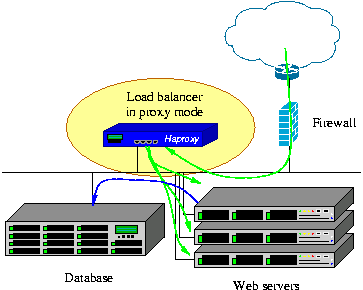
haproxy-pmodePada dasarnya HAProxy sendiri memiliki beberapa fitur yaitu :

  1. Merupakan loadbalancing yang dapat dibuat master dan slave load balancing, sehingga apabila load balacing utama gagal/fail, maka load balancing cadangan dapat otomatis bekerja.
  2. Support loadbalancing untuk beberapa server
  3. Health status, untuk cek status server, yaitu Jika server dalam datacenter mati, maka trafik ke server tersebut otomatis dihentikan
  4. Dapat untuk loadbalancing aplikasi yang tidak support loadbalancing, maksudnya adalah aplikasi yang mengatur sesi user di server bersangkutan seperti ecommerce, shopping, dll
  5. Ada statistik yang mudah dibaca

Bisakah SMTP dibuat Load Balancing ??

Tentu saja bisa, HAProxy bukan saja bisa memberikan load balancing untuk web server saja seperti apache, akan tetapi untuk aplikasi SMTP seperti Postfix pun bisa, dalam tulisan ini saya menggunakan Linux SLES 11 SP3 sebagai uji coba.

Topologi
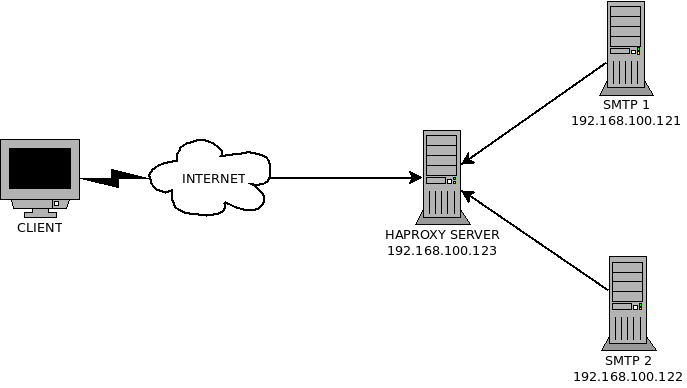
SMTP-HAPROXY

Instalasi HAProxy

Pada SLES, paket HAProxy terdapat pada repository yang ada pada http://software.opensuse.org/search. Caranya buka website tersebut lalu ketikkan paket yang akan di install (HAProxy). Pilih salah satu repositrory yang ada. kemudian tambahkan ke SLES. Masukkan perintah berikut :

zypper ar http://download.opensuse.org/repositories/home:/KGronlund/SLE_11_SP3/ haproxy
zypper ref
zypper in haproxy

Instalasi & Konfigurasi HAProxy Server

Setelah di install, HAProxy harus di konfigurasi. File konfigurasi HAProxy terdapat pada direktori “/etc/haproxy/haproxy.cfg“, Berikut konfigurasi yang ada pada file tersebut :

# this config needs haproxy-1.1.28 or haproxy-1.2.1

global
    user daemon
    group daemon
    daemon
    log 127.0.0.1 daemon
    maxconn 4096
    chroot /var/lib/haproxy

defaults
    log global
    retries 2
    timeout connect 3000
    timeout server 5000
    timeout client 5000

frontend ft_smtp
  bind 0.0.0.0:25
  mode tcp
  no option http-server-close
  timeout client 1m
  log global
  option tcplog
  default_backend bk_postfix

backend bk_postfix
  mode tcp
  no option http-server-close
  log global
  option tcplog
  timeout server 1m
  timeout connect 5s
  server postfix1 192.168.100.121:25 check
  server postfix2 192.168.100.122:25 check

Instalasi & Konfigurasi SMTP Server

Install SMTP server dalah hal ini saya menggunakan postfix sebagai SMTP Server.

zypper in postfix

Buka “/etc/postfix/main.cf“, lalu edit skrip berikut :

inet_interfaces = localhost

Ubah menjadi :

inet_interfaces = all

Fungsinya agar semua interface yang terhubung pada Server SMTP dapat mengakses server SMTP. Setelah selesai Restart Service Postfix.

service postfix restart

Uji Coba

Akses IP Haproxy dengan port 25 menggunakan telnet untuk mengecek apakah sudah terhubung atau belum :
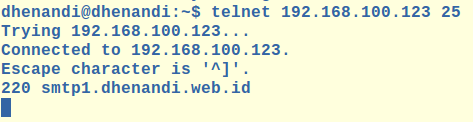
smtp1-oke smtp2-oke


Loh ko Hostnamenya beda???, Hostname nya memang sengaja dibedakan untuk membuktikan apakah Load Balancing sudah berjalan dengan semestinya. Semoga bermanfaat :-).

haproxy
Prev

Excellent Insight : Community Gathering Membahas High Availability Cluster, Load Balancer & LTSP Server

Next

Training VMware vSphere Fundamental & Medium (High Availability), 27 - 30 Juni 2015

Related Posts

vavai-hades-canyon1-1024×768.jpg
BlogVMWare
February 18, 2019

Intel NUC Hades Canyon untuk Simulasi VMware vSphere, Kerja dan Main Games

Read more
Blog
March 5, 2012

PT. Excellent Sebagai VMware Professional Solution Provider

Read more
excellent-smtp-dashboard.png
BlogBlog & ResourcesHeadline
November 3, 2018

Pembelajaran : Studi Kasus Gangguan Layanan

Read more

Comment(01)

  1. By riki
    June 8, 2018

    Bagaimana ya caranya untuk mengirm email melalui php atau bahasa pemrograman lain?

    jadi topoliginya -> client -> webserver (recive message) -> haproxy -> mail server?

Leave a Reply

Your email address will not be published. Required fields are marked *

Search
Recent Post
  • Zimbra Daffodil 10.1.16 Rilis: Modern Web App Makin Cerdas, Backup Lebih Hemat Storage, dan Peningkatan Keamanan
  • Live Migration vs High Availability di XCP-ng: Perbedaan dan Skenario Penggunaan
  • Informasi untuk Pelanggan PT. Excellent Infotama Kreasindo : Penyesuaian Kebijakan Masa Berlaku Sertifikat SSL/TLS Menuju Standar Keamanan Global
  • Excellent Infotama Kreasindo: Lingkungan Kerja yang Memberi Ruang untuk Bertumbuh
  • Segudang Benefit dari Dana Buffer: Ketika Kebijakan Berangkat dari Pengalaman
Categories
Archives
Featured image: Load Balancing SMTP dengan HAProxy
Get in Touch

KATEGORI

  • Home
  • Artikel
  • Jadwal
  • Event
  • Berita

LAYANAN

  • Zimbra Mail Server
  • Ubuntu
  • XCP-ng
  • Vinchin
  • ASAV
  • Proxmox
  • RHEL
  • Nakivo
  • SMTP Relay
  • SSL Certificate

KONTAK KAMI

PT. Excellent Infotama Kreasindo, Premier Serenity Blok J12, Jl. KH. Agus Salim No. 40E, Bekasi Jaya, Bekasi Timur, Bekasi 17112, Jawa Barat, Indonesia

TENTANG KAMI

PT. Excellent Infotama Kreasindo merupakan entitas bisnis yang fokus pada layanan komputerisasi seperti implementasi sistem, konsultasi, training/workshop, dan maintenance sistem, terutama migrasi dari sistem Windows ke Linux. more…