logotype
  • Home
  • News
  • Product dan Services
    • Zimbra Mail Server
      • Excellent Managed Services Email
      • Lisensi Zimbra NE
      • Support dan Maintenance
      • MX Backup & ASAV
      • SMTP Relay
    • Proxmox
      • Proxmox Virtual Environment
      • Proxmox Mail Gateway
      • Proxmox Backup Server
    • XCP-ng
    • Red Hat Enterprise Linux
    • Ubuntu Pro
    • Nakivo Backup & Recovery
    • Vinchin Backup & Recovery
    • Lisensi
      • Proxmox Mail Gateway
      • Lisensi Zimbra Network Edition
      • Lisensi Nakivo Backup & Recovery
      • Subscription Zoom
    • Buku Training Mandiri
      • Buku Training Mandiri
      • Ebook Training Mandiri
    • Cloud & Hosting
      • Excellent Managed Services Email Server
      • MX Backup/Anti Spam & Anti Virus
      • SMTP Relay & Mail Gateway
      • Excellent Mail Hosing
    • SSL Sertifikat
  • Training
  • Insight
  • About Us
  • Contacts
logotype
logotype
  • Home
  • News
  • Product dan Services
    • Zimbra Mail Server
      • Excellent Managed Services Email
      • Lisensi Zimbra NE
      • Support dan Maintenance
      • MX Backup & ASAV
      • SMTP Relay
    • Proxmox
      • Proxmox Virtual Environment
      • Proxmox Mail Gateway
      • Proxmox Backup Server
    • XCP-ng
    • Red Hat Enterprise Linux
    • Ubuntu Pro
    • Nakivo Backup & Recovery
    • Vinchin Backup & Recovery
    • Lisensi
      • Proxmox Mail Gateway
      • Lisensi Zimbra Network Edition
      • Lisensi Nakivo Backup & Recovery
      • Subscription Zoom
    • Buku Training Mandiri
      • Buku Training Mandiri
      • Ebook Training Mandiri
    • Cloud & Hosting
      • Excellent Managed Services Email Server
      • MX Backup/Anti Spam & Anti Virus
      • SMTP Relay & Mail Gateway
      • Excellent Mail Hosing
    • SSL Sertifikat
  • Training
  • Insight
  • About Us
  • Contacts
logotype
  • Home
  • News
  • Product dan Services
    • Zimbra Mail Server
      • Excellent Managed Services Email
      • Lisensi Zimbra NE
      • Support dan Maintenance
      • MX Backup & ASAV
      • SMTP Relay
    • Proxmox
      • Proxmox Virtual Environment
      • Proxmox Mail Gateway
      • Proxmox Backup Server
    • XCP-ng
    • Red Hat Enterprise Linux
    • Ubuntu Pro
    • Nakivo Backup & Recovery
    • Vinchin Backup & Recovery
    • Lisensi
      • Proxmox Mail Gateway
      • Lisensi Zimbra Network Edition
      • Lisensi Nakivo Backup & Recovery
      • Subscription Zoom
    • Buku Training Mandiri
      • Buku Training Mandiri
      • Ebook Training Mandiri
    • Cloud & Hosting
      • Excellent Managed Services Email Server
      • MX Backup/Anti Spam & Anti Virus
      • SMTP Relay & Mail Gateway
      • Excellent Mail Hosing
    • SSL Sertifikat
  • Training
  • Insight
  • About Us
  • Contacts
Blog Post
vavai-vsphere-client-login
VMWare

Tips VMWare VSphere/ESXi : Virtual Machine Auto Start

January 29, 2012by Masim Vavai Sugianto

Salah satu feature tersembunyi dan kerap membuat bingung rekan-rekan yang hendak melakukan implementasi VMWare VSphere Hypervisor/ESXi adalah menjalankan Virtual Machine (VM) secara otomatis pada saat host/induknya dihidupkan. Feature ini penting agar SysAdmin tidak perlu secara manual menghidupkan VM. Memangnya SysAdmin nggak punya pekerjaan lain yang lebih keren selain menghidupkan VM secara manual ? šŸ˜›

VMWare ESXi secara default menonaktifkan feature ini. Untuk mengaktifkannya, lakukan prosedur sebagai berikut :

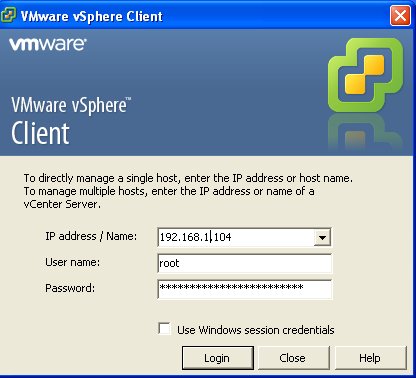
  1. Buka VMWare VSphere Client
  2. Klik pada bagian Inventory | Nama Mesin ESXi, kemudian klik tab Configuration
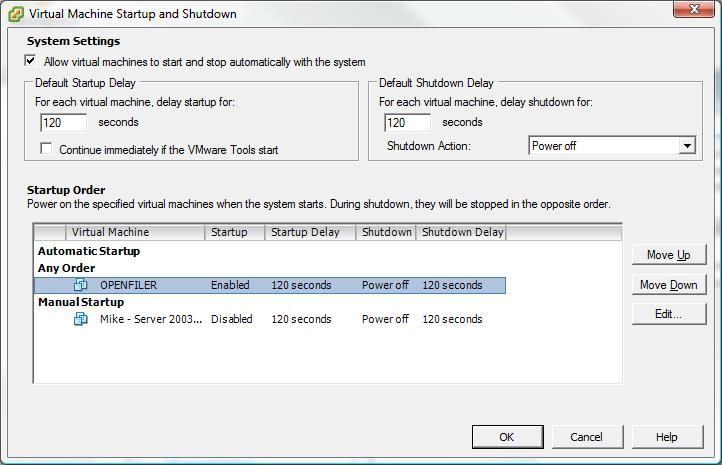
  3. Lihat pada panel disisi kiri, “Virtual Machine Startup/Shutdown” kemudian klik Properties (sudut kanan atas)
  4. Pilih VM yang ingin diset agar auto start, kemudian klik tombol “Move Up” agar masuk ke bagian “Automatic StartupĀ  (Any Order)“
  5. Klik OK

ESXi Virtualization VMWare VSphere
Prev

Solved : Zimbra Error Message: System Failure: Exception During Auth RemoteManager

Next

Link Mirror Server IIX untuk Download Binary Zimbra & Proxmox

Related Posts

Screenshot-2019-01-03-17.58.12.png
BlogBlog & ResourcesVMWare
January 4, 2019

Instalasi vCenter Server 6.7 via CLI

Read more
ResourceVMWare
September 9, 2011

Tips Memindahkan Mesin Fisik ke Mesin Virtual

Read more
VMW-StoreProduct-vSphereEssentialsKit-BoxShot-225×225
PartnerVMWare
December 5, 2012

Paket VMware vSphere Essentials Kit untuk Small Business

Read more

Comment(01)

  1. By irfan
    November 10, 2015

    Makasih Pak tutorialnya, btw saya sudah coba namun belum berhasil ya pak. ketika fisik server saya hidup kembali setelah mati listrik, VM nya tidak mau start otomatis. apa harus digeser ke paling atas ya Pak (Automatic Startup) bukan ANy Order? terima kasih

Leave a Reply

Your email address will not be published. Required fields are marked *

Search
Recent Post
  • Zimbra Daffodil 10.1.16 Rilis: Modern Web App Makin Cerdas, Backup Lebih Hemat Storage, dan Peningkatan Keamanan
  • Live Migration vs High Availability di XCP-ng: Perbedaan dan Skenario Penggunaan
  • Informasi untuk Pelanggan PT. Excellent Infotama Kreasindo : Penyesuaian Kebijakan Masa Berlaku Sertifikat SSL/TLS Menuju Standar Keamanan Global
  • Excellent Infotama Kreasindo: Lingkungan Kerja yang Memberi Ruang untuk Bertumbuh
  • Segudang Benefit dari Dana Buffer: Ketika Kebijakan Berangkat dari Pengalaman
Categories
Archives
Featured image: Tips VMWare VSphere/ESXi : Virtual Machine Auto Start
Get in Touch

KATEGORI

  • Home
  • Artikel
  • Jadwal
  • Event
  • Berita

LAYANAN

  • Zimbra Mail Server
  • Ubuntu
  • XCP-ng
  • Vinchin
  • ASAV
  • Proxmox
  • RHEL
  • Nakivo
  • SMTP Relay
  • SSL Certificate

KONTAK KAMI

PT. Excellent Infotama Kreasindo, Premier Serenity Blok J12, Jl. KH. Agus Salim No. 40E, Bekasi Jaya, Bekasi Timur, Bekasi 17112, Jawa Barat, Indonesia

TENTANG KAMI

PT. Excellent Infotama Kreasindo merupakan entitas bisnis yang fokus pada layanan komputerisasi seperti implementasi sistem, konsultasi, training/workshop, dan maintenance sistem, terutama migrasi dari sistem Windows ke Linux. more…