logotype
  • Home
  • News
  • Product dan Services
    • Zimbra Mail Server
      • Excellent Managed Services Email
      • Lisensi Zimbra NE
      • Support dan Maintenance
      • MX Backup & ASAV
      • SMTP Relay
    • Proxmox
      • Proxmox Virtual Environment
      • Proxmox Mail Gateway
      • Proxmox Backup Server
    • XCP-ng
    • Red Hat Enterprise Linux
    • Ubuntu Pro
    • Nakivo Backup & Recovery
    • Vinchin Backup & Recovery
    • Lisensi
      • Proxmox Mail Gateway
      • Lisensi Zimbra Network Edition
      • Lisensi Nakivo Backup & Recovery
      • Subscription Zoom
    • Buku Training Mandiri
      • Buku Training Mandiri
      • Ebook Training Mandiri
    • Cloud & Hosting
      • Excellent Managed Services Email Server
      • MX Backup/Anti Spam & Anti Virus
      • SMTP Relay & Mail Gateway
      • Excellent Mail Hosing
    • SSL Sertifikat
  • Training
  • Insight
  • About Us
  • Contacts
logotype
logotype
  • Home
  • News
  • Product dan Services
    • Zimbra Mail Server
      • Excellent Managed Services Email
      • Lisensi Zimbra NE
      • Support dan Maintenance
      • MX Backup & ASAV
      • SMTP Relay
    • Proxmox
      • Proxmox Virtual Environment
      • Proxmox Mail Gateway
      • Proxmox Backup Server
    • XCP-ng
    • Red Hat Enterprise Linux
    • Ubuntu Pro
    • Nakivo Backup & Recovery
    • Vinchin Backup & Recovery
    • Lisensi
      • Proxmox Mail Gateway
      • Lisensi Zimbra Network Edition
      • Lisensi Nakivo Backup & Recovery
      • Subscription Zoom
    • Buku Training Mandiri
      • Buku Training Mandiri
      • Ebook Training Mandiri
    • Cloud & Hosting
      • Excellent Managed Services Email Server
      • MX Backup/Anti Spam & Anti Virus
      • SMTP Relay & Mail Gateway
      • Excellent Mail Hosing
    • SSL Sertifikat
  • Training
  • Insight
  • About Us
  • Contacts
logotype
  • Home
  • News
  • Product dan Services
    • Zimbra Mail Server
      • Excellent Managed Services Email
      • Lisensi Zimbra NE
      • Support dan Maintenance
      • MX Backup & ASAV
      • SMTP Relay
    • Proxmox
      • Proxmox Virtual Environment
      • Proxmox Mail Gateway
      • Proxmox Backup Server
    • XCP-ng
    • Red Hat Enterprise Linux
    • Ubuntu Pro
    • Nakivo Backup & Recovery
    • Vinchin Backup & Recovery
    • Lisensi
      • Proxmox Mail Gateway
      • Lisensi Zimbra Network Edition
      • Lisensi Nakivo Backup & Recovery
      • Subscription Zoom
    • Buku Training Mandiri
      • Buku Training Mandiri
      • Ebook Training Mandiri
    • Cloud & Hosting
      • Excellent Managed Services Email Server
      • MX Backup/Anti Spam & Anti Virus
      • SMTP Relay & Mail Gateway
      • Excellent Mail Hosing
    • SSL Sertifikat
  • Training
  • Insight
  • About Us
  • Contacts
Blog Post
BlogBlog & ResourcesProduct & ServicesXCP-ng

Migrasi Virtualisasi: Panduan Import VM dari VMware ke XCP-ng

April 17, 2026by Zaidan

Perubahan skema lisensi dan peningkatan biaya operasional membuat banyak perusahaan mencari allternatif hypervisor yang lebih efisien. Salah satu opsinya adalah XCP-ng.

Tantangan yang ada dalam proses transisi ke sistem hypervisor yang baru adalah kekhawatiran akan rumitnya proses migrasi sistem. Kenyataannya, proses migrasi dari sistem hypervisor VMware tidak sesulit yang dibayangkan. Terdapat fitur yang memungkinkan Anda untuk melakukan migrasi VM dari VMware ke XCP-ng dengan cara yang relatif mudah.

Panduan Import VM

Berikut adalah panduan praktis untuk melakukan import VM dari VMware ke XCP-ng.

Tambahkan VMware ke XCP-ng

Langkah awal yang perlu dilakukan adalah menghubungkan sistem VMware dengan XCP-ng melalui Xen Orchestra. Pada panel sebelah kiri, pilih menu Import> From VMware.
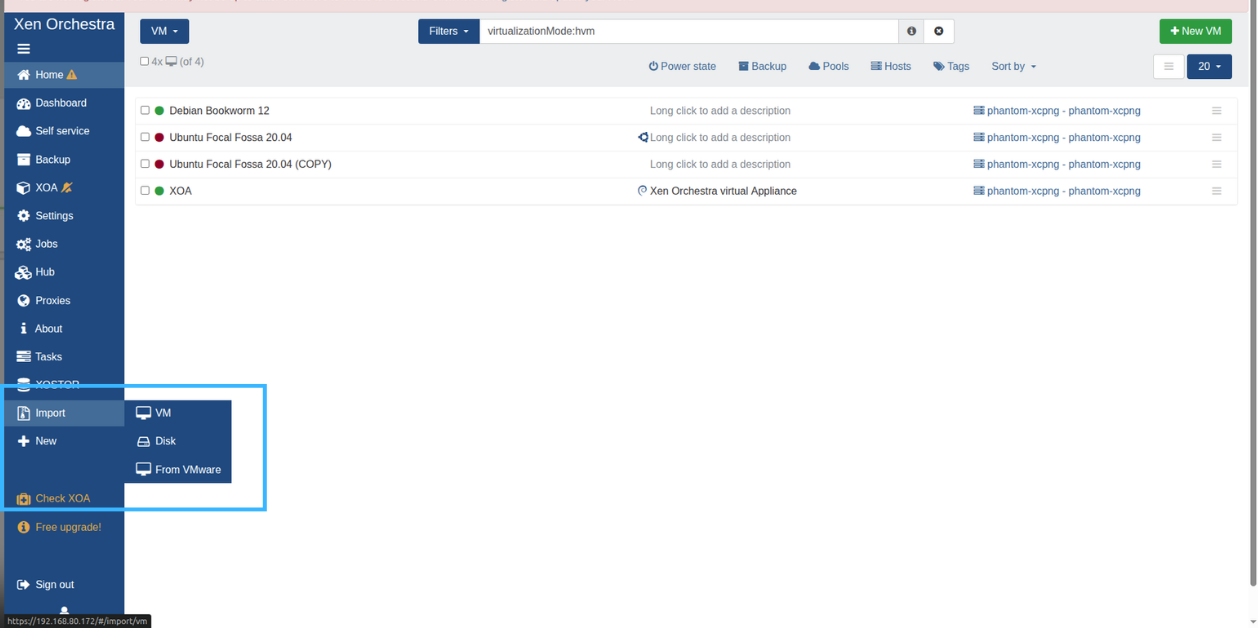
image host
Masukkan informasi server VMware yang hendak ditambahkan, seperti alamat IP, username & password. Pilih tombol Connect untuk melanjutkan.
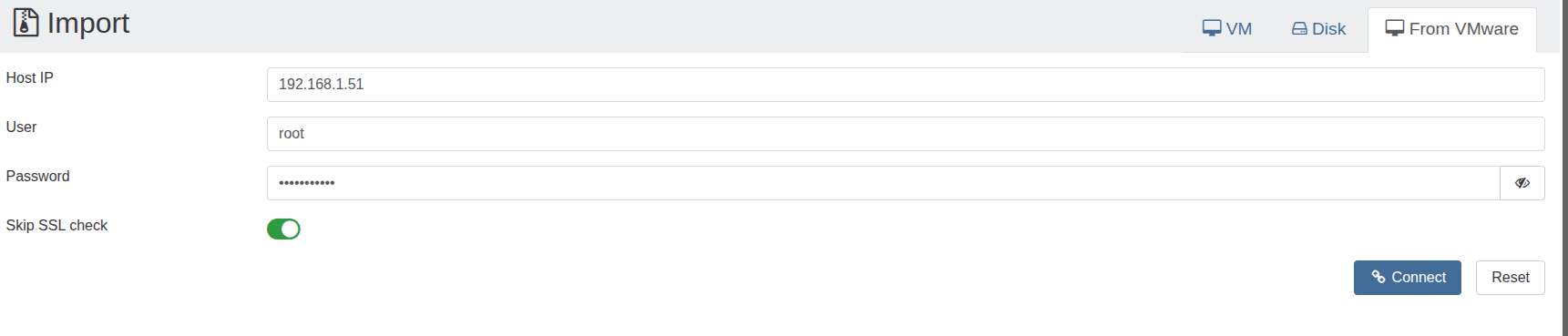
image host

Konfigurasi Parameter Migrasi VM

Setelah koneksi berhasil, XOA akan membaca daftar VM yang ada pada VMware. Pilih VM yang akan dimigrasikan dan sesuaikan parameternya seperti pool & storage tujuan.
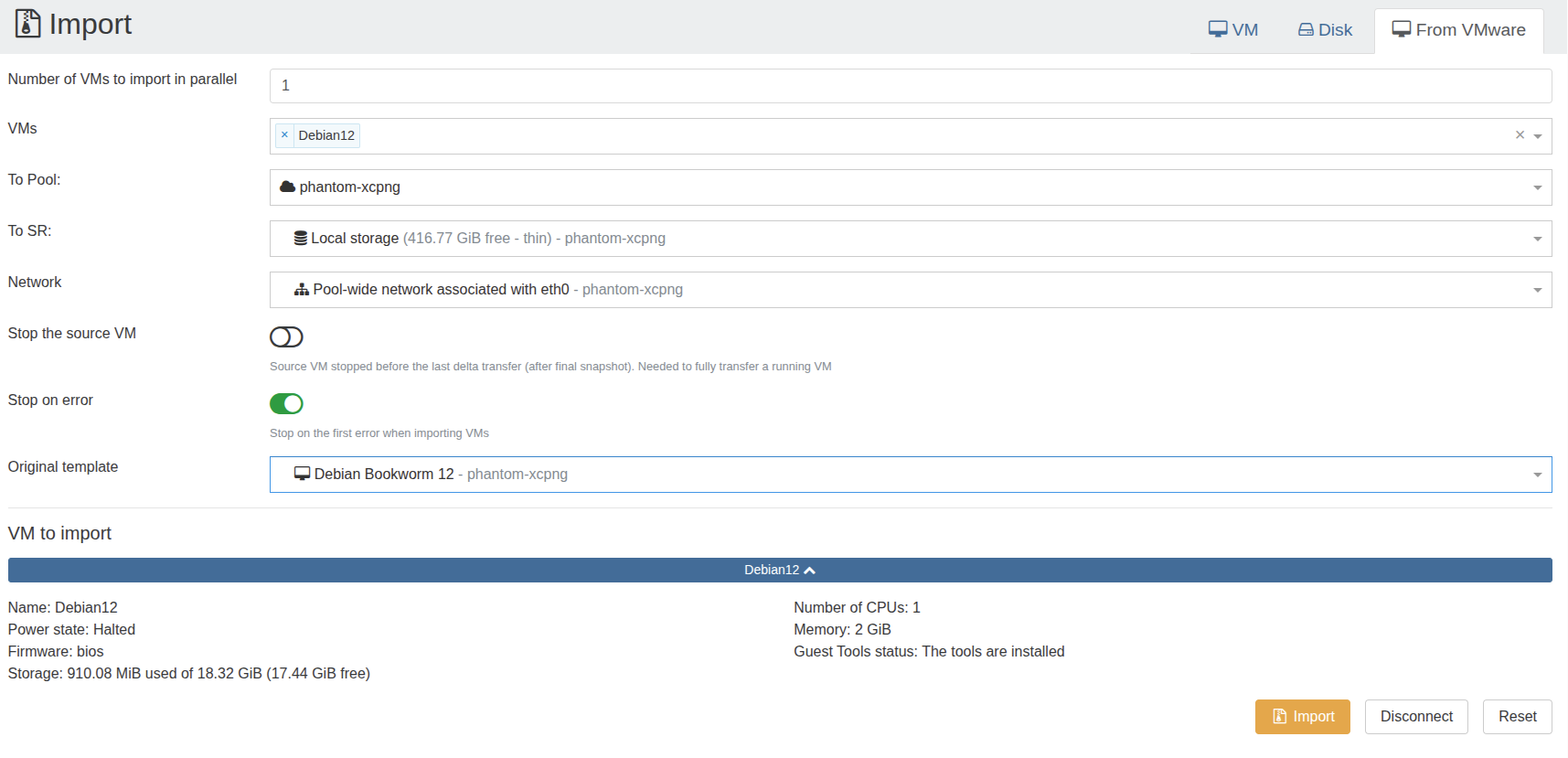
image host
Konfigurasi parameter lanjutan ini juga penting untuk memastikan VM berjalan optimal setelah berpindah host.

  • Stop the source VM: Aktifkan opsi ini jika Anda ingin sistem otomatis mematikan VM di VMware saat proses import dimulai. Ini mencegah inkonsistensi data.
  • Stop on error: Aktifkan opsi ini agar sistem langsung menghentikan proses jika mendeteksi masalah di tengah jalan.
  • Original template: (Wajib diisi) Anda harus memilih template sistem operasi yang sesuai dengan VM sumber (misalnya, Debian).

Proses Import VM

Periksa kembali ringkasan konfigurasi yang dipilih. Apabila sudah sesuai, klik tombol Import pada bagian bawah halaman untuk memulai proses migrasi VM. Proses migrasi juga dapat dipantau dari menu Tasks.

Gambar di bawah ini menampilkan VM hasil migrasi yang berhasil dijalankan di XCP-ng.
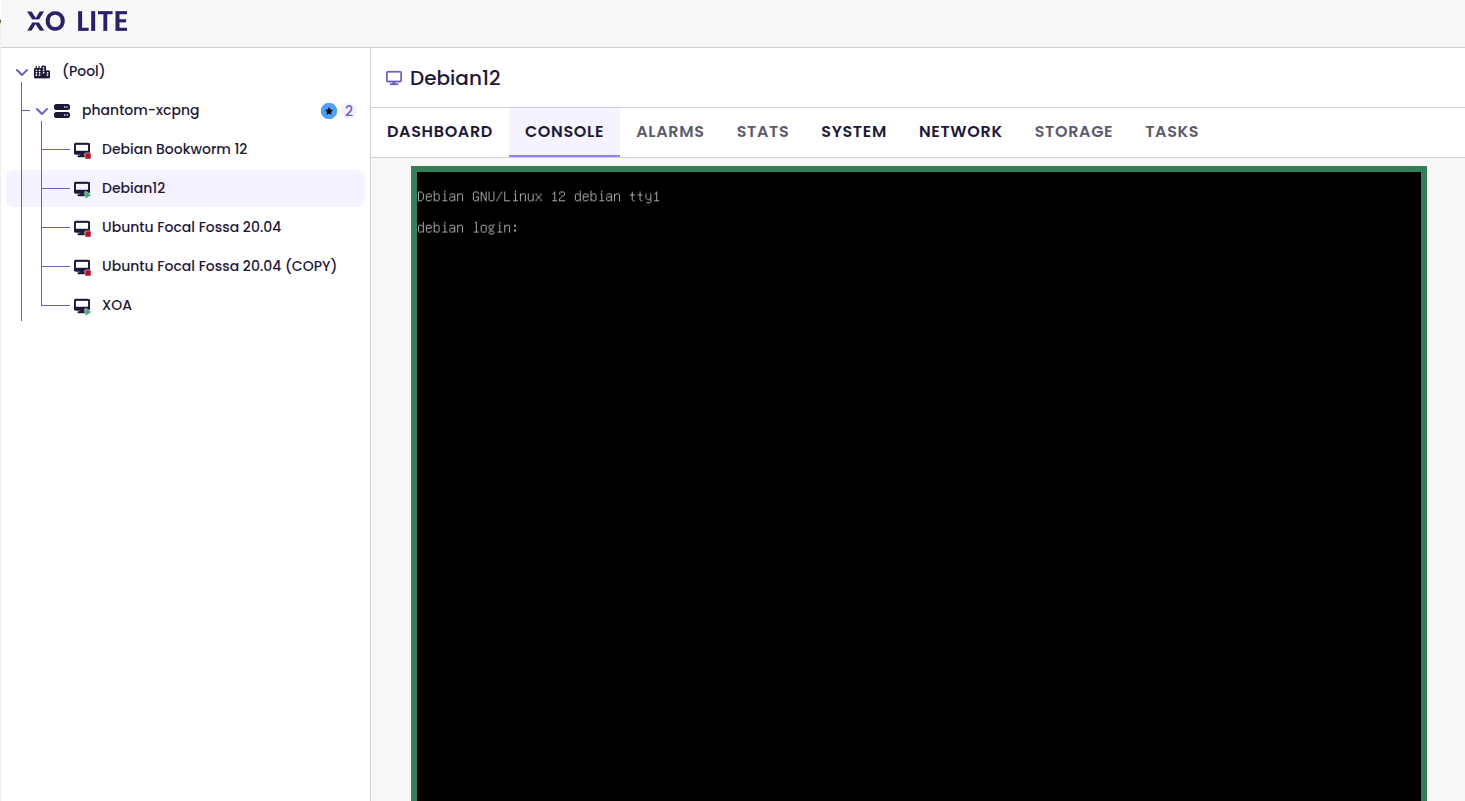
image host

Penutup

Fitur Import from VMware pada XOA memudahkan proses migrasi VM dari VMware ke XCP-ng tanpa konfigurasi rumit seperti penyesuaian format disk secara manual. Administrator IT dapat memindahkan beban kerja dari VMware ke XCP-ng dengan cepat dan aman.

Jika perusahaan Anda sedang mengevaluasi XCP-ng sebagai alternatif virtualisasi dan memiliki pertanyaan terkait XCP-ng dan lisensinya, tim Excellent siap membantu menjawab pertanyaan Anda. Hubungi kami melalui email sales@excellent.co.id .


AboutMuhammad Zaidan
IT Support for PT Excellent Infotama Kreasindo | Certified Nakivo Technical & Sales Professional | In charge of Excellent Managed Services (EMS), Proxmox and Nakivo
Prev

Saatnya Upgrade Versi Ubuntu Sekarang!

Related Posts

Resource
September 23, 2012

Instalasi & Konfigurasi Samba 4 Sebagai Active Directory Server-Bagian 1-Instalasi & Kompilasi

Read more
vavai-vmware-converter-install
ResourceVMWare
April 10, 2012

Tips Memindahkan Mesin Fisik ke Virtual Machine (P2V) Menggunakan VMWare Converter-Bagian 2

Read more
Blue Modern Tech Company Presentation
BlogCloud & HostingLinuxNewsOpen Nebula
October 19, 2025

Memahami OpenNebula: Solusi Private Cloud yang Sederhana tapi Tangguh

Read more

Leave a Reply

Your email address will not be published. Required fields are marked *

Search
Recent Post
  • Migrasi Virtualisasi: Panduan Import VM dari VMware ke XCP-ng
  • Saatnya Upgrade Versi Ubuntu Sekarang!
  • Email Perusahaan Sering Bermasalah? Saatnya Kenalan dengan Solusi Tepat: Zimbra Mail Server
  • Amankan Data dengan Vinchin Backup & Recovery
  • Ingin Website Bisnis Anda Dipercaya? Ini Kuncinya!
Categories
Archives
Featured image: Migrasi Virtualisasi: Panduan Import VM dari VMware ke XCP-ng
Get in Touch

KATEGORI

  • Home
  • Artikel
  • Jadwal
  • Event
  • Berita

LAYANAN

  • Zimbra Mail Server
  • Ubuntu
  • XCP-ng
  • Vinchin
  • ASAV
  • Proxmox
  • RHEL
  • Nakivo
  • SMTP Relay
  • SSL Certificate

KONTAK KAMI

PT. Excellent Infotama Kreasindo, Premier Serenity Blok J12, Jl. KH. Agus Salim No. 40E, Bekasi Jaya, Bekasi Timur, Bekasi 17112, Jawa Barat, Indonesia

TENTANG KAMI

PT. Excellent Infotama Kreasindo merupakan entitas bisnis yang fokus pada layanan komputerisasi seperti implementasi sistem, konsultasi, training/workshop, dan maintenance sistem, terutama migrasi dari sistem Windows ke Linux. more…