logotype
  • Home
  • News
  • Product dan Services
    • Zimbra Mail Server
      • Excellent Managed Services Email
      • Lisensi Zimbra NE
      • Support dan Maintenance
      • MX Backup & ASAV
      • SMTP Relay
    • Proxmox
      • Proxmox Virtual Environment
      • Proxmox Mail Gateway
      • Proxmox Backup Server
    • XCP-ng
    • Red Hat Enterprise Linux
    • Ubuntu Pro
    • Nakivo Backup & Recovery
    • Vinchin Backup & Recovery
    • Lisensi
      • Proxmox Mail Gateway
      • Lisensi Zimbra Network Edition
      • Lisensi Nakivo Backup & Recovery
      • Subscription Zoom
    • Buku Training Mandiri
      • Buku Training Mandiri
      • Ebook Training Mandiri
    • Cloud & Hosting
      • Excellent Managed Services Email Server
      • MX Backup/Anti Spam & Anti Virus
      • SMTP Relay & Mail Gateway
      • Excellent Mail Hosing
    • SSL Sertifikat
  • Training
  • Insight
  • About Us
  • Contacts
logotype
logotype
  • Home
  • News
  • Product dan Services
    • Zimbra Mail Server
      • Excellent Managed Services Email
      • Lisensi Zimbra NE
      • Support dan Maintenance
      • MX Backup & ASAV
      • SMTP Relay
    • Proxmox
      • Proxmox Virtual Environment
      • Proxmox Mail Gateway
      • Proxmox Backup Server
    • XCP-ng
    • Red Hat Enterprise Linux
    • Ubuntu Pro
    • Nakivo Backup & Recovery
    • Vinchin Backup & Recovery
    • Lisensi
      • Proxmox Mail Gateway
      • Lisensi Zimbra Network Edition
      • Lisensi Nakivo Backup & Recovery
      • Subscription Zoom
    • Buku Training Mandiri
      • Buku Training Mandiri
      • Ebook Training Mandiri
    • Cloud & Hosting
      • Excellent Managed Services Email Server
      • MX Backup/Anti Spam & Anti Virus
      • SMTP Relay & Mail Gateway
      • Excellent Mail Hosing
    • SSL Sertifikat
  • Training
  • Insight
  • About Us
  • Contacts
logotype
  • Home
  • News
  • Product dan Services
    • Zimbra Mail Server
      • Excellent Managed Services Email
      • Lisensi Zimbra NE
      • Support dan Maintenance
      • MX Backup & ASAV
      • SMTP Relay
    • Proxmox
      • Proxmox Virtual Environment
      • Proxmox Mail Gateway
      • Proxmox Backup Server
    • XCP-ng
    • Red Hat Enterprise Linux
    • Ubuntu Pro
    • Nakivo Backup & Recovery
    • Vinchin Backup & Recovery
    • Lisensi
      • Proxmox Mail Gateway
      • Lisensi Zimbra Network Edition
      • Lisensi Nakivo Backup & Recovery
      • Subscription Zoom
    • Buku Training Mandiri
      • Buku Training Mandiri
      • Ebook Training Mandiri
    • Cloud & Hosting
      • Excellent Managed Services Email Server
      • MX Backup/Anti Spam & Anti Virus
      • SMTP Relay & Mail Gateway
      • Excellent Mail Hosing
    • SSL Sertifikat
  • Training
  • Insight
  • About Us
  • Contacts
Blog Post
BlogBlog & ResourcesSSLWindows

Instalasi SSL di MDaemon Mail Server

August 1, 2025by Zaidan

MDaemon Email Server adalah salah satu mail server berbasis Windows yang banyak digunakan untuk kebutuhan email perusahaan. Salah satu konfigurasi penting yang perlu diterapkan adalah instalasi sertifikat SSL untuk membantu mengamankan komunikasi data antara client dan server.

Persiapan

Sebelum memulai proses instalasi SSL, pastikan Anda telah menyiapkan hal-hal berikut:

  • File sertifikat SSL dalam format .pfx. File .pfx adalah gabungan dari sertifikat SSL (.crt), private key (.key), dan juga CA bundle (.crt).
  • Akses administrator ke server yang menjalankan MDaemon.
  • MDaemon sudah terinstal dan berjalan.

Apabila Anda belum menyiapkan file .pfx, dapat melihat tulisan kami pada link ini.

Import File SSL ke Windows Certificate Store

Sebelum sertifikat SSL dapat digunakan oleh MDaemon, sertifikat tersebut perlu di-import terlebih dahulu ke Windows Certificate Store.
Tahapan Import:

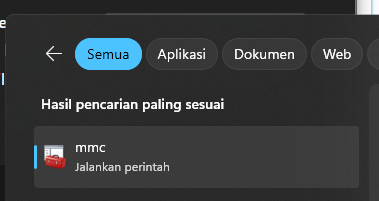
  • Buka Microsoft Management Console dari Start Menu (gambar 1) atau menggunakan perintah mmc pada menu Run (Windows+R)

image host
gambar 1 – mmc

  • Pada jendela mmc, pilih menu File> Add/Remove Snap-in (gambar 2).

    image host
    gambar 2 – File> Add/Remove Snap-in

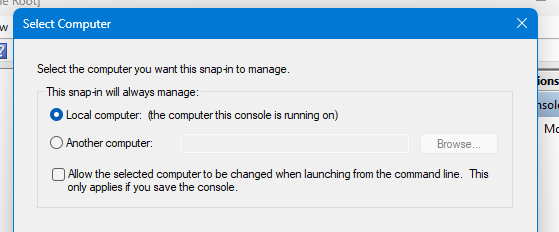
  • Pada daftar Available Snap-Ins, pilih Certificates> Add> Computer Account> Local Computer (gambar 3-4).
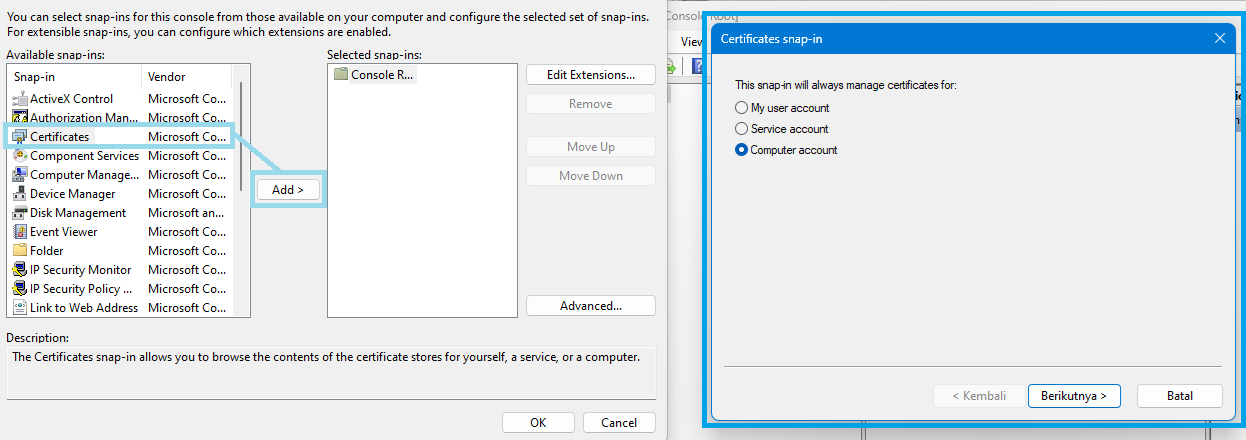
    image host
    gambar 3 – Add Snap-Ins

image host
gambar 4 – Add Snap-in Target

  • Kembali lagi ke halaman awal MMC. Pilih menu Certificates> Personal (right click)> All Tasks> Import (gambar 5).

    image host
    gambar 5 – Import Certificate

  • Pilih file .pfx dan masukkan password apabila filenya dilindungi password (gambar 6).

    image host
    gambar 6 – Import SSL

  • Pada opsi penyimpanan certificate store, pilih Automatically select the certificatee store based on the type of certificate (gambar 7).
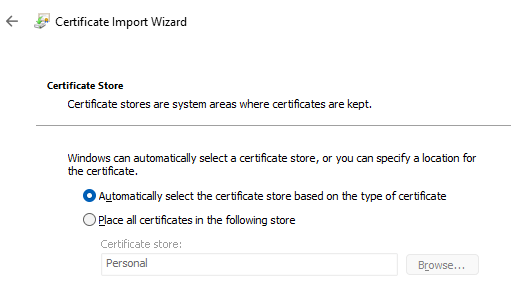
    image host
    gambar 7 – Certificate Store

Konfigurasi SSL di MDaemon Security Manager

Setelah SSL berhasil di-import ke Windows Certificate Store, langkah selanjutnya adalah konfigurasi SSL di MDaemon Mail Server. Konfigurasi tidak dilakukan melalui Web UI, melainkan menggunakan MDaemon Configuration Session (gambar 8) yang bisa diakses dari Start Menu.

image host
gambar 8 – MDaemon Configuration Session
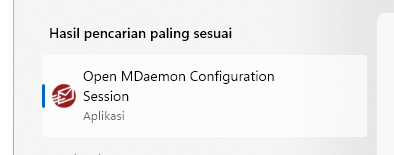
  • Buka menu Security Manager yang ditandai dengan ikon berbentuk gembok (gambar 9).

    image host
    gambar 9 – Security Manager

  • Pada halaman Security Manager, buka menu SSL&TLS > MDaemon & Webmail (gambar 10). Aktifkan opsi Enable SSL for MDaemon services dan pilih sertifikat SSL yang sesuai (atau pilih juga opsi SSL lain yang sesuai dengan kebutuhan).

    image host
    gambar 10 – Security Manager

Verifikasi

Untuk melakukan verifikasi apakah SSL sudah berjalan dengan baik atau belum, Anda dapat mengakses webmail MDaemon dari web browser. Kemudian cek address bar. Pastikan koneksi HTTPS berhasil, muncul ikon gembok dan sertifikat SSL yang digunakan sudah benar-benar sesuai.

Penutup

Apabila Anda menggunakan MDaemon sebagai mail server perusahaan Anda, konfigurasi SSL adalah hal yang sangat penting untuk mengamankan komunikasi data antara client dan server.

Dengan menerapkan SSL, koneksi email jadi lebih aman, terenkripsi, dan memenuhi standar keamanan yang disyaratkan oleh mayoritas plaftorm email modern.

Apabila perusahaan Anda memerlukan sertifikat SSL atau Anda memiliki pertanyaan lebih lanjut mengenai SSL, Anda dapat menghubungi kami melalui email sales@excellent.co.id .

AboutMuhammad Zaidan
IT Support for PT Excellent Infotama Kreasindo | Certified Nakivo Technical & Sales Professional | In charge of Excellent Managed Services (EMS), Proxmox and Nakivo
Prev

Instalasi SSL pada Microsoft IIS

Next

Instalasi SSL pada cPanel

Related Posts

New Hiro Zimbra
BlogNewsZimbra
October 15, 2025

Solusi Praktis untuk Bisnis: Zimbra Collaboration Suite

Read more
BlogBlog & ResourcesProduct & ServicesSSL
August 4, 2025

Instalasi SSL pada cPanel

Read more
Salinan dari Salinan dari Header Artikel – Zimbra (1)
BlogCloud & HostingLinuxNewsOpen Nebula
January 7, 2026

Membuat Network Bridge untuk OpenNebula

Read more

Leave a Reply

Your email address will not be published. Required fields are marked *

Search
Recent Post
  • Zimbra Daffodil 10.1.16 Rilis: Modern Web App Makin Cerdas, Backup Lebih Hemat Storage, dan Peningkatan Keamanan
  • Live Migration vs High Availability di XCP-ng: Perbedaan dan Skenario Penggunaan
  • Informasi untuk Pelanggan PT. Excellent Infotama Kreasindo : Penyesuaian Kebijakan Masa Berlaku Sertifikat SSL/TLS Menuju Standar Keamanan Global
  • Excellent Infotama Kreasindo: Lingkungan Kerja yang Memberi Ruang untuk Bertumbuh
  • Segudang Benefit dari Dana Buffer: Ketika Kebijakan Berangkat dari Pengalaman
Categories
Archives
Featured image: Instalasi SSL di MDaemon Mail Server
Get in Touch

KATEGORI

  • Home
  • Artikel
  • Jadwal
  • Event
  • Berita

LAYANAN

  • Zimbra Mail Server
  • Ubuntu
  • XCP-ng
  • Vinchin
  • ASAV
  • Proxmox
  • RHEL
  • Nakivo
  • SMTP Relay
  • SSL Certificate

KONTAK KAMI

PT. Excellent Infotama Kreasindo, Premier Serenity Blok J12, Jl. KH. Agus Salim No. 40E, Bekasi Jaya, Bekasi Timur, Bekasi 17112, Jawa Barat, Indonesia

TENTANG KAMI

PT. Excellent Infotama Kreasindo merupakan entitas bisnis yang fokus pada layanan komputerisasi seperti implementasi sistem, konsultasi, training/workshop, dan maintenance sistem, terutama migrasi dari sistem Windows ke Linux. more…