
logotype
  • Home
  • News
  • Product dan Services
    • Zimbra Mail Server
      • Excellent Managed Services Email
      • Lisensi Zimbra NE
      • Support dan Maintenance
      • MX Backup & ASAV
      • SMTP Relay
    • Proxmox
      • Proxmox Virtual Environment
      • Proxmox Mail Gateway
      • Proxmox Backup Server
    • XCP-ng
    • Red Hat Enterprise Linux
    • Ubuntu Pro
    • Nakivo Backup & Recovery
    • Vinchin Backup & Recovery
    • Lisensi
      • Proxmox Mail Gateway
      • Lisensi Zimbra Network Edition
      • Lisensi Nakivo Backup & Recovery
      • Subscription Zoom
    • Buku Training Mandiri
      • Buku Training Mandiri
      • Ebook Training Mandiri
    • Cloud & Hosting
      • Excellent Managed Services Email Server
      • MX Backup/Anti Spam & Anti Virus
      • SMTP Relay & Mail Gateway
      • Excellent Mail Hosing
    • SSL Sertifikat
  • Training
  • Insight
  • About Us
  • Contacts
logotype
logotype
  • Home
  • News
  • Product dan Services
    • Zimbra Mail Server
      • Excellent Managed Services Email
      • Lisensi Zimbra NE
      • Support dan Maintenance
      • MX Backup & ASAV
      • SMTP Relay
    • Proxmox
      • Proxmox Virtual Environment
      • Proxmox Mail Gateway
      • Proxmox Backup Server
    • XCP-ng
    • Red Hat Enterprise Linux
    • Ubuntu Pro
    • Nakivo Backup & Recovery
    • Vinchin Backup & Recovery
    • Lisensi
      • Proxmox Mail Gateway
      • Lisensi Zimbra Network Edition
      • Lisensi Nakivo Backup & Recovery
      • Subscription Zoom
    • Buku Training Mandiri
      • Buku Training Mandiri
      • Ebook Training Mandiri
    • Cloud & Hosting
      • Excellent Managed Services Email Server
      • MX Backup/Anti Spam & Anti Virus
      • SMTP Relay & Mail Gateway
      • Excellent Mail Hosing
    • SSL Sertifikat
  • Training
  • Insight
  • About Us
  • Contacts
logotype
  • Home
  • News
  • Product dan Services
    • Zimbra Mail Server
      • Excellent Managed Services Email
      • Lisensi Zimbra NE
      • Support dan Maintenance
      • MX Backup & ASAV
      • SMTP Relay
    • Proxmox
      • Proxmox Virtual Environment
      • Proxmox Mail Gateway
      • Proxmox Backup Server
    • XCP-ng
    • Red Hat Enterprise Linux
    • Ubuntu Pro
    • Nakivo Backup & Recovery
    • Vinchin Backup & Recovery
    • Lisensi
      • Proxmox Mail Gateway
      • Lisensi Zimbra Network Edition
      • Lisensi Nakivo Backup & Recovery
      • Subscription Zoom
    • Buku Training Mandiri
      • Buku Training Mandiri
      • Ebook Training Mandiri
    • Cloud & Hosting
      • Excellent Managed Services Email Server
      • MX Backup/Anti Spam & Anti Virus
      • SMTP Relay & Mail Gateway
      • Excellent Mail Hosing
    • SSL Sertifikat
  • Training
  • Insight
  • About Us
  • Contacts
Blog Post
Zextras

Migrasi Zimbra Mail Server dengan ZeXtras Migration Tools-Bagian Pertama

April 18, 2012by Masim Vavai Sugianto

Pada tulisan ini, saya akan melakukan Migration Zimbra Open Source  menggunakan ZeXtras Migration Tool versi 1.2.5.

Berikut adalah panduan untuk Migrasi Sistem Zimbra Open Source menggunakan ZeXtras Migration Tool :

  1. Download ZeXtras  dari mesin Zimbra . Untuk melakukan download file binary ZeXtras migrasi tool bisa menggunakan perintah :
    [code lang=”cpp”] wget -c http://www.zextras.com/download/ zextras_migration_tool-latest.tgz
    [/code] file tersebut kita asumsikan di letakkan di /opt/
  2. Extract file tersebut dengan perintah tar -zxvf  zextras_migration_tool-latest.tgz
  3. Masuk ke folder instalasi  dan ketikkan
    [code lang=”cpp”] ./install.sh all
    [/code]

zextras_migration_tool-1.2.5# ./install.sh al./install.sh all————————-

checking for existing installations …

found zimbra 7.1.3

checking whether you are running the latest version …

this installer is up to date: version 1.2.5
————————-

checking whether the core is already installed …

checking whether the zextras admin zimlet is already installed …

checking whether the zextras migration tool zimlet is already installed …

————————————————–

no preexistent core installation found.

no preexistent zextras suite zimlet installation found.

no preexistent zextras migration zimlet installation found.

———————————————————————————————–
please read this agreement carefully before using the software.
zextras will only license this software to you if you first
accept the terms of this agreement. by downloading or installing
the software, or using the product, you are consenting to be bound by
this agreement. if you do not agree to all of the terms of this
agreement, then do not download, install or use the product.

license terms for this zextras suite software:
http://www.zextras.com/zextras-eula.html
———————————————————————-

do you agree with the terms of the software license agreement? [n] y

===========================

beginning core installation procedure …

****************************  note  ****************************

in addition to the zextras migration tool zimlet a command line tool
is now available, “zxmig” .
run it as the zimbra user in order to see the available options.

****************************************************************

press any key to continue …

************************  warning:  ************************

zextras migration tool needs to bind on tcp port 8735 in order to operate,
for inter-instance communication.
please verify no other service listens on that port and that
it is properly filtered from public access by your firewall.

************************************************************

zextras migration tool core will now be installed. proceed? [y]
the zimbra web application must be restarted
in order to perform the installation.

do you wish to stop the zimbra web application (mailboxd)? [y]

stopping mailboxd…done.
zextras core installation successfully completed.

* be warned that zextras migration tool needs for the
* related zimlet to be installed in order to operate.

starting the zimbra web application (mailboxd) ….

 Setelah selesai kita masuk ke menu Zimbra Admin http://yourdomain:7071/

Kemudia Klik ZxMig pada ZeXtras akan terbuka tampilan seperti di bawah ini
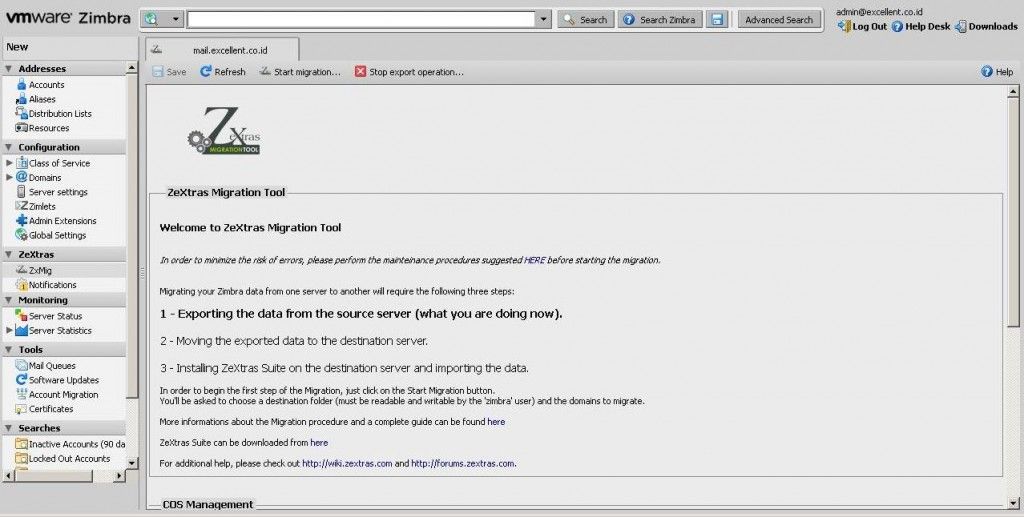
Kemudian  Klik Start Migration
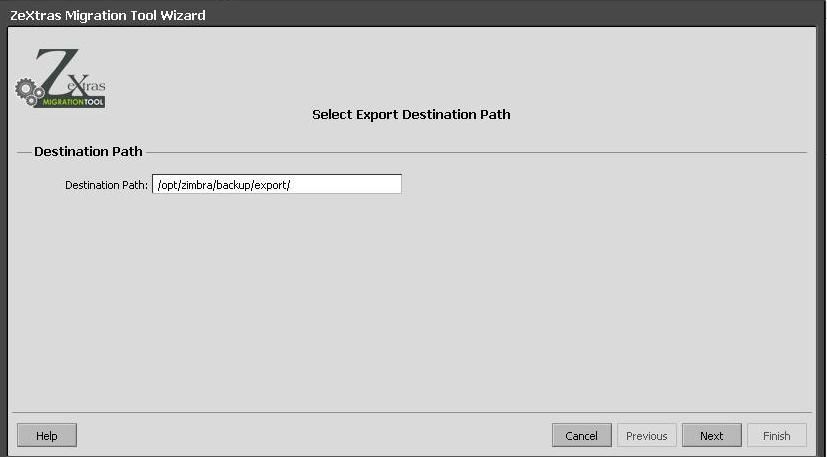
Disini kita akan menentukan Destination Path yang akan di tujukan untuk meletakkan hasil dari backup, secara default akan tertuju ke /opt/zimbra/backup/export/ akan tetapi folder tersebut belum ada dan akan kita buatkan dengan perintah mkdir /opt/zimbra/backup/export/ lalu jangan lupa di berikan group kepemilikan daripada zimbra dengan perintah chown -R zimbra:zimbra /opt/zimbra/backup/export/ Lalu kita Klik Next
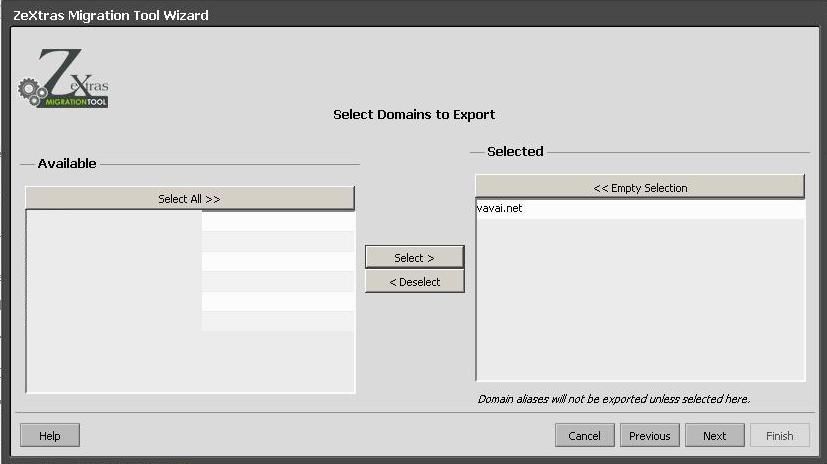
 

ZeXtras akan meminta kita untuk menentukan domain mana yang akan kita backup. Disini saya hanya akan membackup domain vavai.net
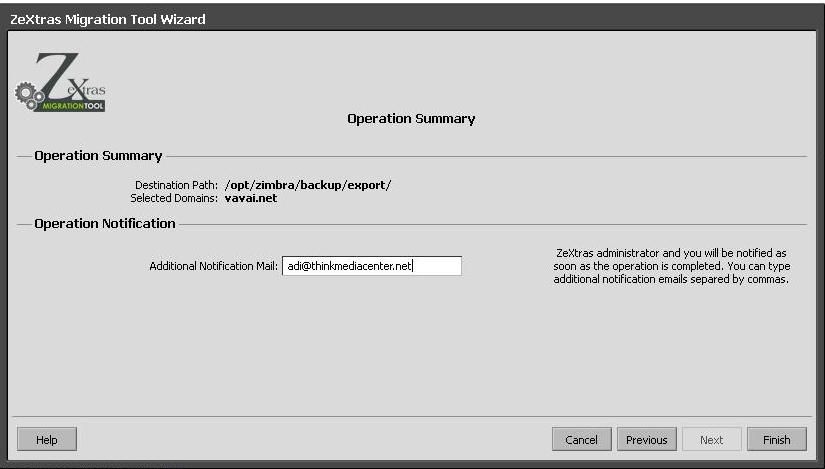
ZeXtras akan memberikan informasi backup tersebut akan di letakkan di folder apa dan domain yang akan di backup. ZeXtras pun akan meminta untuk memasukkan email sebagai notifikasi bahwa proses backup terlah berhasil di backup. Saran saya gunakan email luar seperti yahoo, Gmail etc.
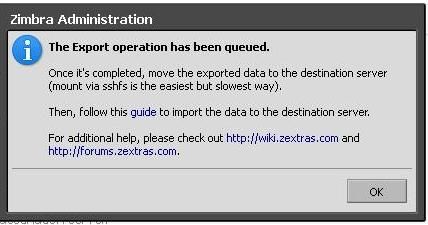


ZeXtras akan memberitahukan bahwa proses backup kita telah masuk dalam antrian dan kita menunggu hasil backup tersebut dengan mengecek email kita bahwa proses telah berhasil.

Prev

Summary Proses Instalasi & Konfigurasi Mail Server untuk Production Server (Live)-Bagian 3

Next

Tips VMWare vSphere : Memaksa Virtual Machine Masuk ke BIOS

Related Posts

Zextras
September 8, 2011

ZeXtras Suite 1.0.0 Release Candidate 3 Released!

Read more
Zextras
April 18, 2012

Migrasi Zimbra Mail Server dengan ZeXtras Migration Tools-Bagian Pertama

Read more
vavai-zextras-install1
Zextras
September 11, 2011

Menggunakan ZeXtras untuk Migrasi Zimbra Mail Server

Read more

Comments(03)

  1. By dewi
    April 20, 2012

    backupnya bisa incremental gak mas?

    thx

  2. By Masim Vavai Sugianto
    April 20, 2012

    @Dewi,

    Untuk artikel ini yang digunakan adalah full backup untuk keperluan migrasi. Zextras sendiri punya kemampuan incremental backup

  3. By dhoeng
    November 12, 2013

    Mas itu udah sama inbox nya ya? atau account mail nya aja?

Leave a Reply

Your email address will not be published. Required fields are marked *

Search
Recent Post
  • Rilis Nakivo Backup & Replication v11.2: Dukungan untuk Proxmox VE 9 dan VMware vSphere 9
  • Di Balik Sepucuk Kartu dan Meja Makan: Cerita Ulang Tahun di Excellent
  • Munggahan di Excellent: Menyambut Ramadhan dengan Makna Kebersamaan dan Kekeluargaan
  • Zimbra Daffodil 10.1.16 Rilis: Modern Web App Makin Cerdas, Backup Lebih Hemat Storage, dan Peningkatan Keamanan
  • Live Migration vs High Availability di XCP-ng: Perbedaan dan Skenario Penggunaan
Categories
Archives
Featured image: Migrasi Zimbra Mail Server dengan ZeXtras Migration Tools-Bagian Pertama
Get in Touch

KATEGORI

  • Home
  • Artikel
  • Jadwal
  • Event
  • Berita

LAYANAN

  • Zimbra Mail Server
  • Ubuntu
  • XCP-ng
  • Vinchin
  • ASAV
  • Proxmox
  • RHEL
  • Nakivo
  • SMTP Relay
  • SSL Certificate

KONTAK KAMI

PT. Excellent Infotama Kreasindo, Premier Serenity Blok J12, Jl. KH. Agus Salim No. 40E, Bekasi Jaya, Bekasi Timur, Bekasi 17112, Jawa Barat, Indonesia

TENTANG KAMI

PT. Excellent Infotama Kreasindo merupakan entitas bisnis yang fokus pada layanan komputerisasi seperti implementasi sistem, konsultasi, training/workshop, dan maintenance sistem, terutama migrasi dari sistem Windows ke Linux. more…