
logotype
  • Home
  • News
  • Product dan Services
    • Zimbra Mail Server
      • Excellent Managed Services Email
      • Lisensi Zimbra NE
      • Support dan Maintenance
      • MX Backup & ASAV
      • SMTP Relay
    • Proxmox
      • Proxmox Virtual Environment
      • Proxmox Mail Gateway
      • Proxmox Backup Server
    • XCP-ng
    • Red Hat Enterprise Linux
    • Ubuntu Pro
    • Nakivo Backup & Recovery
    • Vinchin Backup & Recovery
    • Lisensi
      • Proxmox Mail Gateway
      • Lisensi Zimbra Network Edition
      • Lisensi Nakivo Backup & Recovery
      • Subscription Zoom
    • Buku Training Mandiri
      • Buku Training Mandiri
      • Ebook Training Mandiri
    • Cloud & Hosting
      • Excellent Managed Services Email Server
      • MX Backup/Anti Spam & Anti Virus
      • SMTP Relay & Mail Gateway
      • Excellent Mail Hosing
    • SSL Sertifikat
  • Training
  • Insight
  • About Us
  • Contacts
logotype
logotype
  • Home
  • News
  • Product dan Services
    • Zimbra Mail Server
      • Excellent Managed Services Email
      • Lisensi Zimbra NE
      • Support dan Maintenance
      • MX Backup & ASAV
      • SMTP Relay
    • Proxmox
      • Proxmox Virtual Environment
      • Proxmox Mail Gateway
      • Proxmox Backup Server
    • XCP-ng
    • Red Hat Enterprise Linux
    • Ubuntu Pro
    • Nakivo Backup & Recovery
    • Vinchin Backup & Recovery
    • Lisensi
      • Proxmox Mail Gateway
      • Lisensi Zimbra Network Edition
      • Lisensi Nakivo Backup & Recovery
      • Subscription Zoom
    • Buku Training Mandiri
      • Buku Training Mandiri
      • Ebook Training Mandiri
    • Cloud & Hosting
      • Excellent Managed Services Email Server
      • MX Backup/Anti Spam & Anti Virus
      • SMTP Relay & Mail Gateway
      • Excellent Mail Hosing
    • SSL Sertifikat
  • Training
  • Insight
  • About Us
  • Contacts
logotype
  • Home
  • News
  • Product dan Services
    • Zimbra Mail Server
      • Excellent Managed Services Email
      • Lisensi Zimbra NE
      • Support dan Maintenance
      • MX Backup & ASAV
      • SMTP Relay
    • Proxmox
      • Proxmox Virtual Environment
      • Proxmox Mail Gateway
      • Proxmox Backup Server
    • XCP-ng
    • Red Hat Enterprise Linux
    • Ubuntu Pro
    • Nakivo Backup & Recovery
    • Vinchin Backup & Recovery
    • Lisensi
      • Proxmox Mail Gateway
      • Lisensi Zimbra Network Edition
      • Lisensi Nakivo Backup & Recovery
      • Subscription Zoom
    • Buku Training Mandiri
      • Buku Training Mandiri
      • Ebook Training Mandiri
    • Cloud & Hosting
      • Excellent Managed Services Email Server
      • MX Backup/Anti Spam & Anti Virus
      • SMTP Relay & Mail Gateway
      • Excellent Mail Hosing
    • SSL Sertifikat
  • Training
  • Insight
  • About Us
  • Contacts
Blog Post
ResourceVMWare

Tips Memindahkan Mesin Fisik ke Mesin Virtual

September 9, 2011by Masim Vavai Sugianto

1 pekan menjelang akhir tahun 2009 saya mendapat telepon dari salah satu klien di daerah Jakarta. Pesannya singkat, servernya mengalami problem, ada service yang tidak berjalan sebagai mana mestinya (service Samba PDC+OpenLDAP).

Setelah masalah bisa diatasi, ia menanyakan apakah mungkin jika server fisiknya dipindah menjadi server virtual sehingga ia lebih mudah mengelolanya, terutama jika ia ingin melakukan proses backup & restore sistem secara mudah.
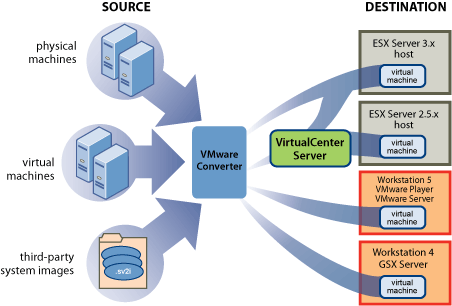
Baca-baca literatur, model pemindahan ini biasa dikena dengan istilah P2V, alias Physical To Virtual. Prosesnya bisa menggunakan VMWare Converter yang gratis untuk digunakan (versi enterprise memiliki lisensi komersil tapi versi open source juga cukup kapabel). Awalnya saya berencana menggunakan VMWare Converter ini namun karena saya tidak memiliki VMWare ESX atau VMWare server untuk menampung hasil transfer, saya akhirnya memilih cara manual menggunakan distro Linux CloneZilla dengan bantuan VMWare Workstation.

Baca artikel “Tips Memindahkan Mesin Fisik ke Mesin Virtual” Selengkapnya…

CloneZilla Converter P2V VMWare Workstation
Prev

New 2.6.32 Kernel with stable OpenVZ (pvetest)

Next

Belajar Teknologi Virtualisasi : VMWare vSphere Hypervisor™ ESXi (1)

Related Posts

ResourceVMWare
April 20, 2012

Tips VMWare vSphere : FreeNAS iSCSI Share untuk vSphere Network Storage/Datastore-Bagian Kedua

Read more
ResourceSLES, RHEL & Zextras
October 1, 2012

Tips Export-Import Data Account Zimbra Menjadi Data LDAP

Read more
VMWare
September 23, 2011

Belajar Teknologi Virtualisasi (3) : Instalasi VMWare vSphere Client

Read more

Leave a Reply

Your email address will not be published. Required fields are marked *

Search
Recent Post
  • Excellent Training Proxmox VE: High Availability & Efficient Infrastructure Solution, 20 & 21 Juni 2026
  • Server Kantor Sering Bermasalah Saat Jam Kerja? Proxmox Cluster Bisa Menjadi Solusi agar Operasional Tetap Berjalan
  • Rilis Proxmox Virtual Environment 9.2: Optimalisasi Cluster dengan Dynamic Load Balancer
  • Infrastruktur Virtualisasi Sudah Berjalan, Tapi Kenapa Server Masih Sering Lambat dan Sulit Dikembangkan?
  • Training Proxmox: High Availability & Efficient Infrastructure Solution
Categories
Archives
Featured image: Tips Memindahkan Mesin Fisik ke Mesin Virtual
Get in Touch

KATEGORI

  • Home
  • Artikel
  • Training
  • Event
  • Berita

LAYANAN

  • Zimbra Mail Server
  • Ubuntu
  • XCP-ng
  • Vinchin
  • ASAV
  • Proxmox
  • RHEL
  • Nakivo
  • SMTP Relay
  • SSL Certificate

KONTAK KAMI

PT. Excellent Infotama Kreasindo, Premier Serenity Blok J12, Jl. KH. Agus Salim No. 40E, Bekasi Jaya, Bekasi Timur, Bekasi 17112, Jawa Barat, Indonesia

TENTANG KAMI

PT. Excellent Infotama Kreasindo merupakan entitas bisnis yang fokus pada layanan komputerisasi seperti implementasi sistem, konsultasi, training/workshop, dan maintenance sistem, terutama migrasi dari sistem Windows ke Linux. more…