
Migrasi Zimbra Mail Server dengan ZeXtras Backup Tools-Bagian Kedua
Pada tulisan sebelumnya Migrasi Zimbra Mail Server dengan ZeXtras Migration Tools-Bagian Pertama kita menggunakan ZeXtras migration tools untuk membackup data-data di zimbra.
Di server lama telah terdapat file backup di /opt/zimbra/backup/export/ lalu akan kita copy kan ke server baru, bisa menggunakan perintah SCP, login ke server lama lalu kita berikan perintah :
[code lang=”cpp”]cd /srv/
mkdir backup
chown -R zimbra:zimbra /srv/backup/
scp -r /opt/zimbra/backup/ root@192.168.xxx.xxx:/srv/backup/
[/code]Lalu setelah itu kita instalasi ZeXtras Backup Tools di server baru, untuk source bisa kita download di website ZeXtras. Perintah untuk mendownload :
[code lang=”cpp”]cd /opt/
wget -c http://www.zextras.com/download/zextras_suite-latest.tgz
[/code]Setelah itu kita ekstrak file tersebut dengan perintah
[code lang=”cpp”]tar -zxvf zextras_suite-latest.tgz
[/code]kita masuk ke folder ZeXtras dan lakukan instalasi ZeXtras Backup Tools
[code lang=”cpp”]cd zextras_suite-1.2.5/
./install.sh all
[/code]
————————-
Checking for existing installations …
FOUND Zimbra 7.1.4
Checking whether you are running the latest version …
This installer is up to date: version 1.2.5
————————-
Checking whether the Core is already installed …
Checking whether the ZeXtras Suite Zimlet is already installed …
Checking whether the ZeXtras Migration Tool Zimlet is already installed …
————————-
————————-
No preexistent Core installation found.
No preexistent ZeXtras Migration Tool Zimlet installation found.
No preexistent ZeXtras Suite Zimlet installation found.
————————-
———————————————————————-
PLEASE READ THIS AGREEMENT CAREFULLY BEFORE USING THE SOFTWARE.
ZeXtras WILL ONLY LICENSE THIS SOFTWARE TO YOU IF YOU FIRST
ACCEPT THE TERMS OF THIS AGREEMENT. BY DOWNLOADING OR INSTALLING
THE SOFTWARE, OR USING THE PRODUCT, YOU ARE CONSENTING TO BE BOUND BY
THIS AGREEMENT. IF YOU DO NOT AGREE TO ALL OF THE TERMS OF THIS
AGREEMENT, THEN DO NOT DOWNLOAD, INSTALL OR USE THE PRODUCT.
License Terms for this ZeXtras Suite Software:
http://www.zextras.com/zextras-eula.html
———————————————————————-
Do you agree with the terms of the software license agreement? [N] y
===========================
Beginning Core installation procedure …
**************************** Note ****************************
In addition to the ZeXtras Suite Zimlet a command line tool
is now available, “zxsuite” .
Run it as the zimbra user in order to see the available options.
****************************************************************
Press any key to continue …
************************ WARNING: ************************
ZeXtras Suite needs to bind on TCP port 8735 in order to operate,
for inter-instance communication.
Please verify no other service listens on that port and that
it is properly filtered from public access by your firewall.
************************************************************
ZeXtras Suite Core will now be installed. Proceed? [Y]
The Zimbra Web Application must be restarted
in order to perform the installation.
Do you wish to stop the Zimbra Web Application (mailboxd)? [Y]
Stopping mailboxd…done.
ZeXtras Core installation successfully completed.
* Be warned that ZeXtras Suite needs for the
* related zimlet to be installed in order to operate.
Starting The Zimbra Web Application (mailboxd) ….
Starting mailboxd…done.
mailboxd is running.
===========================
===========================
Beginning ZeXtras Suite Zimlet installation procedure …
The ZeXtras Suite Zimlet will now be installed. Proceed? [Y]
Checking whether the Core is already installed …
ZeXtras Suite Core detected.
Deploying zimlet …
ZeXtras Suite Core detected.
Deploying zimlet …
[] INFO: Deploying on mail.vavai.net[] INFO: Deploy initiated. Check the server’s mailbox.log for the status.
The ZeXtras Suite Zimlet has been successfully installed.
===========================
Lalu kita masuk ke menu admin Zimbra di https://zimbraipaddress:7071/
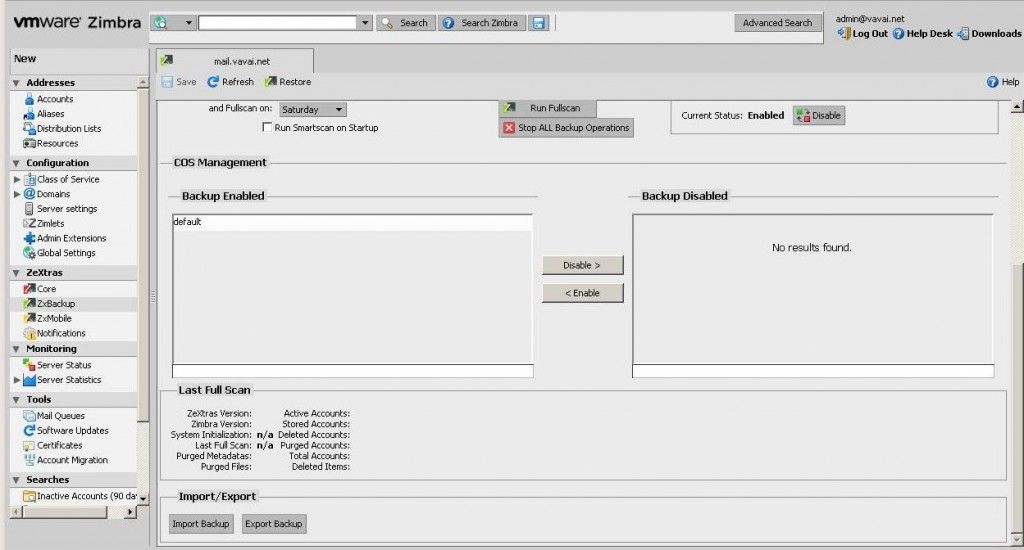
Sebelum melakukan Import Backup, kita buatkan dulu folder zextras di /opt/zimbra/backup/ karena pada waktu merestore secara default menulis di /opt/zimbra/backup/zextras
[code lang=”cpp”]mkdir /opt/zimbra/backup/zextras
chown -R zimbra:zimbra /opt/zimbra/backup/zextras
[/code]Setelah itu Klik Import Backup untuk melakukan restore data
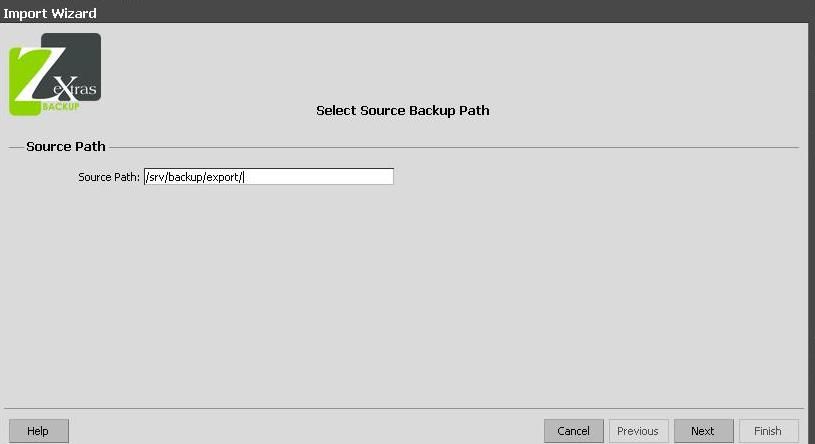
Lalu masukkan path backup yang terdapat di folder server baru. Secara default otomatis ke folder / , karna saya telah membackup di /srv/backup/export/ maka saya ketikkan pathnya /srv/backup/export/
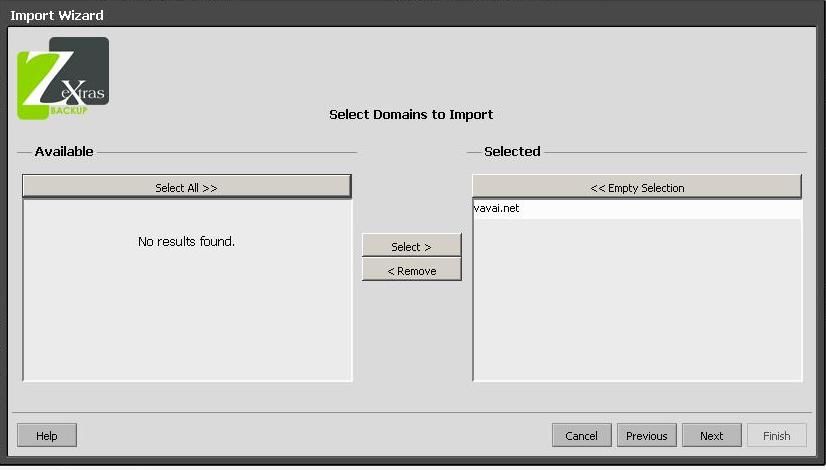
Select Domain yang akan di restore, disini saya memilih domain vavai.net
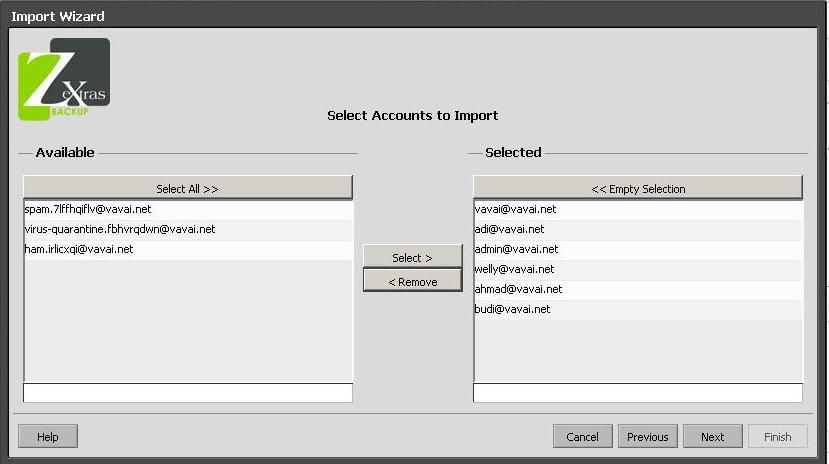
Setelah itu ZeXtras akan bertanya user mana saja yang akan kita backup, disini saya memilih semua user kecuali default dari Zimbra seperti spam, virus.quarantine dan ham.
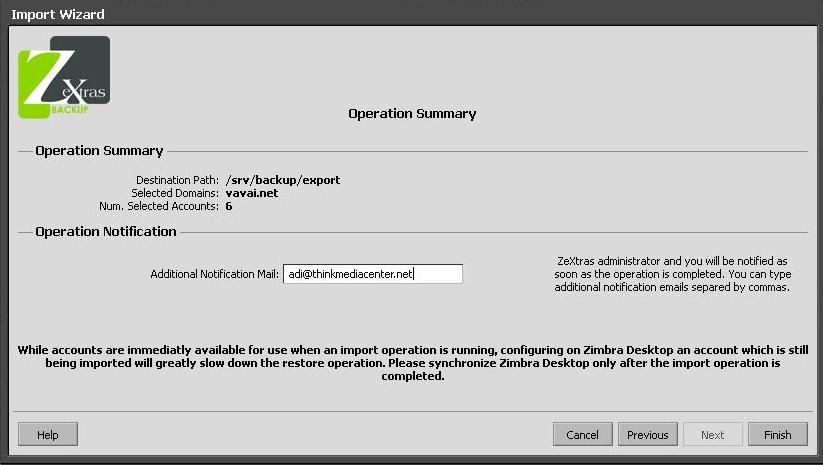
Kemudian ZeXtras akan memberikan informasi tentang restore path, domain selected dan berapa jumlah account yang akan kita restore. ZeXtras juga meminta memasukkan email untuk notifikasi apabila proses restore telah selesai, seperti saran saya di bagian pertama, gunakan email seperti Yahoo, Gmail etc.
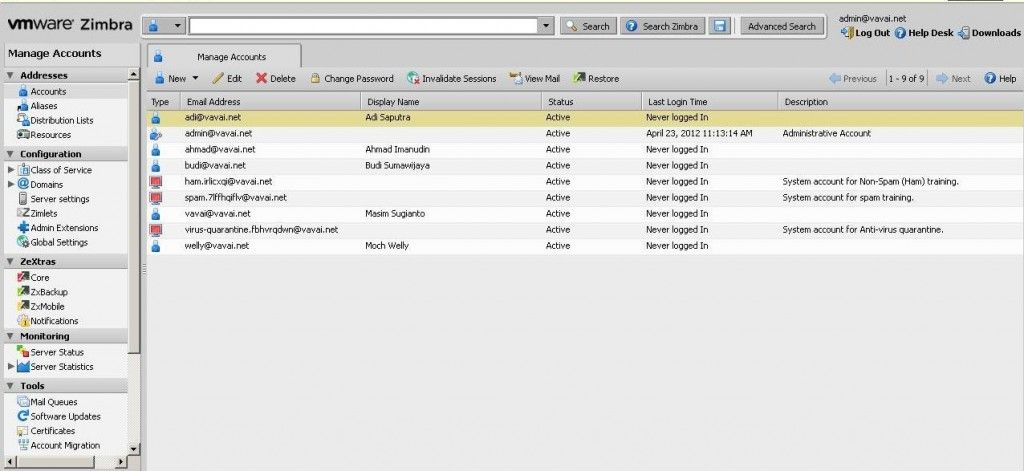
Jika sudah membuka tampilan Administrator Zimbra di server baru, maka akan terdapat account-account yang telah berhasil di restore dari server lama. Dalam proses Migration menggunakan ZeXtras selain backup Inbox dan Account, ZeXtras juga berhasil membackup password user tersebut hingga tidak perlu mereset atau memberikan password standard kepada user, sehingga bisa menggunakan password yang lama.

Zextras ada license nya kan mas ?berbayar atau ngga ?
@Taufan,
Zextras untuk migrasi free mas. Yang berbayar untuk backup, mobile dll. Kebetulan kami partnernya.
untuk mailboxnya apakah ikut termigrasi juga mas ? atau hanya domain dan user saja yang termigrasi ?
kalau mailbox tidak terestore adakah cara untuk restore mailbox dari server lama ke server baru ?
kemudian cara tersebut bisa kan dilakukan migrasi dari zimbra 7 ke zimbra 8 ?
terimakasih mas.
Dear mas Vavai,
Kalau setiap akses admin kok selalu ada peringatan : zextras suite license warning? Bagaimancara mengatasinya? Apakah harus bayar lisensi?
Atas perhatian dan kerjasamanya, saya ucapkan terima kasih.
Salam,
Dikman