
logotype
  • Home
  • News
  • Product dan Services
    • Zimbra Mail Server
      • Excellent Managed Services Email
      • Lisensi Zimbra NE
      • Support dan Maintenance
      • MX Backup & ASAV
      • SMTP Relay
    • Proxmox
      • Proxmox Virtual Environment
      • Proxmox Mail Gateway
      • Proxmox Backup Server
    • XCP-ng
    • Red Hat Enterprise Linux
    • Ubuntu Pro
    • Nakivo Backup & Recovery
    • Vinchin Backup & Recovery
    • Lisensi
      • Proxmox Mail Gateway
      • Lisensi Zimbra Network Edition
      • Lisensi Nakivo Backup & Recovery
      • Subscription Zoom
    • Buku Training Mandiri
      • Buku Training Mandiri
      • Ebook Training Mandiri
    • Cloud & Hosting
      • Excellent Managed Services Email Server
      • MX Backup/Anti Spam & Anti Virus
      • SMTP Relay & Mail Gateway
      • Excellent Mail Hosing
    • SSL Sertifikat
  • Training
  • Insight
  • About Us
  • Contacts
logotype
logotype
  • Home
  • News
  • Product dan Services
    • Zimbra Mail Server
      • Excellent Managed Services Email
      • Lisensi Zimbra NE
      • Support dan Maintenance
      • MX Backup & ASAV
      • SMTP Relay
    • Proxmox
      • Proxmox Virtual Environment
      • Proxmox Mail Gateway
      • Proxmox Backup Server
    • XCP-ng
    • Red Hat Enterprise Linux
    • Ubuntu Pro
    • Nakivo Backup & Recovery
    • Vinchin Backup & Recovery
    • Lisensi
      • Proxmox Mail Gateway
      • Lisensi Zimbra Network Edition
      • Lisensi Nakivo Backup & Recovery
      • Subscription Zoom
    • Buku Training Mandiri
      • Buku Training Mandiri
      • Ebook Training Mandiri
    • Cloud & Hosting
      • Excellent Managed Services Email Server
      • MX Backup/Anti Spam & Anti Virus
      • SMTP Relay & Mail Gateway
      • Excellent Mail Hosing
    • SSL Sertifikat
  • Training
  • Insight
  • About Us
  • Contacts
logotype
  • Home
  • News
  • Product dan Services
    • Zimbra Mail Server
      • Excellent Managed Services Email
      • Lisensi Zimbra NE
      • Support dan Maintenance
      • MX Backup & ASAV
      • SMTP Relay
    • Proxmox
      • Proxmox Virtual Environment
      • Proxmox Mail Gateway
      • Proxmox Backup Server
    • XCP-ng
    • Red Hat Enterprise Linux
    • Ubuntu Pro
    • Nakivo Backup & Recovery
    • Vinchin Backup & Recovery
    • Lisensi
      • Proxmox Mail Gateway
      • Lisensi Zimbra Network Edition
      • Lisensi Nakivo Backup & Recovery
      • Subscription Zoom
    • Buku Training Mandiri
      • Buku Training Mandiri
      • Ebook Training Mandiri
    • Cloud & Hosting
      • Excellent Managed Services Email Server
      • MX Backup/Anti Spam & Anti Virus
      • SMTP Relay & Mail Gateway
      • Excellent Mail Hosing
    • SSL Sertifikat
  • Training
  • Insight
  • About Us
  • Contacts
Blog Post
HeadlineResource

Update Bash untuk Antisipasi Shellshock Bug pada SUSE Linux Enterprise Server (SLES)

September 30, 2014by Masim Vavai Sugianto

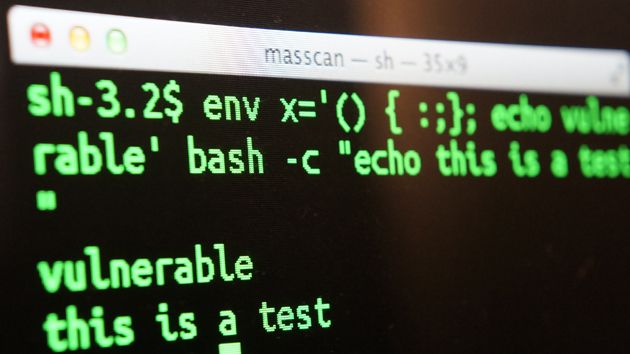
Salah satu bug software yang cukup populer setelah kasus SSL Heartbleed bug adalah Bash Shellshock bug. Celah keamanan ini terjadi pada aplikasi Bash yang banyak terdapat pada sistem operasi Linux. Untuk mengecek apakah server yang dikelola vulnerable terhadap celah keamanan ini atau tidak, coba jalankan perintah berikut pada bash konsole/terminal :
shellshock

[code lang=bash] env x='() { :;}; echo vulnerable’ bash -c “echo this is a test”
[/code] Jika hasilnya “vulnerable”, berarti confirmed Bash software-nya perlu diupdate. Untuk melakukan update Bash pada sistem operasi SUSE Linux Enterprise Server (SLES), check versi yang digunakan dengan perintah berikut :
[code lang=bash] cat /etc/SuSE-release
[/code] Contoh :
bash-sles-1
Pada contoh diatas, server menggunakan sistem SLES 11 SP2. Untuk melakukan update, jalankan perintah berikut :
[code lang=”bash”] zypper mr -da
zypper ar http://download.opensuse.org/repositories/shells/SLE_11_SP2/ bash
zypper ref
[/code] Catatan : Jika menggunakan SLES/openSUSE versi lain, silakan sesuaikan path-nya dengan merujuk ke link berikut : http://download.opensuse.org/repositories/shells/

Perintah diatas akan menonaktifkan semua repository yang ada (untuk menghindari kemungkinan update/upgrade software yang tidak diinginkan selain update bash), menambahkan repo bash sekaligus melakukan refresh repository.

bash-sles2

Setelah selesai refresh, jalankan perintah berikut untuk mengecek update package untuk bash :

[code lang=bash] zypper up bash
[/code]

Akan muncul pesan berupa perintah untuk update bash. Silakan jalankan perintahnya seperti contoh berikut ini :

bash-sles3
Selesai update, check ulang status bash shellshock bug-nya :

bash-sles4

Prosedur diatas bisa dimanfaatkan untuk melakukan update SLES versi lain maupun untuk openSUSE dengan menyesuaikan alamat repository sesuai versi sistem yang digunakan

BASH Bug Shellshock SLES
Prev

Training Web Hosting (cPanel, WHM & DNS Hosting), 15-16 Oktober 2014

Next

Training All About Proxy Server & Bandwidth Management, 29 Oktober 2014

Related Posts

ResourceVMWare
April 20, 2012

Tips VMWare vSphere : FreeNAS iSCSI Share untuk vSphere Network Storage/Datastore-Bagian Pertama

Read more
ResourceVMWare
March 16, 2012

Tips VMWare vSphere Virtualization : Fungsi vCenter Server

Read more
EventHeadlineTraining
April 27, 2013

Training Zimbra Mail Server : Fundamental & Medium, 11-12 Mei 2013

Read more

Comment(01)

  1. By Irfan P
    September 30, 2014

    Maaf, apakah untuk pengguna desktop linux perlu melakukan update bash ini?

    terima kasih…

Leave a Reply

Your email address will not be published. Required fields are marked *

Search
Recent Post
  • Zimbra Daffodil 10.1.16 Rilis: Modern Web App Makin Cerdas, Backup Lebih Hemat Storage, dan Peningkatan Keamanan
  • Live Migration vs High Availability di XCP-ng: Perbedaan dan Skenario Penggunaan
  • Informasi untuk Pelanggan PT. Excellent Infotama Kreasindo : Penyesuaian Kebijakan Masa Berlaku Sertifikat SSL/TLS Menuju Standar Keamanan Global
  • Excellent Infotama Kreasindo: Lingkungan Kerja yang Memberi Ruang untuk Bertumbuh
  • Segudang Benefit dari Dana Buffer: Ketika Kebijakan Berangkat dari Pengalaman
Categories
Archives
Featured image: Update Bash untuk Antisipasi Shellshock Bug pada SUSE Linux Enterprise Server (SLES)
Get in Touch

KATEGORI

  • Home
  • Artikel
  • Jadwal
  • Event
  • Berita

LAYANAN

  • Zimbra Mail Server
  • Ubuntu
  • XCP-ng
  • Vinchin
  • ASAV
  • Proxmox
  • RHEL
  • Nakivo
  • SMTP Relay
  • SSL Certificate

KONTAK KAMI

PT. Excellent Infotama Kreasindo, Premier Serenity Blok J12, Jl. KH. Agus Salim No. 40E, Bekasi Jaya, Bekasi Timur, Bekasi 17112, Jawa Barat, Indonesia

TENTANG KAMI

PT. Excellent Infotama Kreasindo merupakan entitas bisnis yang fokus pada layanan komputerisasi seperti implementasi sistem, konsultasi, training/workshop, dan maintenance sistem, terutama migrasi dari sistem Windows ke Linux. more…