
logotype
  • Home
  • News
  • Product dan Services
    • Zimbra Mail Server
      • Excellent Managed Services Email
      • Lisensi Zimbra NE
      • Support dan Maintenance
      • MX Backup & ASAV
      • SMTP Relay
    • Proxmox
      • Proxmox Virtual Environment
      • Proxmox Mail Gateway
      • Proxmox Backup Server
    • XCP-ng
    • Red Hat Enterprise Linux
    • Ubuntu Pro
    • Nakivo Backup & Recovery
    • Vinchin Backup & Recovery
    • Lisensi
      • Proxmox Mail Gateway
      • Lisensi Zimbra Network Edition
      • Lisensi Nakivo Backup & Recovery
      • Subscription Zoom
    • Buku Training Mandiri
      • Buku Training Mandiri
      • Ebook Training Mandiri
    • Cloud & Hosting
      • Excellent Managed Services Email Server
      • MX Backup/Anti Spam & Anti Virus
      • SMTP Relay & Mail Gateway
      • Excellent Mail Hosing
    • SSL Sertifikat
  • Training
  • Insight
  • About Us
  • Contacts
logotype
logotype
  • Home
  • News
  • Product dan Services
    • Zimbra Mail Server
      • Excellent Managed Services Email
      • Lisensi Zimbra NE
      • Support dan Maintenance
      • MX Backup & ASAV
      • SMTP Relay
    • Proxmox
      • Proxmox Virtual Environment
      • Proxmox Mail Gateway
      • Proxmox Backup Server
    • XCP-ng
    • Red Hat Enterprise Linux
    • Ubuntu Pro
    • Nakivo Backup & Recovery
    • Vinchin Backup & Recovery
    • Lisensi
      • Proxmox Mail Gateway
      • Lisensi Zimbra Network Edition
      • Lisensi Nakivo Backup & Recovery
      • Subscription Zoom
    • Buku Training Mandiri
      • Buku Training Mandiri
      • Ebook Training Mandiri
    • Cloud & Hosting
      • Excellent Managed Services Email Server
      • MX Backup/Anti Spam & Anti Virus
      • SMTP Relay & Mail Gateway
      • Excellent Mail Hosing
    • SSL Sertifikat
  • Training
  • Insight
  • About Us
  • Contacts
logotype
  • Home
  • News
  • Product dan Services
    • Zimbra Mail Server
      • Excellent Managed Services Email
      • Lisensi Zimbra NE
      • Support dan Maintenance
      • MX Backup & ASAV
      • SMTP Relay
    • Proxmox
      • Proxmox Virtual Environment
      • Proxmox Mail Gateway
      • Proxmox Backup Server
    • XCP-ng
    • Red Hat Enterprise Linux
    • Ubuntu Pro
    • Nakivo Backup & Recovery
    • Vinchin Backup & Recovery
    • Lisensi
      • Proxmox Mail Gateway
      • Lisensi Zimbra Network Edition
      • Lisensi Nakivo Backup & Recovery
      • Subscription Zoom
    • Buku Training Mandiri
      • Buku Training Mandiri
      • Ebook Training Mandiri
    • Cloud & Hosting
      • Excellent Managed Services Email Server
      • MX Backup/Anti Spam & Anti Virus
      • SMTP Relay & Mail Gateway
      • Excellent Mail Hosing
    • SSL Sertifikat
  • Training
  • Insight
  • About Us
  • Contacts
Blog Post
Proxmox & UntangleResource

Install Java Plugins pada Mozilla Firefox-LinuxMint 64 Bit

September 10, 2012by Masim Vavai Sugianto

Saya biasanya memerlukan Java Plugins untuk melakukan remote sistem atau saat hendak melakukan instalasi Virtual Machine berbasis Proxmox VE. Saat ini saya menggunakan LinuxMint 11 “Katya” dan berikut adalah proses untuk mengaktifkan Java Plugins pada Firefox :

  1. Download Java untuk Linux 64 bit versi .tar.gz dari sini : http://www.java.com/en/download/linux_manual.jsp?locale=en
  2. Tutup Firefox dan jalankan perintah berikut secara berurutan pada folder tempat file Java didownload. Jalankan menggunakan hak akses user normal, bukan user root. Jangan lupa sesuaikan nama Java binary installer sesuai dengan versi Java yang didownload.
    [code lang=”bash”] sudo mkdir -p -v /opt/java/64
    tar -zxvf jre-7u7-linux-x64.tar.gz
    mv jre1.7.0_07/ /opt/java/64/
    sudo update-alternatives –install “/usr/bin/java” “java” “/opt/java/64/jre1.7.0_07/bin/java” 1
    sudo update-alternatives –set java /opt/java/64/jre1.7.0_07/bin/java
    sudo apt-get remove icedtea-6-plugin && sudo apt-get remove icedtea-7-plugin
    mkdir -v ~/.mozilla/plugins
    rm -v ~/.mozilla/plugins/libnpjp2.so
    ln -s /opt/java/64/jre1.7.0_07/lib/amd64/libnpjp2.so ~/.mozilla/plugins/
    [/code]

Setelah selesai, jalankan ulang Firefox-nya, kemudian test ke link berikut untuk memastikan bahwa Java sudah terinstall dengan baik : http://www.java.com/en/download/testjava.jsp
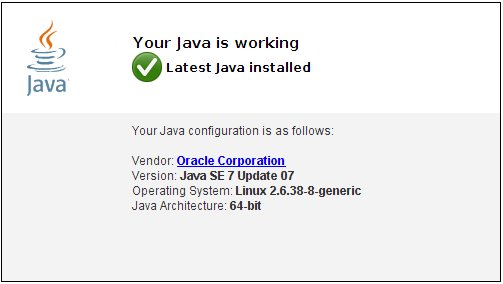
Firefox Java Plugin Proxmox & Untangle
Prev

Tips Mail Server : Zimbra & Mailman Mailing List Multi Domain

Next

Training Linux Fundamental & Advanced Server (Migrasi Windows Linux) 29-30 September 2012

Related Posts

ResourceVMWare
April 20, 2012

Tips VMWare vSphere : FreeNAS iSCSI Share untuk vSphere Network Storage/Datastore-Bagian Kedua

Read more
ResourceZimbra
March 21, 2013

Tips Zimbra : Integrasi Mailman Mailing List pada Zimbra Multi Server

Read more
Proxmox & Untangle
September 10, 2011

Roadmap untuk Proxmox Versi 2.0

Read more

Leave a Reply

Your email address will not be published. Required fields are marked *

Search
Recent Post
  • Zimbra Daffodil 10.1.16 Rilis: Modern Web App Makin Cerdas, Backup Lebih Hemat Storage, dan Peningkatan Keamanan
  • Live Migration vs High Availability di XCP-ng: Perbedaan dan Skenario Penggunaan
  • Informasi untuk Pelanggan PT. Excellent Infotama Kreasindo : Penyesuaian Kebijakan Masa Berlaku Sertifikat SSL/TLS Menuju Standar Keamanan Global
  • Excellent Infotama Kreasindo: Lingkungan Kerja yang Memberi Ruang untuk Bertumbuh
  • Segudang Benefit dari Dana Buffer: Ketika Kebijakan Berangkat dari Pengalaman
Categories
Archives
Featured image: Install Java Plugins pada Mozilla Firefox-LinuxMint 64 Bit
Get in Touch

KATEGORI

  • Home
  • Artikel
  • Jadwal
  • Event
  • Berita

LAYANAN

  • Zimbra Mail Server
  • Ubuntu
  • XCP-ng
  • Vinchin
  • ASAV
  • Proxmox
  • RHEL
  • Nakivo
  • SMTP Relay
  • SSL Certificate

KONTAK KAMI

PT. Excellent Infotama Kreasindo, Premier Serenity Blok J12, Jl. KH. Agus Salim No. 40E, Bekasi Jaya, Bekasi Timur, Bekasi 17112, Jawa Barat, Indonesia

TENTANG KAMI

PT. Excellent Infotama Kreasindo merupakan entitas bisnis yang fokus pada layanan komputerisasi seperti implementasi sistem, konsultasi, training/workshop, dan maintenance sistem, terutama migrasi dari sistem Windows ke Linux. more…