logotype
  • Home
  • News
  • Product dan Services
    • Zimbra Mail Server
      • Excellent Managed Services Email
      • Lisensi Zimbra NE
      • Support dan Maintenance
      • MX Backup & ASAV
      • SMTP Relay
    • Proxmox
      • Proxmox Virtual Environment
      • Proxmox Mail Gateway
      • Proxmox Backup Server
    • XCP-ng
    • Red Hat Enterprise Linux
    • Ubuntu Pro
    • Nakivo Backup & Recovery
    • Vinchin Backup & Recovery
    • Lisensi
      • Proxmox Mail Gateway
      • Lisensi Zimbra Network Edition
      • Lisensi Nakivo Backup & Recovery
      • Subscription Zoom
    • Buku Training Mandiri
      • Buku Training Mandiri
      • Ebook Training Mandiri
    • Cloud & Hosting
      • Excellent Managed Services Email Server
      • MX Backup/Anti Spam & Anti Virus
      • SMTP Relay & Mail Gateway
      • Excellent Mail Hosing
    • SSL Sertifikat
  • Training
  • Insight
  • About Us
  • Contacts
logotype
logotype
  • Home
  • News
  • Product dan Services
    • Zimbra Mail Server
      • Excellent Managed Services Email
      • Lisensi Zimbra NE
      • Support dan Maintenance
      • MX Backup & ASAV
      • SMTP Relay
    • Proxmox
      • Proxmox Virtual Environment
      • Proxmox Mail Gateway
      • Proxmox Backup Server
    • XCP-ng
    • Red Hat Enterprise Linux
    • Ubuntu Pro
    • Nakivo Backup & Recovery
    • Vinchin Backup & Recovery
    • Lisensi
      • Proxmox Mail Gateway
      • Lisensi Zimbra Network Edition
      • Lisensi Nakivo Backup & Recovery
      • Subscription Zoom
    • Buku Training Mandiri
      • Buku Training Mandiri
      • Ebook Training Mandiri
    • Cloud & Hosting
      • Excellent Managed Services Email Server
      • MX Backup/Anti Spam & Anti Virus
      • SMTP Relay & Mail Gateway
      • Excellent Mail Hosing
    • SSL Sertifikat
  • Training
  • Insight
  • About Us
  • Contacts
logotype
  • Home
  • News
  • Product dan Services
    • Zimbra Mail Server
      • Excellent Managed Services Email
      • Lisensi Zimbra NE
      • Support dan Maintenance
      • MX Backup & ASAV
      • SMTP Relay
    • Proxmox
      • Proxmox Virtual Environment
      • Proxmox Mail Gateway
      • Proxmox Backup Server
    • XCP-ng
    • Red Hat Enterprise Linux
    • Ubuntu Pro
    • Nakivo Backup & Recovery
    • Vinchin Backup & Recovery
    • Lisensi
      • Proxmox Mail Gateway
      • Lisensi Zimbra Network Edition
      • Lisensi Nakivo Backup & Recovery
      • Subscription Zoom
    • Buku Training Mandiri
      • Buku Training Mandiri
      • Ebook Training Mandiri
    • Cloud & Hosting
      • Excellent Managed Services Email Server
      • MX Backup/Anti Spam & Anti Virus
      • SMTP Relay & Mail Gateway
      • Excellent Mail Hosing
    • SSL Sertifikat
  • Training
  • Insight
  • About Us
  • Contacts
Blog Post
Poster Nakivo(3)
BlogBlog & ResourcesLinuxProduct & ServicesProxmox & Untangle

Import VM ke Proxmox VE Menggunakan File .vmdk

April 24, 2025by Zaidan

Selain menggunakan native tool untuk melakukan migrasi VM ke Proxmox VE, ada cara lain yang dapat digunakan yaitu menggunakan file .vmdk dari VM yang akan dimigrasikan.

Untuk melakukan migrasi dengan cara ini, pada Proxmox VE kita perlu menyiapkan VM “kosong” baru. Maksudnya VM kosong adalah VM yang dibuat tidak perlu diisi dengan OS/file .iso dan juga virtual disk yang digunakan hanya sebagai “pancingan” saja. Pada pengujian kali ini, VM kosong yang disiapkan hanya menggunakan virtual disk sebesar 1 GB. Nantinya, disk pancingan ini akan diganti dengan file VM yang akan diimpor.
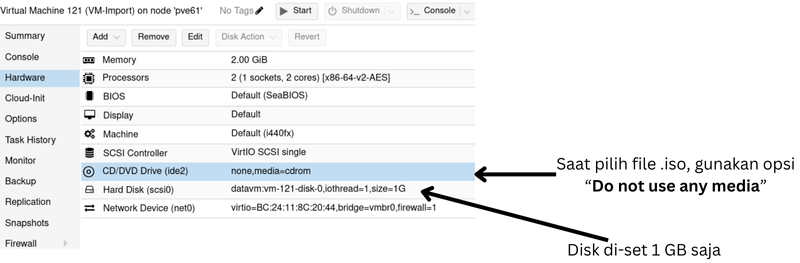
image host

Selanjutnya, siapkan file .vmdk dari VM yang hendak diimpor ke Proxmox VE. Untuk salin file ke server Proxmox VE bisa juga menggunakan metode/perintah scp.

Apabila file .vmdk sudah berada di server Proxmox VE, langkah selanjutnya adalah impor/assign file .vmdk tersebut ke VM kosong yang sudah dibuat selanjutnya. Perintahnya adalah qm importdisk [ID VM] [file.vmdk][nama-storage] . Proses ini akan “mengekstrak” file .vmdk dan di-assign ke VM kosong yang dipilih.

image host

Setelah proses import disk selesai, VM tidak bisa langsung dijalankan. Hasil import disk tadi statusnya masih sebagai “Unused Disk” di Proxmox VE. Atur hasil import disk agar dapat digunakan dengan cara klik dua kali pada Unused disk.

image host

Data VM berhasil ditambahkan, namun untuk disk pancingan masih belum dihapus. Disk pancingan pada pengujian kali ini ditandai dengan ukuran disk sebesar 1G. Untuk menghapus, pilih disk tersebut> Detach > pilih lagi> Remove. CD/DVD juga dapat dihapus apabila tidak dibutuhkan (caranya relatif sama).

image host

Masih ada konfigurasi lain yang perlu dilakukan, yaitu mengatur boot order. Buka menu Options> Boot Order lalu aktifkan disk dan atur menjadi prioritas/urutan pertama.

image host

Apabila konfigurasi tersebut sudah dilakukan, maka VM siap untuk digunakan. Pada pengujian kali ini menggunakan Ubuntu sebagai sistem operasinya dan VM berhasil dijalankan.

image host

Anda memiliki pertanyaan lebih lanjut mengenai Proxmox VE? Hubungi kami di sales@excellent.co.id .

AboutMuhammad Zaidan
IT Support for PT Excellent Infotama Kreasindo | Certified Nakivo Technical & Sales Professional | In charge of Excellent Managed Services (EMS), Proxmox and Nakivo
Prev

Immutable Backup dengan Nakivo Backup & Replication: Perlindungan dari Ransomware dan Data Corruption

Next

Broadcom Naikkan Minimum Lisensi VMware: Dari 16 Jadi 72 Core, Efektif April 2025

Related Posts

stock-screen.png
Blog
October 19, 2018

Portfolio Investasi Merah dan Kewajiban yang harus Dipenuhi

Read more
logo 1
BlogZimbra
February 13, 2025

Penggunaan Backup Dan Restore Pada Zimbra Network Edition

Read more
Blog
September 25, 2012

Workshop “Membangun Linux Active Directory, Domain Controller & File Server Berbasis Samba 4”, Sabtu, 6 Oktober 2012

Read more

Leave a Reply

Your email address will not be published. Required fields are marked *

Search
Recent Post
  • Zimbra Daffodil 10.1.16 Rilis: Modern Web App Makin Cerdas, Backup Lebih Hemat Storage, dan Peningkatan Keamanan
  • Live Migration vs High Availability di XCP-ng: Perbedaan dan Skenario Penggunaan
  • Informasi untuk Pelanggan PT. Excellent Infotama Kreasindo : Penyesuaian Kebijakan Masa Berlaku Sertifikat SSL/TLS Menuju Standar Keamanan Global
  • Excellent Infotama Kreasindo: Lingkungan Kerja yang Memberi Ruang untuk Bertumbuh
  • Segudang Benefit dari Dana Buffer: Ketika Kebijakan Berangkat dari Pengalaman
Categories
Archives
Featured image: Import VM ke Proxmox VE Menggunakan File .vmdk
Get in Touch

KATEGORI

  • Home
  • Artikel
  • Jadwal
  • Event
  • Berita

LAYANAN

  • Zimbra Mail Server
  • Ubuntu
  • XCP-ng
  • Vinchin
  • ASAV
  • Proxmox
  • RHEL
  • Nakivo
  • SMTP Relay
  • SSL Certificate

KONTAK KAMI

PT. Excellent Infotama Kreasindo, Premier Serenity Blok J12, Jl. KH. Agus Salim No. 40E, Bekasi Jaya, Bekasi Timur, Bekasi 17112, Jawa Barat, Indonesia

TENTANG KAMI

PT. Excellent Infotama Kreasindo merupakan entitas bisnis yang fokus pada layanan komputerisasi seperti implementasi sistem, konsultasi, training/workshop, dan maintenance sistem, terutama migrasi dari sistem Windows ke Linux. more…