
logotype
  • Home
  • News
  • Product dan Services
    • Zimbra Mail Server
      • Excellent Managed Services Email
      • Lisensi Zimbra NE
      • Support dan Maintenance
      • MX Backup & ASAV
      • SMTP Relay
    • Proxmox
      • Proxmox Virtual Environment
      • Proxmox Mail Gateway
      • Proxmox Backup Server
    • XCP-ng
    • Red Hat Enterprise Linux
    • Ubuntu Pro
    • Nakivo Backup & Recovery
    • Vinchin Backup & Recovery
    • Lisensi
      • Proxmox Mail Gateway
      • Lisensi Zimbra Network Edition
      • Lisensi Nakivo Backup & Recovery
      • Subscription Zoom
    • Buku Training Mandiri
      • Buku Training Mandiri
      • Ebook Training Mandiri
    • Cloud & Hosting
      • Excellent Managed Services Email Server
      • MX Backup/Anti Spam & Anti Virus
      • SMTP Relay & Mail Gateway
      • Excellent Mail Hosing
    • SSL Sertifikat
  • Training
  • Insight
  • About Us
  • Contacts
logotype
logotype
  • Home
  • News
  • Product dan Services
    • Zimbra Mail Server
      • Excellent Managed Services Email
      • Lisensi Zimbra NE
      • Support dan Maintenance
      • MX Backup & ASAV
      • SMTP Relay
    • Proxmox
      • Proxmox Virtual Environment
      • Proxmox Mail Gateway
      • Proxmox Backup Server
    • XCP-ng
    • Red Hat Enterprise Linux
    • Ubuntu Pro
    • Nakivo Backup & Recovery
    • Vinchin Backup & Recovery
    • Lisensi
      • Proxmox Mail Gateway
      • Lisensi Zimbra Network Edition
      • Lisensi Nakivo Backup & Recovery
      • Subscription Zoom
    • Buku Training Mandiri
      • Buku Training Mandiri
      • Ebook Training Mandiri
    • Cloud & Hosting
      • Excellent Managed Services Email Server
      • MX Backup/Anti Spam & Anti Virus
      • SMTP Relay & Mail Gateway
      • Excellent Mail Hosing
    • SSL Sertifikat
  • Training
  • Insight
  • About Us
  • Contacts
logotype
  • Home
  • News
  • Product dan Services
    • Zimbra Mail Server
      • Excellent Managed Services Email
      • Lisensi Zimbra NE
      • Support dan Maintenance
      • MX Backup & ASAV
      • SMTP Relay
    • Proxmox
      • Proxmox Virtual Environment
      • Proxmox Mail Gateway
      • Proxmox Backup Server
    • XCP-ng
    • Red Hat Enterprise Linux
    • Ubuntu Pro
    • Nakivo Backup & Recovery
    • Vinchin Backup & Recovery
    • Lisensi
      • Proxmox Mail Gateway
      • Lisensi Zimbra Network Edition
      • Lisensi Nakivo Backup & Recovery
      • Subscription Zoom
    • Buku Training Mandiri
      • Buku Training Mandiri
      • Ebook Training Mandiri
    • Cloud & Hosting
      • Excellent Managed Services Email Server
      • MX Backup/Anti Spam & Anti Virus
      • SMTP Relay & Mail Gateway
      • Excellent Mail Hosing
    • SSL Sertifikat
  • Training
  • Insight
  • About Us
  • Contacts
Blog Post
ResourceVMWare

Tips VMWare vSphere Virtualization : Fungsi vCenter Server

March 16, 2012by Masim Vavai Sugianto

Bagi SysAdmin yang mempelajari teknologi VMWare Virtualization berbasis vSphere, vCenter Server merupakan salah satu item yang penting untuk dipelajari. Meskipun penting, kadang timbul pertanyaan, mengapa harus menggunakan vCenter Server padahal akses ke vSphere dan manajemen Virtual Machine bisa menggunakan vSphere Client? Apalagi vCenter Server itu berbayar sedangkan vSphere Client gratis.
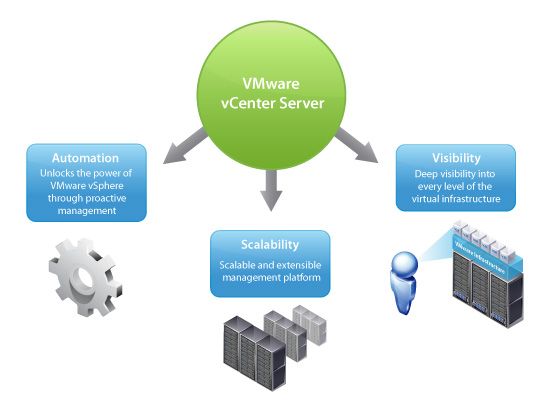
Jawabannya sederhana, yaitu :

  1. vCenter Server dibutuhkan jika host VMWare ESXi/vSphere Hypervisor cukup banyak, misalnya > 3
  2. vCenter Server mutlak diperlukan jika ingin mengaplikasikan feature-feature advanced dari vSphere, misalnya untuk cluster, vMotion, DRS, Fault Tolerance (FT), Storage vMotion da feature advanced lainnya

Untuk alasan pertama, alasannya memang kemudahan dan efektifitas. Repot juga jika mengelola 10 mesin ESXi dan untuk manajemennya harus berulangkali login menggunakan vSphere Client. Jika jumlah vSphere host hanya 1-3 unit sebenarnya vCenter belum terlalu diperlukan. Jika membeli lisensi Essential Kit sekitar US$ 600 (Lisensi vSphere+Support) malah sudah menyertakan vCenter untuk maksimum 3 host.

Untuk alasan kedua, keberadaan vCenter mutlak diperlukan jika kita ingin mengimplementasikan feature cluster seperti vMotion, HA, FT dan DRS. vSphere Client yang mengakses host secara individual tidak memiliki menu konfigurasi untuk hal-hal advanced tersebut.
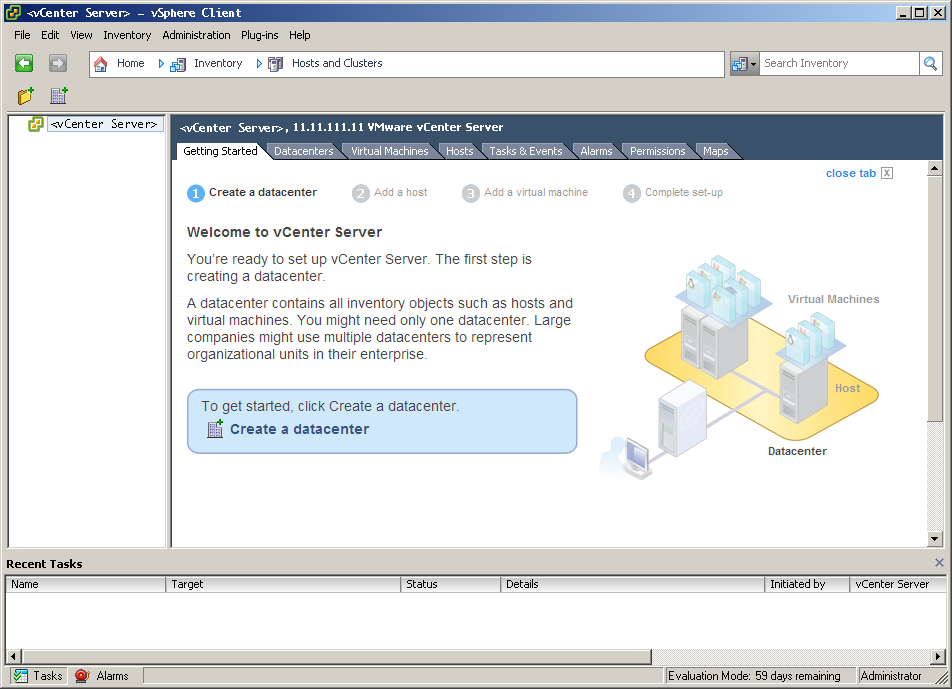
Sejak vSphere 5, vCenter Server sudah menyediakan akses web management dan tersedia juga dalam bentuk Linux Appliance berbasis SUSE Linux. Keberadaan Linux Appliance ini merupakan angin segar bagi pengguna vSphere yang tidak ingin membeli lisensi Windows 2003 64 bit atau Windows 2008 64 bit. Pada versi sebelumnya, vCenter hanya tersedia dalam bentuk aplikasi Windows.

vCenter Virtualization VMWare VSphere
Prev

Tips Belajar VMWare Virtualization Technology : vSphere 5

Next

Mengapa VMWare vSphere Menarik untuk Dipelajari & Diimplementasikan?

Related Posts

ResourceZimbra
September 1, 2013

Improvement Anti Spam Zimbra : Restricted Sender/Sender Must Login pada Zimbra 8

Read more
ResourceZimbra
February 9, 2012

Kumpulan Artikel & Tutorial Mengenai Zimbra Mail Server

Read more
ResourceZimbra
March 11, 2013

Tips Zimbra : MTA Relay Menggunakan User Authentication pada Zimbra 8

Read more

Leave a Reply

Your email address will not be published. Required fields are marked *

Search
Recent Post
  • Zimbra Daffodil 10.1.16 Rilis: Modern Web App Makin Cerdas, Backup Lebih Hemat Storage, dan Peningkatan Keamanan
  • Live Migration vs High Availability di XCP-ng: Perbedaan dan Skenario Penggunaan
  • Informasi untuk Pelanggan PT. Excellent Infotama Kreasindo : Penyesuaian Kebijakan Masa Berlaku Sertifikat SSL/TLS Menuju Standar Keamanan Global
  • Excellent Infotama Kreasindo: Lingkungan Kerja yang Memberi Ruang untuk Bertumbuh
  • Segudang Benefit dari Dana Buffer: Ketika Kebijakan Berangkat dari Pengalaman
Categories
Archives
Featured image: Tips VMWare vSphere Virtualization : Fungsi vCenter Server
Get in Touch

KATEGORI

  • Home
  • Artikel
  • Jadwal
  • Event
  • Berita

LAYANAN

  • Zimbra Mail Server
  • Ubuntu
  • XCP-ng
  • Vinchin
  • ASAV
  • Proxmox
  • RHEL
  • Nakivo
  • SMTP Relay
  • SSL Certificate

KONTAK KAMI

PT. Excellent Infotama Kreasindo, Premier Serenity Blok J12, Jl. KH. Agus Salim No. 40E, Bekasi Jaya, Bekasi Timur, Bekasi 17112, Jawa Barat, Indonesia

TENTANG KAMI

PT. Excellent Infotama Kreasindo merupakan entitas bisnis yang fokus pada layanan komputerisasi seperti implementasi sistem, konsultasi, training/workshop, dan maintenance sistem, terutama migrasi dari sistem Windows ke Linux. more…