
logotype
  • Home
  • News
  • Product dan Services
    • Zimbra Mail Server
      • Excellent Managed Services Email
      • Lisensi Zimbra NE
      • Support dan Maintenance
      • MX Backup & ASAV
      • SMTP Relay
    • Proxmox
      • Proxmox Virtual Environment
      • Proxmox Mail Gateway
      • Proxmox Backup Server
    • XCP-ng
    • Red Hat Enterprise Linux
    • Ubuntu Pro
    • Nakivo Backup & Recovery
    • Vinchin Backup & Recovery
    • Lisensi
      • Proxmox Mail Gateway
      • Lisensi Zimbra Network Edition
      • Lisensi Nakivo Backup & Recovery
      • Subscription Zoom
    • Buku Training Mandiri
      • Buku Training Mandiri
      • Ebook Training Mandiri
    • Cloud & Hosting
      • Excellent Managed Services Email Server
      • MX Backup/Anti Spam & Anti Virus
      • SMTP Relay & Mail Gateway
      • Excellent Mail Hosing
    • SSL Sertifikat
  • Training
  • Insight
  • About Us
  • Contacts
logotype
logotype
  • Home
  • News
  • Product dan Services
    • Zimbra Mail Server
      • Excellent Managed Services Email
      • Lisensi Zimbra NE
      • Support dan Maintenance
      • MX Backup & ASAV
      • SMTP Relay
    • Proxmox
      • Proxmox Virtual Environment
      • Proxmox Mail Gateway
      • Proxmox Backup Server
    • XCP-ng
    • Red Hat Enterprise Linux
    • Ubuntu Pro
    • Nakivo Backup & Recovery
    • Vinchin Backup & Recovery
    • Lisensi
      • Proxmox Mail Gateway
      • Lisensi Zimbra Network Edition
      • Lisensi Nakivo Backup & Recovery
      • Subscription Zoom
    • Buku Training Mandiri
      • Buku Training Mandiri
      • Ebook Training Mandiri
    • Cloud & Hosting
      • Excellent Managed Services Email Server
      • MX Backup/Anti Spam & Anti Virus
      • SMTP Relay & Mail Gateway
      • Excellent Mail Hosing
    • SSL Sertifikat
  • Training
  • Insight
  • About Us
  • Contacts
logotype
  • Home
  • News
  • Product dan Services
    • Zimbra Mail Server
      • Excellent Managed Services Email
      • Lisensi Zimbra NE
      • Support dan Maintenance
      • MX Backup & ASAV
      • SMTP Relay
    • Proxmox
      • Proxmox Virtual Environment
      • Proxmox Mail Gateway
      • Proxmox Backup Server
    • XCP-ng
    • Red Hat Enterprise Linux
    • Ubuntu Pro
    • Nakivo Backup & Recovery
    • Vinchin Backup & Recovery
    • Lisensi
      • Proxmox Mail Gateway
      • Lisensi Zimbra Network Edition
      • Lisensi Nakivo Backup & Recovery
      • Subscription Zoom
    • Buku Training Mandiri
      • Buku Training Mandiri
      • Ebook Training Mandiri
    • Cloud & Hosting
      • Excellent Managed Services Email Server
      • MX Backup/Anti Spam & Anti Virus
      • SMTP Relay & Mail Gateway
      • Excellent Mail Hosing
    • SSL Sertifikat
  • Training
  • Insight
  • About Us
  • Contacts
Blog Post
Resource

Instalasi & Konfigurasi Samba 4 Sebagai Active Directory Server-Bagian 1-Instalasi & Kompilasi

September 23, 2012by Masim Vavai Sugianto

Artikel kali ini merupakan kelanjutan dari artikel sebelumnya : Excellent Samba 4 Appliance. Tulisan ini merupakan seri tulisan yang akan dibuat oleh team Excellent dengan target membuat sebuah File Server, Domain Controller dan Active Directory Server berbasis Linux Server. Tulisan ini akan menggunakan distro SUSE Linux Enterprise Server 11 SP2 yang dikemas dalam bentuk appliance. Kami sudah melakukan ujicoba setting menggunakan CentOS dan berhasil melakukannya dengan sedikit modifikasi script dan prosedur.
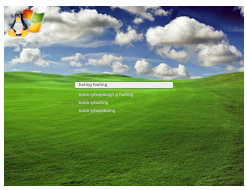
Salah satu keunggulan utama dari Samba 4 adalah kemampuannya menyediakan feature Active Directory. Dengan feature ini, Samba 4 bisa secara penuh menggantikan Windows Server karena Samba 4 bisa menerapkan policy berbasis GPO (Group Policy Object) dengan feature sama persis seperti yang disediakan oleh Windows Server.

Hal ini berarti 2 hal yaitu :

  1. Linux Server bisa menggantikan Windows Server sepenuhnya untuk urusan Active Directory, Domain Logon, Domain Controller, File Server dan DNS Server. Artinya, perusahaan tidak perlu mengeluarkan biaya lisensi untuk mendapatkan semua feature ini
  2. System Administrator yang terbiasa menggunakan Windows Server tidak perlu pusing memikirkan cara melakukan manajemen Active Directory berbasis Linux Server Samba 4. Mengapa? Karena tampilan dan prosedur manajemennya sama persis seperti yang bisa digunakan di sistem Windows, misalnya untuk menambahkan user, sama-sama menggunakan menu “Active Directory User & Computer”

Tertarik untuk mempergunakannya? Mari kita mulai dengan langkah pertama, yaitu setup dan konfigurasi Samba 4 dengan mengikuti langkah-langkah sebagai berikut :

    1. Siapkan sistem Excellent Samba 4 Appliance dengan mengikuti prosedur berikut : Excellent Samba 4 Appliance
    2. Setting network untuk appliance dengan menjalankan perintah : yast lan melalui konsole. Dalam case ini saya menggunakan konfigurasi sebagai berikut :
      [code lang=”bash”] IP : 192.168.1.208
      Hostname : samba4
      Domain : excellent.co.id
      DNS 1 : 192.168.1.208
      DNS 2 : 8.8.8.8
      [/code]
    3. Download Samba 4 Source via : http://ftp.samba.org/pub/samba/samba4/. Saya menggunakan Samba 4 RC yang pada saat tulisan ini dibuat belum ada pada link tersebut namun sudah bisa didownload dari link : https://download.samba.org/pub/samba/rc/samba-4.0.0rc1.tar.gz. Saya menyimpan file tersebut di folder /srv/v
      [code lang=”bash”] mkdir /srv/v
      cd /srv/v/
      wget -c https://download.samba.org/pub/samba/rc/samba-4.0.0rc1.tar.gz
      [/code]
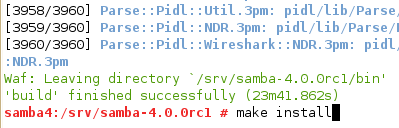
    4. Jalankan perintah untuk melakukan kompilasi sistem dengan perintah sebagai berikut :
      [code lang=”bash”] cd /srv/v/
      tar -zxvf samba-4.0.0rc1.tar.gz
      cd samba-4.0.0rc1/
      ./configure.developer
      make
      make install
      [/code]
      `
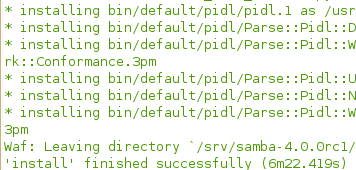
Proses kompilasi berjalan selama beberapa lama, kurang lebih sekitar 5 menit. Setelah selesai, Samba sudah terinstall di folder /usr/local/samba dan proses konfigurasi bisa dilanjutkan dengan artikel berikutnya : Instalasi & Konfigurasi Samba 4 Sebagai Active Directory Server-Bagian 2-Konfigurasi DNS Server

Active Directory Samba4 Windows
Prev

Membangun Active Directory Server, Domain Controller & File Server Menggunakan Excellent Samba 4 Appliance

Next

Instalasi & Konfigurasi Samba 4 Sebagai Active Directory Server-Bagian 2-Konfigurasi DNS Server

Related Posts

ResourceSLES, RHEL & Zextras
December 19, 2012

Tips Improvement Performance MySQL Server Secara Mudah

Read more
Resource
August 28, 2011

FAQ Mail Server : Keuntungan & Tips Implementasi Mail Server

Read more
ResourceVMWare
April 20, 2012

Tips VMWare vSphere : FreeNAS iSCSI Share untuk vSphere Network Storage/Datastore-Bagian Kedua

Read more

Comments(03)

  1. By naedi
    October 20, 2016

    link sambanya sudah deadlink ya mas vavai??

Leave a Reply

Your email address will not be published. Required fields are marked *

Search
Recent Post
  • Ingin Website Bisnis Anda Dipercaya? Ini Kuncinya!
  • Mengapa Lifecycle Red Hat Enterprise Linux (RHEL) Penting di Dunia Enterprise?
  • Cara Efektif dalam Mengelola Email Server
  • Mengelola Banyak Subdomain Tanpa Ribet: Kenapa SSL Wildcard Jadi Pilihan
  • Mengapa kita harus upgrade ke Ubuntu Pro?
Categories
Archives
Featured image: Instalasi & Konfigurasi Samba 4 Sebagai Active Directory Server-Bagian 1-Instalasi & Kompilasi
Get in Touch

KATEGORI

  • Home
  • Artikel
  • Jadwal
  • Event
  • Berita

LAYANAN

  • Zimbra Mail Server
  • Ubuntu
  • XCP-ng
  • Vinchin
  • ASAV
  • Proxmox
  • RHEL
  • Nakivo
  • SMTP Relay
  • SSL Certificate

KONTAK KAMI

PT. Excellent Infotama Kreasindo, Premier Serenity Blok J12, Jl. KH. Agus Salim No. 40E, Bekasi Jaya, Bekasi Timur, Bekasi 17112, Jawa Barat, Indonesia

TENTANG KAMI

PT. Excellent Infotama Kreasindo merupakan entitas bisnis yang fokus pada layanan komputerisasi seperti implementasi sistem, konsultasi, training/workshop, dan maintenance sistem, terutama migrasi dari sistem Windows ke Linux. more…