
Implementasi Fail2Ban untuk Meningkatkan Performa & Keamanan Zimbra Mail Server
 Salah satu masalah besar yang dialami oleh para System Administrator email server adalah serangan spam yang bertubi-tubi. Spam yang datang bisa bervariasi bentuknya, mulai dari upaya mengakses SMTP relay, brute-force attack password user hingga serangan phising/spoofing. Sistem mail server yang sudah disetup dengan baik memang mampu menolak serangan ini, namun jika datang bertubi-tubi tentu akan mengurangi performa sistem mail server.
Untuk mengatasinya, kita dapat meningkatkan kemampuan mail server untuk melakukan proses banned terhadap upaya spamming yang berulang. Misalnya jika ada upaya relay access yang berulangkali salah atau upaya authentikasi sistem yang berulangkali gagal dalam interval waktu tertentu, kita bisa memerintahkan sistem untuk secara otomatis melakukan proses banned.
Salah satu aplikasi yang mudah disetup dan handal untuk keperluan ini adalah aplikasi Fail2Ban. Sesuai namanya, aplikasi ini menggunakan IPTables untuk melakukan proses banned terhadap kegagalan akses. Fungsinya bukan hanya sebatas aplikasi SSH seperti yang dilakukan oleh aplikasi Denyhosts, melainkan juga terhadap semua aplikasi lain yang menggunakan port TCP, seperti SMTP, POP3, IMAP, FTP, Apache dan lain-lain.
Proses integrasi Fail2Ban ke Zimbra relatif tidak terlalu sulit untuk dilakukan. Berikut adalah panduannya, saya set menggunakan Zimbra yang diinstall diatas sistem SUSE Linux Enterprise Server 11 SP2 (berbasis Minimal Server Appliance)
- Instalasi Fail2Ban dan IPtables. Jika menggunakan Minimal Server Appliance, keduanya sudah terinstall. Jika belum, jalankan perintah berikut :
[code lang=”bash”] zypper ar http://download.opensuse.org/repositories/security/SLE_11/ fail2ban
zypper in fail2ban
[/code] - Buat file /etc/fail2ban/filter.d/zimbra.conf. File ini berisi regular expression dari log Zimbra yang akan memicu proses banned IP jika terjadi beberapa kali dalam interval waktu tertentu. Isi file /etc/fail2ban/filter.d/zimbra.conf :
[code lang=”bash”] # Fail2Ban configuration file
#
# Author:
#
# $Revision: 1 $
# [Definition]# Option: failregex
# Notes.: regex to match the password failures messages in the logfile. The
# host must be matched by a group named “host”. The tag “” can
# be used for standard IP/hostname matching and is only an alias for
# (?:::f{4,6}:)?(?P[\w\-.^_]+)
# Values: TEXT
#
failregex = \[ip=;\] account – authentication failed for .* \(no such account\)$
\[ip=;\] security – cmd=Auth; .* error=authentication failed for .*, invalid password;$
;oip=;.* security – cmd=Auth; .* protocol=soap; error=authentication failed for .* invalid password;$
\[oip=;.* SoapEngine – handler exception: authentication failed for .*, account not found$
WARN .*;ip=;ua=ZimbraWebClient .* security – cmd=AdminAuth; .* error=authentication failed for .*;$
NOQUEUE: reject: RCPT from .*\[\]: 550 5.1.1 .*: Recipient address rejected: # .*\[ip=
;\] .* – authentication failed for .* \(invalid password\)
#
# Option: ignoreregex
# Notes.: regex to ignore. If this regex matches, the line is ignored.
# Values: TEXT
#
ignoreregex =
[/code] - Buat/edit file /etc/fail2ban/jail.conf dengan isi sebagai berikut :
[code lang=”bash”] # Fail2Ban configuration file
#
# Author: Cyril Jaquier
#
# $Revision: 747 $
## The DEFAULT allows a global definition of the options. They can be overridden
# in each jail afterwards.
[DEFAULT] # “ignoreip” can be an IP address, a CIDR mask or a DNS host. Fail2ban will not
# ban a host which matches an address in this list. Several addresses can be
# defined using space separator.
ignoreip = 127.0.0.1/8 202.43.115.188/32
# “bantime” is the number of seconds that a host is banned.
bantime = 600
# A host is banned if it has generated “maxretry” during the last “findtime”
# seconds.
findtime = 600# “maxretry” is the number of failures before a host get banned.
maxretry = 3# “backend” specifies the backend used to get files modification. Available
# options are “gamin”, “polling” and “auto”. This option can be overridden in
# each jail too (use “gamin” for a jail and “polling” for another).
#
# gamin: requires Gamin (a file alteration monitor) to be installed. If Gamin
# is not installed, Fail2ban will use polling.
# polling: uses a polling algorithm which does not require external libraries.
# auto: will choose Gamin if available and polling otherwise.
backend = auto# This jail corresponds to the standard configuration in Fail2ban 0.6.
[ssh-iptables]
# The mail-whois action send a notification e-mail with a whois request
# in the body.enabled = false
filter = sshd
action = iptables[name=SSH, port=ssh, protocol=tcp] sendmail-whois[name=SSH, dest=zeze@vavai.com, sender=fail2ban@excellent.co.id] logpath = /var/log/messages
maxretry = 5# This jail forces the backend to “polling”.
[sasl-iptables]enabled = false
filter = sasl
backend = polling
action = iptables[name=sasl, port=smtp, protocol=tcp] sendmail-whois[name=sasl, dest=support@excellent.co.id] logpath = /var/log/zimbra.log# Here we use TCP-Wrappers instead of Netfilter/Iptables. “ignoreregex” is
[ssh-tcpwrapper]
# used to avoid banning the user “myuser”.enabled = false
filter = sshd
action = hostsdeny
sendmail-whois[name=SSH, dest=support@excellent.co.id] ignoreregex = for myuser from
logpath = /var/log/messages# This jail uses ipfw, the standard firewall on FreeBSD. The “ignoreip”
[zimbra-account] enabled = true
# option is overridden in this jail. Moreover, the action “mail-whois” defines
# the variable “name” which contains a comma using “”. The characters ” are
# valid too.
filter = zimbra
action = iptables-allports[name=zimbra-account] sendmail[name=zimbra-account, dest=support@excellent.co.id] logpath = /opt/zimbra/log/mailbox.log
bantime = 600
maxretry = 5 [zimbra-audit] enabled = true
filter = zimbra
action = iptables-allports[name=zimbra-audit] sendmail[name=Zimbra-audit, dest=support@excellent.co.id] logpath = /opt/zimbra/log/audit.log
bantime = 600
maxretry = 5 [zimbra-recipient] enabled = true
filter = zimbra
action = iptables-allports[name=zimbra-recipient] sendmail[name=Zimbra-recipient, dest=support@excellent.co.id] logpath = /var/log/zimbra.log
#findtime = 604800
bantime = 172800
maxretry = 5 [postfix] enabled = true
filter = postfix
action = iptables-multiport[name=postfix, port=smtp, protocol=tcp] sendmail-buffered[name=Postfix, dest=support@excellent.co.id] logpath = /var/log/zimbra.log
bantime = -1
maxretry = 5#[sasl] #enabled = true
#port = smtp,ssmtp,imap2,imap3,imaps,pop3,pop3s
#filter = sasl
# You might consider monitoring /var/log/warn.log instead
# if you are running postfix. See http://bugs.debian.org/507990
#logpath = /var/log/zimbra.log
[/code] File jail.conf berisi data log file yang hendak dicheck dan alamat email untuk konfirmasi banned. Jangan lupa mengisi parameter ignoreip untuk memastikan agar akses lokal tidak usah dicheck - Edit file /etc/fail2ban/action.d/sendmail.conf dan ganti baris :
[code lang=”bash”] Fail2Ban” | /usr/sbin/sendmail -f
[/code] Menjadi
[code lang=”bash”] Fail2Ban” | /opt/zimbra/postfix/sbin/sendmail -f
[/code] - Setelah selesai semua, lakukan perintah start Fail2Ban
[code lang=”bash”] service fail2ban restart
[/code]
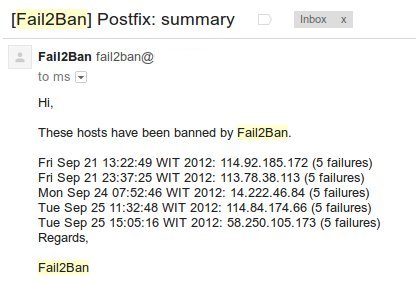
Setelah fail2ban dipasang, kita akan menerima notifikasi melalui email mengenai IP yang coba-coba melakukan proses hacking. IP tersebut akan langsung dibanned jika sudah memenuhi syarat sekian kali dalam interval waktu yang telah didefinisikan. Kita juga bisa memodifikasi fila jail.conf dan file zimbra.conf jika ingin mengecek log-log lainnya.
Contoh hasil banned yang dikirim ke email :
Karena sangat powerful, Fail2Ban ini bisa dimanfaatkan untuk mengantisipasi serangan semacam bruteforce attack, baik terhadap email maupun service server lainnya seperti web server, FTP server, database server dan lain-lain.
Semoga bermanfaat.

awalnya gak tau fail2ban itu apa?membaca pencerahan ini jadi tau dan bagaimana implementasinya,,harus di seminarkan ini menurutku Om Vavai
untuk menghapus yg terblok gimana ya pak?
misal :
Chain fail2ban-postfix (1 references)
target prot opt source destination
DROP all — 75.subnet118-97-201.static.astinet.telkom.net.id anywhere
Untuk Multi server Fail2Ban ini di install di server apa yaaaa Mailbox, LDAP, MTA ?
@Fajar,
MTA mas, kan koneksi internet datang ke MTA. Namun mesti perhatikan log juga, karena Fail2ban mengambil data dari log
Mas VaVai, kalau saya lihat di log nya audit.log, yg invalis password pada saat login kok IP server itu sendiri ya? Ini bagaimana?
Mas untuk jail.conf nya buat zimbra koq selalu error ya?
service fail2ban start
* Starting authentication failure monitor fail2ban ERROR Error in action definition iptables-allports[name=Zimbra-account]
ERROR Errors in jail ‘zimbra-account’. Skipping…
[fail]
help!
selain Fail2Ban, metode apa lagi yang paling efektif untuk mengurangi beban serangan brute-force di mail server Zimbra tanpa mengganggu user legitimate, dan bagaimana kombinasi konfigurasinya agar tetap seimbang antara keamanan dan performa?