Secara umum, cluster server pada Proxmox versi 2.x tidak jauh berbeda dengan cluster server pada Proxmox 1.x. Letak perbedaanya adalah pada Proxmox versi 1.x menggunakan perintah pveca, sedangkan pada Proxmox versi 2.x kita dapat menggunakan perintah pvecm. Pada tulisan ini saya menggunakan Proxmox versi terbaru, yaitu Proxmox 2.1.
Adapun beberapa keuntungan dari cluster server Proxmox ini antara lain :
- Pemusatan web manajemen.
- Kita dapat memigrasikan virtual machines diantara node yang sudah tergabung dicluster tersebut secara live
- Feature HA (High Availability) pada proxmox dapat digunakan.
Sebelum kita membuat Proxmox Cluster server ada beberapa hal yang perlu diperhatikan antara lain, :
- Seluruh node (server Proxmox) saling terhubung didalam 1 network.
- Waktu di seluruh node harus disinkronkan.
- Disarankan node atau server Proxmox yang akan dicluster memiliki spesifikasi yang sama.
Berikut adalah langkah-langkahnya
- Diasumsikan saya memiliki 2 node server Proxmox yang masing-masing memiliki Ip address 10.10.10.2/28 dan 10.10.10.3/28 yang selanjutnya akan disebut pve1 dan pve2.
- Pve1 akan bertindak sebagai master dan pve2 sebagai slave. Seluruh server Proxmox yang saya gunakan adalah fresh install.
- Siapkan console dari masing-masing Proxmox dan jalankan perintah-perintah dibawah ini
root@pve1:~# pvecm create cluster1
Generating public/private rsa key pair.
Your identification has been saved in /root/.ssh/id_rsa.
Your public key has been saved in /root/.ssh/id_rsa.pub.
The key fingerprint is:
a7:5d:af:35:08:a0:39:20:0a:21:c4:74:ad:de:30:74 root@pve1.excellent.co.id
The key's randomart image is:
+--[ RSA 2048]----+
|*o .. |
|.o.. E |
|. o + . |
|.. = . o . |
|. . + + S o . |
| . . . + o o |
| . . . + |
| o . |
| . |
+-----------------+
Restarting pve cluster filesystem: pve-cluster[dcdb] notice: wrote new cluster config '/etc/cluster/cluster.conf'
.
Starting cluster:
Checking if cluster has been disabled at boot... [ OK ]
Checking Network Manager... [ OK ]
Global setup... [ OK ]
Loading kernel modules... [ OK ]
Mounting configfs... [ OK ]
Starting cman... [ OK ]
Waiting for quorum... [ OK ]
Starting fenced... [ OK ]
Starting dlm_controld... [ OK ]
Unfencing self... [ OK ]
root@pve1:~#
root@pve2:~# pvecm add 10.10.10.2
Generating public/private rsa key pair.
Your identification has been saved in /root/.ssh/id_rsa.
Your public key has been saved in /root/.ssh/id_rsa.pub.
The key fingerprint is:
ec:87:63:33:1f:35:cc:8f:f9:a8:25:6b:cb:97:d3:62 root@pve2
The key's randomart image is:
+--[ RSA 2048]----+
| |
| |
| |
| . o |
| S = |
| . . . = |
| B + +o. |
| . B.=Eo. |
| .*=.o. |
+-----------------+
The authenticity of host '10.10.10.2 (10.10.10.2)' can't be established.
RSA key fingerprint is 67:5a:04:3e:f4:e4:ea:e3:aa:90:c9:f1:a6:9b:5e:68.
Are you sure you want to continue connecting (yes/no)? yes
root@10.10.10.2's password:
copy corosync auth key
stopping pve-cluster service
Stopping pve cluster filesystem: pve-cluster.
backup old database
Starting pve cluster filesystem : pve-cluster.
Starting cluster:
Checking if cluster has been disabled at boot... [ OK ]
Checking Network Manager... [ OK ]
Global setup... [ OK ]
Loading kernel modules... [ OK ]
Mounting configfs... [ OK ]
Starting cman... [ OK ]
Waiting for quorum... [ OK ]
Starting fenced... [ OK ]
Starting dlm_controld... [ OK ]
Unfencing self... [ OK ]
waiting for quorum...OK
generating node certificates
merge known_hosts file
restart services
Restarting PVE Daemon: pvedaemon.
Restarting web server: apache2 ... waiting .
successfully added node 'pve2' to cluster.
root@pve2:~#
Cek status cluster dengan perintah
root@pve1:~# pvecm nodes
Node Sts Inc Joined Name
1 M 4 2012-07-03 08:54:12 pve1
2 M 8 2012-07-03 08:54:53 pve2
root@pve1:~#
Login ke web console pve1 yang memiliki ip 10.10.10.2 dan login seperti biasa. Jika tidak ada masalah harusnya tampilan pada web console akan seperti gambar dibawah ini.
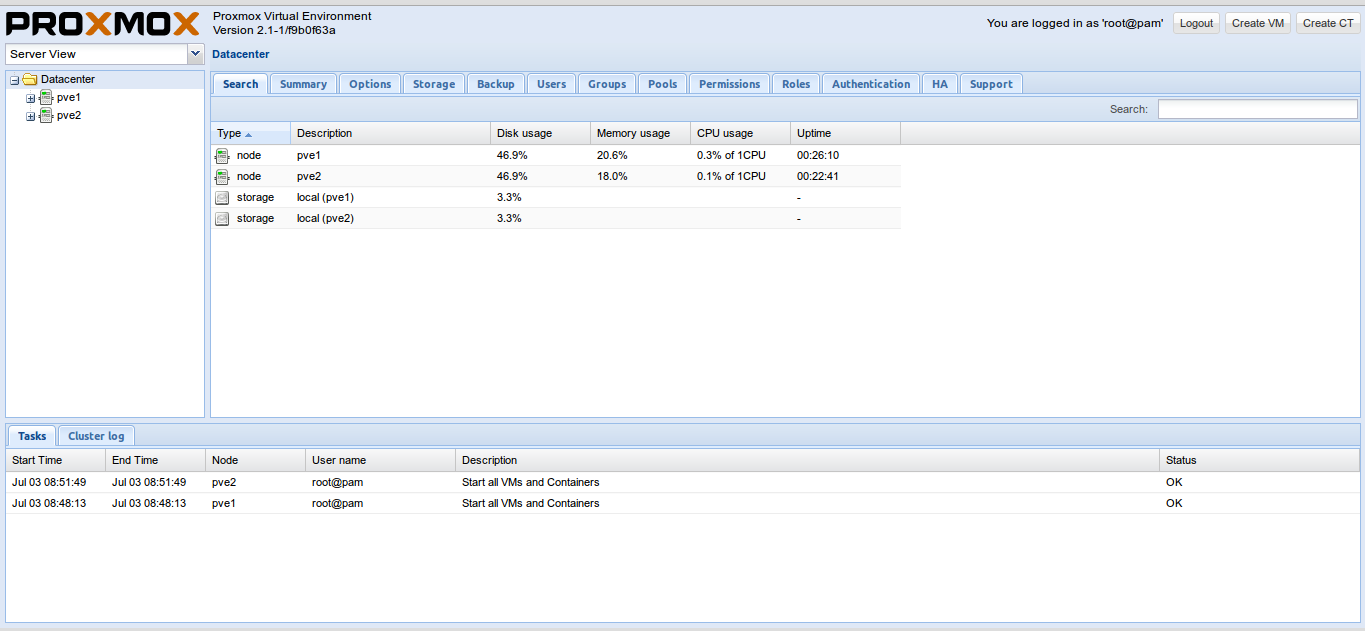
Jika kita menggunakan SAN storage ataupun NFS storage untuk menyimpan data atau harddisk virtual dari VM yang kita miliki, kita dapat menggunakan feature live migration pada Proxmox seperti halnya vMotion pada VMware vSphere.
Semoga bermanfaat 😀




Terima kasih atas artikelnya, sangat bermanfaat bagi saya.
Saya mau tanya,
Saya sudah ada server proxmox di sekolah saya, kebetulan tahun ini menambah 1 server lagi. Tapi untuk spesifikasi server ke dua lebih tinggi.
Apakah ada pengaruh pada kinerja ??
Terima kasih
sya mau tanya.. itu server proxmox untuk pembuatan 2 node pake 2 komputer yang masing2 komputer terinstal proxmox ngk..? terus di clustering
bisa ngk di cluster walapun beda spesifikasi…
untuk clustering ini apakah membutuhkan virtual os yang akan di upload dan diinstall pada pve1? terimakasih banyak
Untuk cluster levelnya adalah sesama host. Tujuannya agar virtual OS/VM masing-masing bisa dimanage, HA dan cloning antar sesama member cluster
saya ga bisa ngcreate cluster baru kenapa ya?
proxmox 4